Compare commits
33 Commits
a9c5bc1038
...
renovate/g
| Author | SHA1 | Date | |
|---|---|---|---|
| c1fc13e091 | |||

|
e0fdadc7ca | ||
|
|
136167b54c | ||
| 02fd599e6b | |||
| b0412a96f3 | |||
|
|
06dbb89868 | ||
|
|
b002f45f29 | ||
|
|
c1eb702384 | ||
|
|
307517e85a | ||
|
|
a8ba227e8b | ||
|
|
cbfdfb9710 | ||
| d85003416e | |||
|
|
61c516149e | ||
|
|
560225cb8c | ||
|
|
2e8367afd4 | ||
| 8c40109341 | |||
|
|
4259c996b6 | ||
| d4218227bd | |||
|
|
6a4c5084a5 | ||
|
|
e38b9cde1f | ||
|
|
dbae8b5bcf | ||
|
|
2d06b7ad32 | ||
|
|
10a674deba | ||
|
|
93b9aa8f34 | ||
| ca826737ed | |||
| 5365cc67eb | |||
|
|
25e3640ba0 | ||
| 3f85bac74e | |||
| 5b83b9da73 | |||
| 3c8c555b94 | |||
| a6a6c0c714 | |||
|
|
66dbdc8913 | ||
|
|
6a125b7c73 |


91
CHANGELOG.md
91
CHANGELOG.md
@@ -7,6 +7,91 @@ and this project adheres to [Semantic Versioning](https://semver.org/spec/v2.0.0
|
||||
|
||||
## [Unreleased]
|
||||
|
||||
## [2.19.1] — 2026-08-11
|
||||
|
||||
### Added
|
||||
- **Drag to reschedule can be turned off.** Settings → Views → *Drag to
|
||||
reschedule*, on by default. Off, no event can be picked up in the month, week
|
||||
or day view — for anyone who kept moving appointments by accident while
|
||||
scrolling ([#173]).
|
||||
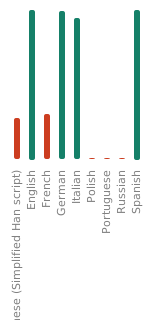
- An early Brazilian Portuguese translation. Calendula has started speaking
|
||||
Brazilian Portuguese, contributed as a community translation through
|
||||
[Calendula's Weblate](https://weblate.dev.jeanlucmakiola.de/projects/calendula/).
|
||||
About a third of the app is covered, so the rest still shows in English — you
|
||||
can pick it under Settings → Language or in Android's per-app language
|
||||
settings. Thanks to
|
||||
[bkrz](https://weblate.dev.jeanlucmakiola.de/user/bkrz/) for getting it
|
||||
started; help finishing it is very welcome.
|
||||
|
||||
### Fixed
|
||||
- **The language picker forgot which language was picked.** Android hands the
|
||||
applied language back with its script filled in — Simplified Chinese goes in
|
||||
as `zh-CN` and comes out as `zh-Hans-CN` — so after a restart no entry in
|
||||
Settings → Language showed as selected, and the row above it named the
|
||||
language the long way round. Only languages that imply a script were
|
||||
affected.
|
||||
|
||||
## [2.19.0] — 2026-08-10
|
||||
|
||||
### Added
|
||||
- **Drag an event to reschedule it.** Press and hold an event in the month,
|
||||
week or day view and drop it on another time or day — the only way to move an
|
||||
appointment used to be opening it and editing its start and end by hand. The
|
||||
block follows your finger, the timeline scrolls when you carry it to an edge,
|
||||
and the event's length is preserved: a 90-minute meeting dropped on 09:00 ends
|
||||
at 10:30. In week and day view the drop snaps to 15-minute steps; in month
|
||||
view it moves the event to the day you dropped it on and leaves the time
|
||||
alone. A confirmation names the new slot and offers **Undo** wherever the move
|
||||
can be taken back in one step. Events you can't edit — read-only calendars, and
|
||||
birthdays and anniversaries mirrored from your contacts — can't be picked up.
|
||||
Rescheduling isn't pointer-only: a screen reader gets a **Move…** action on
|
||||
every event that can be moved ([#68]).
|
||||
- Dragging a **recurring** event asks what it should apply to, the same *this
|
||||
event / this and following / all events* choice a save does. Where moving the
|
||||
whole series would change which weekday it falls on, the rule is rewritten to
|
||||
match — a weekly Monday event dropped on a Wednesday becomes a weekly
|
||||
Wednesday event. Where it can't be rewritten safely, the prompt says so and
|
||||
offers to move just the one occurrence, rather than quietly leaving the
|
||||
series behind ([#68]).
|
||||
- **Delete several search results at once.** Long-press a hit in search to enter
|
||||
selection mode, tap the rest (or **Select all**), and delete the lot in one
|
||||
action — finding and removing, say, every leftover event with the same title
|
||||
no longer means opening them one at a time. Recurring hits in the batch ask
|
||||
once for the whole selection instead of once each, results on read-only
|
||||
calendars can't be selected, and the deletion is confirmed before it runs
|
||||
([#80]).
|
||||
|
||||
### Changed
|
||||
- **First launch is now a short wizard** instead of a single permission screen.
|
||||
It counts its steps, each one can be stepped back out of, and beyond granting
|
||||
calendar access it offers two things worth deciding once: turning on automatic
|
||||
backup — chosen inline, folder picker and all, since events that live only on
|
||||
the phone are lost with it — and choosing which view Calendula opens on, with
|
||||
a live preview of the month, week, day and agenda layouts rather than four
|
||||
names in a list. Both are skippable, everything chosen is changeable in
|
||||
Settings afterwards, and the backup step is offered only where nothing
|
||||
writable is being synced anywhere. Existing installs are not re-onboarded —
|
||||
revoking and re-granting the calendar permission later does not restart the
|
||||
wizard ([#163]).
|
||||
- The one-time notice about calendars switched off for this device is now a step
|
||||
in the flow rather than a dialog thrown over the app on first open.
|
||||
|
||||
### Fixed
|
||||
- Removed the deprecated `statusBarColor` / `navigationBarColor` theme
|
||||
attributes the Play Console flags on Android 15 and up, where they no longer
|
||||
do anything. The launch backdrop now picks its status-bar icons from the
|
||||
light/dark resource instead, so they stay legible over it either way
|
||||
([#123]).
|
||||
|
||||
## [2.18.1] — 2026-08-06
|
||||
|
||||
### Fixed
|
||||
- Tapping an empty slot in week or day view creates the event at the hour you
|
||||
tapped, after the timeline has been zoomed. Pinching the day taller or shorter
|
||||
— or changing **Hour height** in Settings — left the tap still being measured
|
||||
against the old spacing, so the new event landed at some other hour entirely
|
||||
([#148]).
|
||||
|
||||
## [2.18.0] — 2026-07-31
|
||||
|
||||
### Added
|
||||
@@ -1323,3 +1408,9 @@ automatically, with zero telemetry and no internet permission.
|
||||
[#57]: https://codeberg.org/jlmakiola/calendula/issues/57
|
||||
[#56]: https://codeberg.org/jlmakiola/calendula/issues/56
|
||||
[#114]: https://codeberg.org/jlmakiola/calendula/issues/114
|
||||
[#148]: https://codeberg.org/jlmakiola/calendula/issues/148
|
||||
[#68]: https://codeberg.org/jlmakiola/calendula/issues/68
|
||||
[#80]: https://codeberg.org/jlmakiola/calendula/issues/80
|
||||
[#123]: https://codeberg.org/jlmakiola/calendula/issues/123
|
||||
[#163]: https://codeberg.org/jlmakiola/calendula/issues/163
|
||||
[#173]: https://codeberg.org/jlmakiola/calendula/issues/173
|
||||
|
||||
@@ -28,8 +28,8 @@ android {
|
||||
// which builds this version and then creates the matching vX.Y.Z tag +
|
||||
// release itself (versionCode is pinned to MAJOR*10000 + MINOR*100 +
|
||||
// PATCH from versionName, e.g. 2.7.2 -> 20702). See docs/RELEASING.md.
|
||||
versionCode = 21800
|
||||
versionName = "2.18.0"
|
||||
versionCode = 21901
|
||||
versionName = "2.19.1"
|
||||
|
||||
testInstrumentationRunner = "androidx.test.runner.AndroidJUnitRunner"
|
||||
}
|
||||
|
||||
@@ -1,4 +1,4 @@
|
||||
package de.jeanlucmakiola.calendula.ui.permission
|
||||
package de.jeanlucmakiola.calendula.ui.onboarding
|
||||
|
||||
import androidx.compose.ui.test.assertIsDisplayed
|
||||
import androidx.compose.ui.test.junit4.createComposeRule
|
||||
@@ -27,7 +27,7 @@ import de.jeanlucmakiola.calendula.domain.EventDetail
|
||||
import de.jeanlucmakiola.calendula.domain.curatedForPicker
|
||||
import de.jeanlucmakiola.calendula.domain.EventForm
|
||||
import de.jeanlucmakiola.calendula.domain.EventInstance
|
||||
import de.jeanlucmakiola.calendula.domain.EventSearchRanker
|
||||
import de.jeanlucmakiola.calendula.domain.EventSearch
|
||||
import de.jeanlucmakiola.calendula.domain.EventStatus
|
||||
import de.jeanlucmakiola.calendula.domain.Reminder
|
||||
import de.jeanlucmakiola.calendula.domain.SearchCandidate
|
||||
@@ -68,7 +68,7 @@ interface CalendarDataSource {
|
||||
* whitespace-separated token has to appear in the title, description or
|
||||
* location. Reads the Events table directly so the search is unbounded in
|
||||
* time; exception rows are excluded (see [SearchProjection]). A deliberate
|
||||
* superset — [EventSearchRanker] makes the final call and orders the hits.
|
||||
* superset — [EventSearch] makes the final call and orders the hits.
|
||||
* [query] is assumed non-blank.
|
||||
*/
|
||||
fun searchEvents(query: String): List<SearchCandidate>
|
||||
@@ -591,17 +591,21 @@ class AndroidCalendarDataSource @Inject constructor(
|
||||
|
||||
override fun searchEvents(query: String): List<SearchCandidate> {
|
||||
ensureObserversRegistered()
|
||||
val tokens = EventSearchRanker.tokenize(query).take(MAX_SEARCH_TOKENS)
|
||||
val tokens = EventSearch.tokenize(query).take(MAX_SEARCH_TOKENS)
|
||||
if (tokens.isEmpty()) return emptyList()
|
||||
// Every token has to appear somewhere, so the groups are ANDed. This is
|
||||
// only a pre-filter — EventSearchRanker re-checks each token with proper
|
||||
// case folding, and re-checks the tokens dropped by the cap above.
|
||||
val match = tokens.joinToString(" AND ") {
|
||||
"(${CalendarContract.Events.TITLE} LIKE ? ESCAPE '\\' OR " +
|
||||
// Only a pre-filter: EventSearch re-checks every token, including the
|
||||
// ones the cap above dropped.
|
||||
val patterns = tokens.map { likePatterns(it) }
|
||||
val match = patterns.joinToString(" AND ") { variants ->
|
||||
variants.joinToString(" OR ", prefix = "(", postfix = ")") {
|
||||
"${CalendarContract.Events.TITLE} LIKE ? ESCAPE '\\' OR " +
|
||||
"${CalendarContract.Events.DESCRIPTION} LIKE ? ESCAPE '\\' OR " +
|
||||
"${CalendarContract.Events.EVENT_LOCATION} LIKE ? ESCAPE '\\')"
|
||||
"${CalendarContract.Events.EVENT_LOCATION} LIKE ? ESCAPE '\\'"
|
||||
}
|
||||
val args = tokens.flatMap { token -> List(3) { likePattern(token) } }.toTypedArray()
|
||||
}
|
||||
val args = patterns
|
||||
.flatMap { variants -> variants.flatMap { pattern -> List(3) { pattern } } }
|
||||
.toTypedArray()
|
||||
val selection = "($match) AND " +
|
||||
"${CalendarContract.Events.DELETED} = 0 AND " +
|
||||
"${CalendarContract.Events.ORIGINAL_ID} IS NULL"
|
||||
@@ -617,9 +621,8 @@ class AndroidCalendarDataSource @Inject constructor(
|
||||
while (c.moveToNext()) {
|
||||
val description = reader.getString(SearchProjection.IDX_DESCRIPTION)
|
||||
val base = reader.toSearchResult() ?: continue
|
||||
// A recurring master's DTSTART is the series start; show its
|
||||
// nearest occurrence instead so the date is the one the user
|
||||
// actually cares about (and sorting reflects it).
|
||||
// A recurring master's DTSTART is the series start; date the row
|
||||
// by its nearest occurrence instead.
|
||||
val event = if (base.isRecurring) {
|
||||
nearestOccurrenceMillis(base.eventId)?.let { (begin, end) ->
|
||||
base.copy(
|
||||
@@ -630,28 +633,40 @@ class AndroidCalendarDataSource @Inject constructor(
|
||||
} else {
|
||||
base
|
||||
}
|
||||
out += SearchCandidate(event = event, description = description)
|
||||
// The raw title, so matching can't catch on the placeholder an
|
||||
// untitled event is drawn with.
|
||||
out += SearchCandidate(
|
||||
event = event,
|
||||
description = description,
|
||||
title = reader.getString(SearchProjection.IDX_TITLE),
|
||||
)
|
||||
}
|
||||
out
|
||||
} ?: emptyList()
|
||||
}
|
||||
|
||||
/**
|
||||
* One token as a `LIKE` pattern. SQLite folds case for ASCII only, so a
|
||||
* non-ASCII cased letter is substituted with the single-character wildcard
|
||||
* `_` — "ärzte" queries as `%_rzte%` and so still reaches "Ärzte". That
|
||||
* matches more than it should on purpose; [EventSearchRanker] does the real
|
||||
* comparison. Uncased scripts stay literal, keeping the filter selective.
|
||||
* One token as the `LIKE` patterns to OR together. SQLite folds case for
|
||||
* ASCII only, so a token with cased non-ASCII letters is also queried lower-,
|
||||
* upper- and title-cased, which is how "ärzte" reaches "Ärzte". Wildcarding
|
||||
* those letters away instead would make "москва" `%______%` — a full scan.
|
||||
*/
|
||||
private fun likePatterns(token: String): List<String> {
|
||||
if (token.none { it.code > 127 && (it.isUpperCase() || it.isLowerCase()) }) {
|
||||
return listOf(likePattern(token))
|
||||
}
|
||||
val lower = token.lowercase()
|
||||
return listOf(token, lower, token.uppercase(), lower.replaceFirstChar(Char::uppercaseChar))
|
||||
.distinct()
|
||||
.map(::likePattern)
|
||||
}
|
||||
|
||||
private fun likePattern(token: String): String {
|
||||
val sb = StringBuilder("%")
|
||||
for (c in token) {
|
||||
when {
|
||||
c.code > 127 && (c.isUpperCase() || c.isLowerCase()) -> sb.append('_')
|
||||
// A literal wildcard from the query matches itself.
|
||||
c == '%' || c == '_' || c == '\\' -> sb.append('\\').append(c)
|
||||
else -> sb.append(c)
|
||||
}
|
||||
if (c == '%' || c == '_' || c == '\\') sb.append('\\')
|
||||
sb.append(c)
|
||||
}
|
||||
return sb.append('%').toString()
|
||||
}
|
||||
|
||||
@@ -19,9 +19,8 @@ interface CalendarRepository {
|
||||
|
||||
/**
|
||||
* Candidate matches for [query] with hidden calendars removed; empty when
|
||||
* [query] is blank. Searches the whole history/future (see
|
||||
* [CalendarDataSource.searchEvents]) and leaves ranking to
|
||||
* [de.jeanlucmakiola.calendula.domain.EventSearchRanker].
|
||||
* [query] is blank. Searches the whole history/future and leaves matching
|
||||
* and ranking to [de.jeanlucmakiola.calendula.domain.EventSearch].
|
||||
*/
|
||||
suspend fun searchEvents(query: String): List<SearchCandidate>
|
||||
|
||||
|
||||
@@ -180,8 +180,7 @@ internal object SearchProjection {
|
||||
// display its nearest occurrence, not the series-start DTSTART.
|
||||
CalendarContract.Events.RRULE,
|
||||
CalendarContract.Events.RDATE,
|
||||
// Ranked and excerpted, not just filtered on: a description-only hit has
|
||||
// to be able to show what it matched.
|
||||
// Excerpted, not just filtered on: a hit has to show what it matched.
|
||||
CalendarContract.Events.DESCRIPTION,
|
||||
)
|
||||
|
||||
|
||||
@@ -301,6 +301,19 @@ class SettingsPrefs @Inject constructor(
|
||||
store.edit { it[TODAY_BUTTON_IN_TOOLBAR_KEY] = enabled }
|
||||
}
|
||||
|
||||
/**
|
||||
* Whether events can be dragged to another slot in the calendar views (#68,
|
||||
* #173). Defaults to ON. Off means no block registers a drag gesture at all;
|
||||
* rescheduling then goes through the edit form.
|
||||
*/
|
||||
val dragToReschedule: Flow<Boolean> = store.data.map { prefs ->
|
||||
prefs[DRAG_TO_RESCHEDULE_KEY] ?: true
|
||||
}
|
||||
|
||||
suspend fun setDragToReschedule(enabled: Boolean) {
|
||||
store.edit { it[DRAG_TO_RESCHEDULE_KEY] = enabled }
|
||||
}
|
||||
|
||||
/**
|
||||
* How far ahead the in-app Agenda screen shows events (v2.11). Defaults to
|
||||
* [AgendaRange.Month] — a month of upcoming events. Independent of the
|
||||
@@ -550,8 +563,87 @@ class SettingsPrefs @Inject constructor(
|
||||
prefs[REMINDER_ONBOARDING_KEY] ?: false
|
||||
}
|
||||
|
||||
suspend fun setReminderOnboardingDone() {
|
||||
store.edit { it[REMINDER_ONBOARDING_KEY] = true }
|
||||
/** Cleared, not just set: the wizard's back button re-asks a step (#163). */
|
||||
suspend fun setReminderOnboardingDone(done: Boolean = true) {
|
||||
store.edit { it[REMINDER_ONBOARDING_KEY] = done }
|
||||
}
|
||||
|
||||
/**
|
||||
* Whether this install is a fresh one still owing the wizard's optional
|
||||
* steps (#163). Armed on any launch that holds the calendar permission and
|
||||
* has not finished the reminder step, and cleared again by
|
||||
* [finishOnboardingWizard], so an existing user who revokes and re-grants
|
||||
* the permission isn't re-onboarded.
|
||||
*/
|
||||
val onboardingWizardArmed: Flow<Boolean> = store.data.map { prefs ->
|
||||
prefs[ONBOARDING_WIZARD_ARMED_KEY] ?: false
|
||||
}
|
||||
|
||||
suspend fun armOnboardingWizard() {
|
||||
store.edit { prefs ->
|
||||
if (prefs[REMINDER_ONBOARDING_KEY] != true) prefs[ONBOARDING_WIZARD_ARMED_KEY] = true
|
||||
}
|
||||
}
|
||||
|
||||
/** Whether the wizard's backup step has been answered (or skipped). */
|
||||
val onboardingBackupDone: Flow<Boolean> = store.data.map { prefs ->
|
||||
prefs[ONBOARDING_BACKUP_KEY] ?: false
|
||||
}
|
||||
|
||||
suspend fun setOnboardingBackupDone(done: Boolean = true) {
|
||||
store.edit { it[ONBOARDING_BACKUP_KEY] = done }
|
||||
}
|
||||
|
||||
/** Whether the wizard's default-view step has been answered (or skipped). */
|
||||
val onboardingViewDone: Flow<Boolean> = store.data.map { prefs ->
|
||||
prefs[ONBOARDING_VIEW_KEY] ?: false
|
||||
}
|
||||
|
||||
suspend fun setOnboardingViewDone(done: Boolean = true) {
|
||||
store.edit { it[ONBOARDING_VIEW_KEY] = done }
|
||||
}
|
||||
|
||||
/** Whether the wizard's month-style step has been answered (or skipped). */
|
||||
val onboardingMonthStyleDone: Flow<Boolean> = store.data.map { prefs ->
|
||||
prefs[ONBOARDING_MONTH_STYLE_KEY] ?: false
|
||||
}
|
||||
|
||||
suspend fun setOnboardingMonthStyleDone(done: Boolean = true) {
|
||||
store.edit { it[ONBOARDING_MONTH_STYLE_KEY] = done }
|
||||
}
|
||||
|
||||
/**
|
||||
* Whether the wizard's calendar-visibility notice has been read. Separate
|
||||
* from [CalendarPrefs.visibilityNoticePending], which says whether this
|
||||
* install has anything to announce at all.
|
||||
*/
|
||||
val onboardingVisibilityDone: Flow<Boolean> = store.data.map { prefs ->
|
||||
prefs[ONBOARDING_VISIBILITY_KEY] ?: false
|
||||
}
|
||||
|
||||
suspend fun setOnboardingVisibilityDone(done: Boolean = true) {
|
||||
store.edit { it[ONBOARDING_VISIBILITY_KEY] = done }
|
||||
}
|
||||
|
||||
/** Whether the wizard's closing screen has been seen. */
|
||||
val onboardingDoneShown: Flow<Boolean> = store.data.map { prefs ->
|
||||
prefs[ONBOARDING_DONE_KEY] ?: false
|
||||
}
|
||||
|
||||
suspend fun setOnboardingDoneShown(shown: Boolean = true) {
|
||||
store.edit { it[ONBOARDING_DONE_KEY] = shown }
|
||||
}
|
||||
|
||||
/**
|
||||
* Close the wizard for good: the closing screen has been seen and the
|
||||
* install stops counting as fresh, so a later revoke-and-re-grant is only
|
||||
* the permission screen. One edit, so the plan can't see it half-closed.
|
||||
*/
|
||||
suspend fun finishOnboardingWizard() {
|
||||
store.edit { prefs ->
|
||||
prefs[ONBOARDING_DONE_KEY] = true
|
||||
prefs[ONBOARDING_WIZARD_ARMED_KEY] = false
|
||||
}
|
||||
}
|
||||
|
||||
/**
|
||||
@@ -866,6 +958,7 @@ class SettingsPrefs @Inject constructor(
|
||||
internal val MONTH_VIEW_STYLE_KEY = stringPreferencesKey("month_view_style")
|
||||
internal val TIMELINE_SCALE_KEY = stringPreferencesKey("timeline_scale")
|
||||
internal val TODAY_BUTTON_IN_TOOLBAR_KEY = booleanPreferencesKey("today_button_in_toolbar")
|
||||
internal val DRAG_TO_RESCHEDULE_KEY = booleanPreferencesKey("drag_to_reschedule")
|
||||
internal val DEFAULT_VIEW_KEY = stringPreferencesKey("default_view")
|
||||
internal val QUICK_SWITCH_VIEWS_KEY = stringPreferencesKey("quick_switch_views")
|
||||
internal val DRAWER_VIEW_ORDER_KEY = stringPreferencesKey("drawer_view_order")
|
||||
@@ -882,6 +975,14 @@ class SettingsPrefs @Inject constructor(
|
||||
internal const val MAX_EVENT_DURATION = 1_440
|
||||
internal val REMINDERS_ENABLED_KEY = booleanPreferencesKey("reminders_enabled")
|
||||
internal val REMINDER_ONBOARDING_KEY = booleanPreferencesKey("reminder_onboarding_done")
|
||||
internal val ONBOARDING_WIZARD_ARMED_KEY = booleanPreferencesKey("onboarding_wizard_armed")
|
||||
internal val ONBOARDING_BACKUP_KEY = booleanPreferencesKey("onboarding_backup_done")
|
||||
internal val ONBOARDING_VIEW_KEY = booleanPreferencesKey("onboarding_view_done")
|
||||
internal val ONBOARDING_MONTH_STYLE_KEY =
|
||||
booleanPreferencesKey("onboarding_month_style_done")
|
||||
internal val ONBOARDING_VISIBILITY_KEY =
|
||||
booleanPreferencesKey("onboarding_visibility_done")
|
||||
internal val ONBOARDING_DONE_KEY = booleanPreferencesKey("onboarding_done_shown")
|
||||
internal val ALLOW_COLOR_UNSUPPORTED_KEY =
|
||||
booleanPreferencesKey("allow_color_unsupported_calendars")
|
||||
internal val DEFAULT_REMINDER_KEY = stringPreferencesKey("default_reminder_minutes")
|
||||
|
||||
@@ -1,11 +1,21 @@
|
||||
package de.jeanlucmakiola.calendula.domain
|
||||
|
||||
import kotlinx.datetime.DateTimeUnit
|
||||
import kotlinx.datetime.LocalDate
|
||||
import kotlinx.datetime.TimeZone
|
||||
import kotlinx.datetime.atStartOfDayIn
|
||||
import kotlinx.datetime.number
|
||||
import kotlinx.datetime.plus
|
||||
import kotlinx.datetime.toLocalDateTime
|
||||
import kotlin.time.Instant
|
||||
|
||||
/** An event with the free text the search may have matched it on. */
|
||||
data class SearchCandidate(
|
||||
val event: EventInstance,
|
||||
val description: String? = null,
|
||||
/** Null when the event has none: [EventInstance.title] is then a display
|
||||
* placeholder, which the query must not catch on. */
|
||||
val title: String? = event.title,
|
||||
)
|
||||
|
||||
/** A matched run inside one of a hit's texts, for highlighting. */
|
||||
@@ -17,41 +27,49 @@ data class DescriptionSnippet(
|
||||
val spans: List<MatchSpan>,
|
||||
)
|
||||
|
||||
/**
|
||||
* One ranked search result: the event, plus where the query matched so the row
|
||||
* can show why it is in the list.
|
||||
*/
|
||||
/** One result: the event, plus where the query matched it. */
|
||||
data class SearchHit(
|
||||
val event: EventInstance,
|
||||
val titleSpans: List<MatchSpan> = emptyList(),
|
||||
val locationSpans: List<MatchSpan> = emptyList(),
|
||||
val descriptionSnippet: DescriptionSnippet? = null,
|
||||
/** Already over, so the row can say so. Finished-today counts. */
|
||||
val isPast: Boolean = false,
|
||||
)
|
||||
|
||||
/** One month's worth of hits, as the results list draws them under a header. */
|
||||
data class SearchMonth(
|
||||
val year: Int,
|
||||
/** 1–12, so the UI can build the month's first day for a localized label. */
|
||||
val monthNumber: Int,
|
||||
val hits: List<SearchHit>,
|
||||
)
|
||||
|
||||
/** A finished search: a calendar of hits, plus the description-only ones. */
|
||||
data class SearchResults(
|
||||
val months: List<SearchMonth>,
|
||||
val inDescriptions: List<SearchHit>,
|
||||
) {
|
||||
val isEmpty: Boolean get() = months.isEmpty() && inDescriptions.isEmpty()
|
||||
|
||||
/** Every hit, whichever section it sits in — for select-all and delete. */
|
||||
val allHits: List<SearchHit> get() = months.flatMap { it.hits } + inDescriptions
|
||||
}
|
||||
|
||||
/**
|
||||
* Turning a typed query into ranked hits.
|
||||
* Turning a typed query into the results list.
|
||||
*
|
||||
* Matching is token-wise: the query splits on whitespace and an event has to
|
||||
* satisfy *every* token, each in any of title / location / description. Case is
|
||||
* folded through Kotlin's [String.indexOf] rather than SQL's `LIKE`, which folds
|
||||
* ASCII only — "ärzte" has to find "Ärzte".
|
||||
* An event has to carry *every* whitespace-separated token, each in any of
|
||||
* title / location / description; case is folded in Kotlin rather than by SQL's
|
||||
* ASCII-only `LIKE`, so "ärzte" finds "Ärzte".
|
||||
*
|
||||
* Ranking answers the complaint behind #80's follow-up: a description hit used
|
||||
* to outrank a title hit purely by being sooner. A token scores by the field it
|
||||
* matched ([FIELD_TITLE] > [FIELD_LOCATION] > [FIELD_DESCRIPTION]) and by how it
|
||||
* sat in that field (whole-field start > word start > mid-word), and an event
|
||||
* ranks by the *weakest* field the query needed — one token findable only in the
|
||||
* description drags the whole event below the title matches, however soon it is.
|
||||
* Results are a calendar, not a ranking: months from the current one, then
|
||||
* forwards, then backwards, and inside a month what is still to come before
|
||||
* what has passed. The day is the boundary, not the moment. A hit the query
|
||||
* only reached through its description is held back in
|
||||
* [SearchResults.inDescriptions] rather than dated among the real ones.
|
||||
*/
|
||||
object EventSearchRanker {
|
||||
|
||||
private const val FIELD_TITLE = 3
|
||||
private const val FIELD_LOCATION = 2
|
||||
private const val FIELD_DESCRIPTION = 1
|
||||
|
||||
private const val KIND_MID_WORD = 1
|
||||
private const val KIND_WORD_START = 2
|
||||
private const val KIND_FIELD_START = 3
|
||||
object EventSearch {
|
||||
|
||||
/** Characters of description kept around the match in a row's snippet. */
|
||||
private const val SNIPPET_LENGTH = 96
|
||||
@@ -61,116 +79,121 @@ object EventSearchRanker {
|
||||
|
||||
private val WHITESPACE = Regex("\\s+")
|
||||
|
||||
/**
|
||||
* The query as match tokens: whitespace-separated, blanks dropped. Shared
|
||||
* with the data layer so its SQL pre-filter tokenises identically.
|
||||
*/
|
||||
/** Shared with the data layer so its SQL pre-filter tokenises identically. */
|
||||
fun tokenize(query: String): List<String> =
|
||||
query.trim().split(WHITESPACE).filter { it.isNotEmpty() }
|
||||
|
||||
/**
|
||||
* Rank [candidates] against [query], dropping any that don't carry every
|
||||
* token. Ties fall back to the previous ordering — soonest upcoming (and
|
||||
* ongoing) first, then the most recent past — measured against [now].
|
||||
* Search [candidates] for [query], dropping any that don't carry every token.
|
||||
* [now] marks a hit as over, [todayStart] is where it stops being current.
|
||||
* [zone] places each event on the calendar through the span rule, so an
|
||||
* all-day event keeps its own day whichever side of UTC we are on (#82).
|
||||
*/
|
||||
fun rank(
|
||||
fun search(
|
||||
candidates: List<SearchCandidate>,
|
||||
query: String,
|
||||
now: Instant,
|
||||
): List<SearchHit> {
|
||||
todayStart: Instant,
|
||||
zone: TimeZone,
|
||||
): SearchResults {
|
||||
val tokens = tokenize(query)
|
||||
if (tokens.isEmpty()) return emptyList()
|
||||
if (tokens.isEmpty()) return SearchResults(emptyList(), emptyList())
|
||||
|
||||
val scored = candidates.mapNotNull { candidate -> score(candidate, tokens) }
|
||||
return scored
|
||||
.sortedWith(
|
||||
compareByDescending<Scored> { it.weakest }
|
||||
.thenByDescending { it.total }
|
||||
.thenBy { if (it.hit.event.end >= now) 0 else 1 }
|
||||
val today = todayStart.toLocalDateTime(zone).date
|
||||
val matched = candidates.mapNotNull { candidate -> match(candidate, tokens, now, zone) }
|
||||
val upcoming = { m: Matched -> m.event.spanLastDay(zone) >= today }
|
||||
val order = compareBy<Matched> { if (upcoming(it)) 0 else 1 }
|
||||
.thenComparator { a, b ->
|
||||
val aStart = a.hit.event.start
|
||||
val bStart = b.hit.event.start
|
||||
// Same side of now by the key above: upcoming reads
|
||||
// forwards, the past backwards from today.
|
||||
if (a.hit.event.end >= now) {
|
||||
aStart.compareTo(bStart)
|
||||
// What is left reads forwards; what is behind us reads backwards
|
||||
// from today, nearest first.
|
||||
if (upcoming(a)) {
|
||||
a.event.dayStart(zone).compareTo(b.event.dayStart(zone))
|
||||
} else {
|
||||
bStart.compareTo(aStart)
|
||||
b.event.dayStart(zone).compareTo(a.event.dayStart(zone))
|
||||
}
|
||||
}
|
||||
|
||||
val (inDescriptions, dated) = matched.sortedWith(order).partition { it.descriptionOnly }
|
||||
return SearchResults(
|
||||
months = groupByMonth(dated, zone, todayStart),
|
||||
inDescriptions = inDescriptions.map { it.hit },
|
||||
)
|
||||
}
|
||||
|
||||
/** Months from the current one, then forwards, then backwards. */
|
||||
private fun groupByMonth(
|
||||
dated: List<Matched>,
|
||||
zone: TimeZone,
|
||||
todayStart: Instant,
|
||||
): List<SearchMonth> {
|
||||
val currentKey = monthKey(todayStart.toLocalDateTime(zone).date)
|
||||
return dated
|
||||
.groupBy { monthKey(it.event.spanFirstDay(zone)) }
|
||||
.entries
|
||||
.sortedWith(
|
||||
compareBy<Map.Entry<Int, List<Matched>>> {
|
||||
when {
|
||||
it.key == currentKey -> 0
|
||||
it.key > currentKey -> 1
|
||||
else -> 2
|
||||
}
|
||||
}.thenComparator { a, b ->
|
||||
if (a.key > currentKey) a.key.compareTo(b.key) else b.key.compareTo(a.key)
|
||||
},
|
||||
)
|
||||
.map { it.hit }
|
||||
.map { (key, entries) ->
|
||||
SearchMonth(
|
||||
year = key / 12,
|
||||
monthNumber = key % 12 + 1,
|
||||
hits = entries.map { it.hit },
|
||||
)
|
||||
}
|
||||
}
|
||||
|
||||
private fun score(candidate: SearchCandidate, tokens: List<String>): Scored? {
|
||||
val title = candidate.event.title
|
||||
/** Year and month as one comparable number. */
|
||||
private fun monthKey(date: LocalDate): Int = date.year * 12 + (date.month.number - 1)
|
||||
|
||||
private fun match(
|
||||
candidate: SearchCandidate,
|
||||
tokens: List<String>,
|
||||
now: Instant,
|
||||
zone: TimeZone,
|
||||
): Matched? {
|
||||
val title = candidate.title?.takeIf { it.isNotBlank() }
|
||||
val location = candidate.event.location?.takeIf { it.isNotBlank() }
|
||||
// Collapsed once so a multi-line description matches and snippets the
|
||||
// same way it will be drawn.
|
||||
// Collapsed so a multi-line description matches the way it is drawn.
|
||||
val description = candidate.description
|
||||
?.replace(WHITESPACE, " ")
|
||||
?.trim()
|
||||
?.takeIf { it.isNotEmpty() }
|
||||
|
||||
var weakest = Int.MAX_VALUE
|
||||
var total = 0
|
||||
for (token in tokens) {
|
||||
val best = bestScore(token, title, location, description) ?: return null
|
||||
weakest = minOf(weakest, best)
|
||||
total += best
|
||||
// Mid-word counts: "termin" has to keep finding "Zahnarzttermin".
|
||||
val present = { token: String ->
|
||||
title?.contains(token, ignoreCase = true) == true ||
|
||||
location?.contains(token, ignoreCase = true) == true ||
|
||||
description?.contains(token, ignoreCase = true) == true
|
||||
}
|
||||
if (!tokens.all(present)) return null
|
||||
|
||||
val descriptionSpans = description?.let { spansIn(it, tokens) }.orEmpty()
|
||||
return Scored(
|
||||
val titleSpans = title?.let { spansIn(it, tokens) }.orEmpty()
|
||||
val locationSpans = location?.let { spansIn(it, tokens) }.orEmpty()
|
||||
return Matched(
|
||||
hit = SearchHit(
|
||||
event = candidate.event,
|
||||
titleSpans = spansIn(title, tokens),
|
||||
locationSpans = location?.let { spansIn(it, tokens) }.orEmpty(),
|
||||
titleSpans = titleSpans,
|
||||
locationSpans = locationSpans,
|
||||
descriptionSnippet = description
|
||||
?.takeIf { descriptionSpans.isNotEmpty() }
|
||||
?.let { snippet(it, descriptionSpans) },
|
||||
isPast = candidate.event.dayEnd(zone) < now,
|
||||
),
|
||||
weakest = weakest,
|
||||
total = total,
|
||||
// Nothing in the name or the place caught the query: it is only here
|
||||
// for something in its notes.
|
||||
descriptionOnly = titleSpans.isEmpty() && locationSpans.isEmpty(),
|
||||
)
|
||||
}
|
||||
|
||||
/** The best a single token does across the fields, or null if it is absent. */
|
||||
private fun bestScore(
|
||||
token: String,
|
||||
title: String,
|
||||
location: String?,
|
||||
description: String?,
|
||||
): Int? {
|
||||
val scores = listOfNotNull(
|
||||
kindIn(title, token)?.let { FIELD_TITLE * 10 + it },
|
||||
location?.let { kindIn(it, token) }?.let { FIELD_LOCATION * 10 + it },
|
||||
description?.let { kindIn(it, token) }?.let { FIELD_DESCRIPTION * 10 + it },
|
||||
)
|
||||
return scores.maxOrNull()
|
||||
}
|
||||
|
||||
/**
|
||||
* How well [token] sits in [text]: at its very start, at the start of a word,
|
||||
* or inside one. Mid-word still counts — German compounds mean "termin" has
|
||||
* to keep finding "Zahnarzttermin" — it just ranks last.
|
||||
*/
|
||||
private fun kindIn(text: String, token: String): Int? {
|
||||
var best: Int? = null
|
||||
var index = text.indexOf(token, startIndex = 0, ignoreCase = true)
|
||||
while (index >= 0) {
|
||||
val kind = when {
|
||||
index == 0 -> KIND_FIELD_START
|
||||
!text[index - 1].isLetterOrDigit() -> KIND_WORD_START
|
||||
else -> KIND_MID_WORD
|
||||
}
|
||||
if (kind == KIND_FIELD_START) return KIND_FIELD_START
|
||||
if (best == null || kind > best) best = kind
|
||||
index = text.indexOf(token, startIndex = index + 1, ignoreCase = true)
|
||||
}
|
||||
return best
|
||||
}
|
||||
|
||||
/** Every occurrence of every token in [text], merged where they overlap. */
|
||||
private fun spansIn(text: String, tokens: List<String>): List<MatchSpan> {
|
||||
val raw = mutableListOf<MatchSpan>()
|
||||
@@ -196,9 +219,8 @@ object EventSearchRanker {
|
||||
}
|
||||
|
||||
/**
|
||||
* A window of [description] around its first match, elided at both ends, with
|
||||
* the spans rebased onto the window. Anything that falls outside is dropped —
|
||||
* the row shows one excerpt, not the whole note.
|
||||
* A window of [description] around its first match, elided at both ends,
|
||||
* with the spans rebased onto it and any falling outside dropped.
|
||||
*/
|
||||
private fun snippet(description: String, spans: List<MatchSpan>): DescriptionSnippet {
|
||||
if (description.length <= SNIPPET_LENGTH) {
|
||||
@@ -217,5 +239,18 @@ object EventSearchRanker {
|
||||
return DescriptionSnippet(text, rebased)
|
||||
}
|
||||
|
||||
private data class Scored(val hit: SearchHit, val weakest: Int, val total: Int)
|
||||
private data class Matched(val hit: SearchHit, val descriptionOnly: Boolean) {
|
||||
val event: EventInstance get() = hit.event
|
||||
}
|
||||
|
||||
/**
|
||||
* The event's first day as an instant in [zone]. An all-day event sits at
|
||||
* UTC midnight, so its raw start would rank it on a day it isn't drawn on.
|
||||
*/
|
||||
private fun EventInstance.dayStart(zone: TimeZone): Instant =
|
||||
if (isAllDay) spanFirstDay(zone).atStartOfDayIn(zone) else start
|
||||
|
||||
/** The moment the event's last day is over in [zone], exclusive. */
|
||||
private fun EventInstance.dayEnd(zone: TimeZone): Instant =
|
||||
if (isAllDay) spanLastDay(zone).plus(1, DateTimeUnit.DAY).atStartOfDayIn(zone) else end
|
||||
}
|
||||
|
||||
@@ -63,9 +63,8 @@ data class EventInstance(
|
||||
val color: Int,
|
||||
val location: String?,
|
||||
/**
|
||||
* Whether this row's event carries a recurrence rule. Only search results
|
||||
* (which read the series master) fill this in — the Instances query already
|
||||
* yields one row per occurrence, so it stays false there.
|
||||
* Only search results, which read the series master, fill this in — the
|
||||
* Instances query already yields one row per occurrence.
|
||||
*/
|
||||
val isRecurring: Boolean = false,
|
||||
)
|
||||
|
||||
@@ -312,9 +312,13 @@ fun CalendarHost(
|
||||
heldEditKey = key
|
||||
editKey = key
|
||||
}
|
||||
val moveScope = remember(movableCalendarIds, reschedule) {
|
||||
// Off by preference (#173) switches off the gesture, not the scope: blocks
|
||||
// register no drag, while the edit form and its TalkBack action stay put.
|
||||
val dragToReschedule = viewModel.dragToReschedule.collectAsStateWithLifecycle().value
|
||||
val moveScope = remember(movableCalendarIds, reschedule, dragToReschedule) {
|
||||
EventMoveScope(
|
||||
movableCalendarIds = movableCalendarIds,
|
||||
dragEnabled = dragToReschedule,
|
||||
move = reschedule::move,
|
||||
inFlight = reschedule.inFlight,
|
||||
undoStarted = reschedule.undoStarted,
|
||||
|
||||
@@ -53,4 +53,18 @@ class CalendarHostViewModel @Inject constructor(
|
||||
started = SharingStarted.WhileSubscribed(5_000L),
|
||||
initialValue = false,
|
||||
)
|
||||
|
||||
/**
|
||||
* Whether events may be dragged to another slot to reschedule them (#68, #173).
|
||||
* Off until the stored value arrives, even though the preference itself defaults
|
||||
* on: the wrong guess costs an enabled user a gesture for the few frames a cold
|
||||
* start takes to read DataStore, but re-arms the one thing a disabled user
|
||||
* switched off to be rid of.
|
||||
*/
|
||||
val dragToReschedule: StateFlow<Boolean> = prefs.dragToReschedule
|
||||
.stateIn(
|
||||
scope = viewModelScope,
|
||||
started = SharingStarted.WhileSubscribed(5_000L),
|
||||
initialValue = false,
|
||||
)
|
||||
}
|
||||
|
||||
@@ -2,12 +2,15 @@ package de.jeanlucmakiola.calendula.ui
|
||||
|
||||
import android.Manifest
|
||||
import android.content.pm.PackageManager
|
||||
import androidx.compose.animation.Crossfade
|
||||
import androidx.compose.material3.ExperimentalMaterial3ExpressiveApi
|
||||
import androidx.compose.material3.MaterialTheme
|
||||
import androidx.compose.animation.AnimatedContent
|
||||
import androidx.compose.animation.fadeIn
|
||||
import androidx.compose.animation.fadeOut
|
||||
import androidx.compose.animation.togetherWith
|
||||
import androidx.compose.runtime.Composable
|
||||
import androidx.compose.runtime.DisposableEffect
|
||||
import androidx.compose.runtime.LaunchedEffect
|
||||
import androidx.compose.runtime.SideEffect
|
||||
import androidx.compose.runtime.mutableIntStateOf
|
||||
import androidx.compose.runtime.mutableStateOf
|
||||
import androidx.compose.runtime.remember
|
||||
import androidx.compose.runtime.setValue
|
||||
@@ -22,13 +25,22 @@ import androidx.lifecycle.Lifecycle
|
||||
import androidx.lifecycle.LifecycleEventObserver
|
||||
import de.jeanlucmakiola.calendula.data.contacts.SpecialDatesScheduler
|
||||
import de.jeanlucmakiola.calendula.data.contacts.hasContactsPermission
|
||||
import de.jeanlucmakiola.calendula.ui.calendars.CalendarVisibilityNoticeDialog
|
||||
import de.jeanlucmakiola.calendula.ui.calendars.CalendarVisibilityNoticeViewModel
|
||||
import de.jeanlucmakiola.calendula.ui.permission.PermissionScreen
|
||||
import de.jeanlucmakiola.calendula.ui.permission.ReminderOnboardingScreen
|
||||
import de.jeanlucmakiola.calendula.ui.permission.ReminderOnboardingViewModel
|
||||
import de.jeanlucmakiola.calendula.ui.common.rememberCalendarFadeSpec
|
||||
import de.jeanlucmakiola.calendula.ui.onboarding.OnboardingStep
|
||||
import de.jeanlucmakiola.calendula.ui.onboarding.OnboardingSteps
|
||||
import de.jeanlucmakiola.calendula.ui.onboarding.OnboardingViewModel
|
||||
import de.jeanlucmakiola.calendula.ui.onboarding.onboardingSlideTransition
|
||||
import de.jeanlucmakiola.calendula.ui.onboarding.rememberOnboardingSlideSpec
|
||||
import de.jeanlucmakiola.floret.identity.rememberReduceMotion
|
||||
|
||||
/** What the root is showing: a wizard step, the app, or neither yet. */
|
||||
private sealed interface RootTarget {
|
||||
/** DataStore has not emitted yet — render nothing rather than the wrong screen. */
|
||||
data object Loading : RootTarget
|
||||
data object App : RootTarget
|
||||
data class Step(val step: OnboardingStep) : RootTarget
|
||||
}
|
||||
|
||||
@OptIn(ExperimentalMaterial3ExpressiveApi::class)
|
||||
@Composable
|
||||
fun RootScreen(
|
||||
modifier: Modifier = Modifier,
|
||||
@@ -76,33 +88,63 @@ fun RootScreen(
|
||||
onDispose { lifecycle.removeObserver(obs) }
|
||||
}
|
||||
|
||||
// Cross-fade the one-time onboarding gates so granting permission / finishing
|
||||
// onboarding eases into the next screen instead of snapping. A fade carries no
|
||||
// spatial motion, so it stays appropriate under "remove animations" too.
|
||||
val gateSpec = MaterialTheme.motionScheme.fastEffectsSpec<Float>()
|
||||
Crossfade(targetState = hasPermission, animationSpec = gateSpec, label = "permissionGate") { granted ->
|
||||
if (granted) {
|
||||
// Second onboarding gate (v1.4, one-time): reminder notifications.
|
||||
// Null until DataStore's first emission — render nothing for that
|
||||
// frame instead of flashing the wrong screen.
|
||||
val reminderOnboarding: ReminderOnboardingViewModel = hiltViewModel()
|
||||
val onboardingDone by reminderOnboarding.onboardingDone.collectAsStateWithLifecycle()
|
||||
// One-time explainer for the switch to the device's own calendar
|
||||
// visibility (#75), armed by the reconciler.
|
||||
val visibilityNotice: CalendarVisibilityNoticeViewModel = hiltViewModel()
|
||||
val noticePending by visibilityNotice.pending.collectAsStateWithLifecycle()
|
||||
// Runs on entry however the permission was granted, including via
|
||||
// Android's app-settings screen (caught by the ON_RESUME above).
|
||||
LaunchedEffect(Unit) {
|
||||
visibilityNotice.reconcile()
|
||||
if (!grantedAtLaunch) reminderOnboarding.rearmAfterGrant()
|
||||
val onboarding: OnboardingViewModel = hiltViewModel()
|
||||
val plan by onboarding.plan.collectAsStateWithLifecycle()
|
||||
// The grant is reported however it was taken, including via Android's
|
||||
// app-settings screen (caught by the ON_RESUME above); arming the wizard
|
||||
// hangs off that, not off the in-app callback.
|
||||
LaunchedEffect(hasPermission) {
|
||||
onboarding.setHasPermission(hasPermission)
|
||||
if (hasPermission && !grantedAtLaunch) onboarding.onPermissionGranted()
|
||||
}
|
||||
if (onboardingDone == true && noticePending) {
|
||||
CalendarVisibilityNoticeDialog(onDismiss = visibilityNotice::dismiss)
|
||||
|
||||
// Arms the one-time explainer for the switch to the device's own calendar
|
||||
// visibility (#75), which the wizard then carries as a step of its own.
|
||||
LaunchedEffect(hasPermission) {
|
||||
if (hasPermission) onboarding.reconcileCalendarVisibility()
|
||||
}
|
||||
Crossfade(targetState = onboardingDone, animationSpec = gateSpec, label = "onboardingGate") { done ->
|
||||
when (done) {
|
||||
true -> CalendarHost(
|
||||
|
||||
val current = plan
|
||||
val target: RootTarget = when {
|
||||
current == null -> RootTarget.Loading
|
||||
current.current == null -> RootTarget.App
|
||||
else -> RootTarget.Step(current.current)
|
||||
}
|
||||
|
||||
// Which way the flow is moving, so a step-back slides back. The app sorts
|
||||
// after every step, so finishing the wizard reads as one more move forward.
|
||||
val ordinal = when (target) {
|
||||
RootTarget.Loading -> Int.MIN_VALUE
|
||||
RootTarget.App -> Int.MAX_VALUE
|
||||
is RootTarget.Step -> current?.steps?.indexOf(target.step) ?: 0
|
||||
}
|
||||
var lastOrdinal by remember { mutableIntStateOf(ordinal) }
|
||||
val slideDir = if (ordinal < lastOrdinal) -1 else 1
|
||||
SideEffect { lastOrdinal = ordinal }
|
||||
|
||||
val slideSpec = rememberOnboardingSlideSpec()
|
||||
val fadeSpec = rememberCalendarFadeSpec()
|
||||
val reduceMotion = rememberReduceMotion()
|
||||
AnimatedContent(
|
||||
targetState = target,
|
||||
transitionSpec = {
|
||||
// Coming off the blank first frame is not a step change.
|
||||
if (initialState == RootTarget.Loading) {
|
||||
fadeIn(fadeSpec).togetherWith(fadeOut(fadeSpec))
|
||||
} else {
|
||||
onboardingSlideTransition(
|
||||
slideDir = slideDir,
|
||||
spec = slideSpec,
|
||||
fadeSpec = fadeSpec,
|
||||
reduceMotion = reduceMotion,
|
||||
)
|
||||
}
|
||||
},
|
||||
label = "onboardingGate",
|
||||
) { shown ->
|
||||
when (shown) {
|
||||
RootTarget.Loading -> Unit
|
||||
RootTarget.App -> CalendarHost(
|
||||
modifier = modifier,
|
||||
requestedDetailKey = requestedDetailKey,
|
||||
onDetailKeyConsumed = onDetailKeyConsumed,
|
||||
@@ -116,18 +158,17 @@ fun RootScreen(
|
||||
requestedEditKey = requestedEditKey,
|
||||
onEditKeyConsumed = onEditKeyConsumed,
|
||||
)
|
||||
false -> ReminderOnboardingScreen(
|
||||
onFinished = reminderOnboarding::finish,
|
||||
// Both halves of a transition read their position out of the live
|
||||
// plan; the one the outgoing step was drawn with is already gone.
|
||||
is RootTarget.Step -> current?.let { plan ->
|
||||
OnboardingSteps(
|
||||
step = shown.step,
|
||||
plan = plan,
|
||||
viewModel = onboarding,
|
||||
onPermissionGranted = { hasPermission = true },
|
||||
modifier = modifier,
|
||||
)
|
||||
null -> {}
|
||||
}
|
||||
}
|
||||
} else {
|
||||
PermissionScreen(
|
||||
onGranted = { hasPermission = true },
|
||||
modifier = modifier,
|
||||
)
|
||||
}
|
||||
}
|
||||
}
|
||||
|
||||
@@ -276,7 +276,7 @@ private fun AgendaRangeBanner(
|
||||
}
|
||||
|
||||
@Composable
|
||||
private fun AgendaContent(
|
||||
internal fun AgendaContent(
|
||||
state: AgendaUiState,
|
||||
pastDisplay: PastEventDisplay,
|
||||
showToday: Boolean,
|
||||
|
||||
@@ -0,0 +1,64 @@
|
||||
package de.jeanlucmakiola.calendula.ui.agenda
|
||||
|
||||
import androidx.compose.foundation.layout.fillMaxSize
|
||||
import androidx.compose.runtime.Composable
|
||||
import androidx.compose.runtime.remember
|
||||
import androidx.compose.ui.Modifier
|
||||
import androidx.compose.ui.unit.Dp
|
||||
import de.jeanlucmakiola.calendula.data.prefs.PastEventDisplay
|
||||
import de.jeanlucmakiola.calendula.ui.common.ScaledViewPreview
|
||||
import de.jeanlucmakiola.calendula.ui.common.sampleAgendaEvents
|
||||
import kotlinx.datetime.DateTimeUnit
|
||||
import kotlinx.datetime.LocalDate
|
||||
import kotlinx.datetime.TimeZone
|
||||
import kotlinx.datetime.plus
|
||||
import kotlinx.datetime.toLocalDateTime
|
||||
import kotlin.time.Clock
|
||||
|
||||
/** How far ahead the agenda preview's stand-in window runs. */
|
||||
private const val PREVIEW_WINDOW_DAYS = 14
|
||||
|
||||
/**
|
||||
* A live, scaled-down Agenda view for the onboarding view chooser. Today and
|
||||
* the day headers are real; only the events are stand-ins.
|
||||
*/
|
||||
@Composable
|
||||
internal fun AgendaViewPreview(
|
||||
height: Dp,
|
||||
modifier: Modifier = Modifier,
|
||||
) {
|
||||
val zone = remember { TimeZone.currentSystemDefault() }
|
||||
val today = remember(zone) { Clock.System.now().toLocalDateTime(zone).date }
|
||||
val state = remember(today, zone) { sampleAgendaState(today, zone) }
|
||||
|
||||
ScaledViewPreview(height = height, modifier = modifier) {
|
||||
AgendaContent(
|
||||
state = state,
|
||||
// Stand-in events are all upcoming, so the past-event preference
|
||||
// cannot change what the preview shows — keep it at the default.
|
||||
pastDisplay = PastEventDisplay.SHOW,
|
||||
showToday = true,
|
||||
onRetry = {},
|
||||
onEventClick = {},
|
||||
onOpenDay = {},
|
||||
modifier = Modifier.fillMaxSize(),
|
||||
)
|
||||
}
|
||||
}
|
||||
|
||||
/** Sample agenda state, grouped through the same helper the live view uses. */
|
||||
private fun sampleAgendaState(today: LocalDate, zone: TimeZone): AgendaUiState.Success {
|
||||
val windowEnd = today.plus(PREVIEW_WINDOW_DAYS, DateTimeUnit.DAY)
|
||||
return AgendaUiState.Success(
|
||||
anchor = today,
|
||||
today = today,
|
||||
days = groupAgendaDays(today, windowEnd, sampleAgendaEvents(today, zone), zone),
|
||||
range = AgendaRange.Custom(PREVIEW_WINDOW_DAYS),
|
||||
rangeIsOverride = false,
|
||||
rangeEnd = windowEnd,
|
||||
// The range bar belongs to the screen, not the list — the preview shows
|
||||
// the list only.
|
||||
showRangeBar = false,
|
||||
zone = zone,
|
||||
)
|
||||
}
|
||||
@@ -1,71 +0,0 @@
|
||||
package de.jeanlucmakiola.calendula.ui.calendars
|
||||
|
||||
import androidx.compose.material.icons.Icons
|
||||
import androidx.compose.material.icons.filled.VisibilityOff
|
||||
import androidx.compose.material3.AlertDialog
|
||||
import androidx.compose.material3.Icon
|
||||
import androidx.compose.material3.Text
|
||||
import androidx.compose.material3.TextButton
|
||||
import androidx.compose.runtime.Composable
|
||||
import androidx.compose.ui.res.stringResource
|
||||
import androidx.lifecycle.ViewModel
|
||||
import androidx.lifecycle.viewModelScope
|
||||
import dagger.hilt.android.lifecycle.HiltViewModel
|
||||
import de.jeanlucmakiola.calendula.R
|
||||
import de.jeanlucmakiola.calendula.data.calendar.CalendarVisibilityReconciler
|
||||
import de.jeanlucmakiola.calendula.data.prefs.CalendarPrefs
|
||||
import kotlinx.coroutines.flow.SharingStarted
|
||||
import kotlinx.coroutines.flow.StateFlow
|
||||
import kotlinx.coroutines.flow.map
|
||||
import kotlinx.coroutines.flow.stateIn
|
||||
import kotlinx.coroutines.launch
|
||||
import javax.inject.Inject
|
||||
|
||||
/**
|
||||
* The one-time notice that Calendula now follows the device's per-calendar
|
||||
* visibility (#75), armed by `CalendarVisibilityReconciler`. The app does not
|
||||
* switch those calendars back on — that would un-hide them everywhere else too.
|
||||
*/
|
||||
@HiltViewModel
|
||||
class CalendarVisibilityNoticeViewModel @Inject constructor(
|
||||
private val prefs: CalendarPrefs,
|
||||
private val reconciler: CalendarVisibilityReconciler,
|
||||
) : ViewModel() {
|
||||
|
||||
/**
|
||||
* Reconcile whenever the app comes up with the calendar permission held,
|
||||
* rather than off one grant route: a permission granted on Android's
|
||||
* app-settings screen never reaches the permission screen's callback.
|
||||
*/
|
||||
fun reconcile() {
|
||||
viewModelScope.launch { reconciler.run() }
|
||||
}
|
||||
|
||||
val pending: StateFlow<Boolean> = prefs.visibilityNoticePending
|
||||
.map { it == true }
|
||||
.stateIn(
|
||||
scope = viewModelScope,
|
||||
started = SharingStarted.WhileSubscribed(5_000L),
|
||||
initialValue = false,
|
||||
)
|
||||
|
||||
fun dismiss() {
|
||||
viewModelScope.launch { prefs.setVisibilityNoticePending(false) }
|
||||
}
|
||||
}
|
||||
|
||||
/** Plain informational dialog — one acknowledgement, nothing to decide. */
|
||||
@Composable
|
||||
fun CalendarVisibilityNoticeDialog(onDismiss: () -> Unit) {
|
||||
AlertDialog(
|
||||
onDismissRequest = onDismiss,
|
||||
icon = { Icon(Icons.Default.VisibilityOff, contentDescription = null) },
|
||||
title = { Text(stringResource(R.string.calendars_visibility_notice_title)) },
|
||||
text = { Text(stringResource(R.string.calendars_visibility_notice_message)) },
|
||||
confirmButton = {
|
||||
TextButton(onClick = onDismiss) {
|
||||
Text(stringResource(R.string.dialog_ok))
|
||||
}
|
||||
},
|
||||
)
|
||||
}
|
||||
@@ -29,6 +29,12 @@ class EventMoveScope(
|
||||
* the repository writes whatever it is handed — so this gate is load-bearing.
|
||||
*/
|
||||
val movableCalendarIds: Set<Long>,
|
||||
/**
|
||||
* Whether the *gesture* is on (#173). Off gates the drag alone: [edit] and the
|
||||
* TalkBack action below stay, since invoking a menu item can't cause the
|
||||
* accidental drags the setting exists to stop.
|
||||
*/
|
||||
val dragEnabled: Boolean,
|
||||
/** False when the drop was refused outright, so nothing will be written. */
|
||||
val move: (MoveRequest) -> Boolean,
|
||||
/**
|
||||
@@ -91,6 +97,17 @@ fun ghostAlpha(lifted: Boolean): Float = animateFloatAsState(
|
||||
label = "ghost-alpha",
|
||||
).value
|
||||
|
||||
/**
|
||||
* Whether [event] can be picked up and dragged — its calendar allows moving and
|
||||
* the gesture is switched on. Not the same question as [eventMoveAction], which
|
||||
* survives the setting.
|
||||
*/
|
||||
@Composable
|
||||
fun eventDragAllowed(event: EventInstance): Boolean {
|
||||
val move = LocalEventMove.current ?: return false
|
||||
return move.dragEnabled && move.allows(event)
|
||||
}
|
||||
|
||||
/**
|
||||
* A TalkBack action that opens [event] in the edit form, so rescheduling isn't
|
||||
* pointer-only. Null when this event can't be moved.
|
||||
|
||||
@@ -0,0 +1,169 @@
|
||||
package de.jeanlucmakiola.calendula.ui.common
|
||||
|
||||
import de.jeanlucmakiola.calendula.domain.EventInstance
|
||||
import kotlinx.datetime.DateTimeUnit
|
||||
import kotlinx.datetime.LocalDate
|
||||
import kotlinx.datetime.TimeZone
|
||||
import kotlinx.datetime.atTime
|
||||
import kotlinx.datetime.plus
|
||||
import kotlinx.datetime.toInstant
|
||||
import kotlin.time.Duration.Companion.minutes
|
||||
import kotlin.time.Instant
|
||||
|
||||
/**
|
||||
* Stand-in events for the view previews. A preview has no business querying the
|
||||
* provider for a thumbnail, so every chooser renders the same invented week.
|
||||
*
|
||||
* Colours are raw ARGB on purpose: that is what the provider hands out for an
|
||||
* event, so a theme token here would misrepresent what the views actually draw.
|
||||
*/
|
||||
private val SAMPLE_COLORS = listOf(
|
||||
0xFF3F7BD4.toInt(),
|
||||
0xFFCE5B4C.toInt(),
|
||||
0xFF4E9A6A.toInt(),
|
||||
0xFF8A63C7.toInt(),
|
||||
)
|
||||
|
||||
private val SAMPLE_TITLES = listOf(
|
||||
"Standup",
|
||||
"Lunch",
|
||||
"Review",
|
||||
"Gym",
|
||||
"Call",
|
||||
"Workshop",
|
||||
"Dentist",
|
||||
"Trip",
|
||||
)
|
||||
|
||||
/** Hands out [EventInstance]s with running ids and cycling sample titles/colours. */
|
||||
private class SampleEvents(private val zone: TimeZone) {
|
||||
private var id = 0L
|
||||
|
||||
fun timed(
|
||||
day: LocalDate,
|
||||
hour: Int,
|
||||
minute: Int = 0,
|
||||
lengthMinutes: Int,
|
||||
colorIndex: Int,
|
||||
): EventInstance {
|
||||
val start = day.atTime(hour, minute).toInstant(zone)
|
||||
return build(
|
||||
start = start,
|
||||
end = start + lengthMinutes.minutes,
|
||||
isAllDay = false,
|
||||
colorIndex = colorIndex,
|
||||
)
|
||||
}
|
||||
|
||||
fun allDay(from: LocalDate, days: Int, colorIndex: Int): EventInstance = build(
|
||||
// All-day events sit at UTC midnights with an exclusive end.
|
||||
start = from.atTime(0, 0).toInstant(TimeZone.UTC),
|
||||
end = from.plus(days, DateTimeUnit.DAY).atTime(0, 0).toInstant(TimeZone.UTC),
|
||||
isAllDay = true,
|
||||
colorIndex = colorIndex,
|
||||
)
|
||||
|
||||
private fun build(
|
||||
start: Instant,
|
||||
end: Instant,
|
||||
isAllDay: Boolean,
|
||||
colorIndex: Int,
|
||||
): EventInstance {
|
||||
val next = ++id
|
||||
return EventInstance(
|
||||
instanceId = next,
|
||||
eventId = next,
|
||||
calendarId = 1L,
|
||||
title = SAMPLE_TITLES[(next.toInt() - 1) % SAMPLE_TITLES.size],
|
||||
start = start,
|
||||
end = end,
|
||||
isAllDay = isAllDay,
|
||||
color = SAMPLE_COLORS[colorIndex % SAMPLE_COLORS.size],
|
||||
location = null,
|
||||
)
|
||||
}
|
||||
}
|
||||
|
||||
/**
|
||||
* A month's worth of stand-ins, spread so most weeks carry something, with one
|
||||
* multi-day bar bridging cells and a busy today for the split pane.
|
||||
*/
|
||||
internal fun sampleMonthEvents(
|
||||
firstOfMonth: LocalDate,
|
||||
today: LocalDate,
|
||||
zone: TimeZone,
|
||||
): List<EventInstance> {
|
||||
val sample = SampleEvents(zone)
|
||||
return buildList {
|
||||
add(sample.allDay(firstOfMonth.plus(9, DateTimeUnit.DAY), days = 3, colorIndex = 2))
|
||||
add(sample.timed(firstOfMonth.plus(1, DateTimeUnit.DAY), 9, lengthMinutes = 60, colorIndex = 0))
|
||||
add(sample.timed(firstOfMonth.plus(4, DateTimeUnit.DAY), 14, lengthMinutes = 120, colorIndex = 1))
|
||||
add(sample.timed(firstOfMonth.plus(7, DateTimeUnit.DAY), 11, lengthMinutes = 60, colorIndex = 3))
|
||||
add(sample.timed(firstOfMonth.plus(15, DateTimeUnit.DAY), 10, lengthMinutes = 60, colorIndex = 0))
|
||||
add(sample.timed(firstOfMonth.plus(18, DateTimeUnit.DAY), 16, lengthMinutes = 60, colorIndex = 2))
|
||||
add(sample.timed(firstOfMonth.plus(22, DateTimeUnit.DAY), 8, lengthMinutes = 120, colorIndex = 1))
|
||||
add(sample.timed(firstOfMonth.plus(25, DateTimeUnit.DAY), 13, lengthMinutes = 60, colorIndex = 3))
|
||||
// Today, so the split pane's list and the grid's dots both have content.
|
||||
add(sample.timed(today, 9, lengthMinutes = 60, colorIndex = 0))
|
||||
add(sample.timed(today, 12, lengthMinutes = 60, colorIndex = 1))
|
||||
add(sample.timed(today, 15, lengthMinutes = 120, colorIndex = 3))
|
||||
}
|
||||
}
|
||||
|
||||
/**
|
||||
* Stand-ins for a timeline preview over [days]. [anchor] — the day the preview
|
||||
* is centred on — gets the busy set, including one overlapping pair so the
|
||||
* side-by-side lane layout shows; the rest of the week is sparser. A multi-day
|
||||
* all-day bar is only added when there is more than one column to span.
|
||||
*/
|
||||
internal fun sampleTimelineEvents(
|
||||
days: List<LocalDate>,
|
||||
anchor: LocalDate,
|
||||
zone: TimeZone,
|
||||
): List<EventInstance> {
|
||||
val sample = SampleEvents(zone)
|
||||
return buildList {
|
||||
if (days.size > 1) {
|
||||
add(sample.allDay(days[days.size / 2], days = 2, colorIndex = 2))
|
||||
} else {
|
||||
add(sample.allDay(anchor, days = 1, colorIndex = 2))
|
||||
}
|
||||
// The anchor day: enough to fill the column, with 09:30–11:00 running
|
||||
// under 09:00–10:00 so the overlap resolves into two lanes.
|
||||
add(sample.timed(anchor, 9, lengthMinutes = 60, colorIndex = 0))
|
||||
add(sample.timed(anchor, 9, minute = 30, lengthMinutes = 90, colorIndex = 1))
|
||||
add(sample.timed(anchor, 13, lengthMinutes = 120, colorIndex = 3))
|
||||
days.filterNot { it == anchor }.forEachIndexed { index, day ->
|
||||
// Skip every third day so the week doesn't read as a solid block.
|
||||
if (index % 3 == 2) return@forEachIndexed
|
||||
add(
|
||||
sample.timed(
|
||||
day = day,
|
||||
hour = 8 + (index * 3) % 9,
|
||||
lengthMinutes = if (index % 2 == 0) 60 else 90,
|
||||
colorIndex = index,
|
||||
),
|
||||
)
|
||||
}
|
||||
}
|
||||
}
|
||||
|
||||
/**
|
||||
* Stand-ins for the agenda preview: a forward-looking fortnight where the first
|
||||
* days are busy and later ones thin out, so the grouped-by-day list shows both
|
||||
* a full day and the gaps between days.
|
||||
*/
|
||||
internal fun sampleAgendaEvents(today: LocalDate, zone: TimeZone): List<EventInstance> {
|
||||
val sample = SampleEvents(zone)
|
||||
return buildList {
|
||||
add(sample.timed(today, 9, lengthMinutes = 60, colorIndex = 0))
|
||||
add(sample.timed(today, 12, minute = 30, lengthMinutes = 60, colorIndex = 1))
|
||||
add(sample.timed(today, 16, lengthMinutes = 90, colorIndex = 3))
|
||||
val tomorrow = today.plus(1, DateTimeUnit.DAY)
|
||||
add(sample.allDay(tomorrow, days = 2, colorIndex = 2))
|
||||
add(sample.timed(tomorrow, 10, lengthMinutes = 120, colorIndex = 1))
|
||||
add(sample.timed(today.plus(3, DateTimeUnit.DAY), 14, lengthMinutes = 60, colorIndex = 0))
|
||||
add(sample.timed(today.plus(6, DateTimeUnit.DAY), 11, lengthMinutes = 60, colorIndex = 3))
|
||||
add(sample.timed(today.plus(10, DateTimeUnit.DAY), 18, lengthMinutes = 120, colorIndex = 2))
|
||||
}
|
||||
}
|
||||
@@ -76,6 +76,18 @@ fun TimelineScale.hourHeight(viewportHeight: Dp): Dp = when (this) {
|
||||
.coerceAtLeast(fillHourHeight(viewportHeight))
|
||||
}
|
||||
|
||||
/**
|
||||
* The minute of the day a tap [offsetY] px down a timeline column means, snapped
|
||||
* to the hour it landed in.
|
||||
*
|
||||
* [hourPx] must be the hour height the column is drawing at *now* — a tap
|
||||
* detector that captured it when it was installed maps taps to a pre-pinch grid
|
||||
* (#148). A zero or negative height (a viewport measured at nothing) has no grid
|
||||
* to read, so it answers midnight rather than dividing by it.
|
||||
*/
|
||||
fun tappedMinuteOfDay(offsetY: Float, hourPx: Float): Int =
|
||||
if (hourPx <= 0f) 0 else (offsetY / hourPx).toInt().coerceIn(0, 23) * 60
|
||||
|
||||
/**
|
||||
* Shortest an event block may render, as a fraction of an hour. Blocks keep a
|
||||
* floor so a 15-minute event stays tappable, but the floor scales with the hour
|
||||
|
||||
@@ -0,0 +1,145 @@
|
||||
package de.jeanlucmakiola.calendula.ui.common
|
||||
|
||||
import androidx.compose.animation.Crossfade
|
||||
import androidx.compose.animation.core.snap
|
||||
import androidx.compose.animation.core.tween
|
||||
import androidx.compose.foundation.background
|
||||
import androidx.compose.foundation.layout.Box
|
||||
import androidx.compose.foundation.layout.Column
|
||||
import androidx.compose.foundation.layout.fillMaxSize
|
||||
import androidx.compose.foundation.layout.fillMaxWidth
|
||||
import androidx.compose.foundation.layout.padding
|
||||
import androidx.compose.foundation.shape.RoundedCornerShape
|
||||
import androidx.compose.material3.MaterialTheme
|
||||
import androidx.compose.runtime.Composable
|
||||
import androidx.compose.ui.Alignment
|
||||
import androidx.compose.ui.Modifier
|
||||
import androidx.compose.ui.draw.clip
|
||||
import androidx.compose.ui.draw.clipToBounds
|
||||
import androidx.compose.ui.graphics.TransformOrigin
|
||||
import androidx.compose.ui.graphics.graphicsLayer
|
||||
import androidx.compose.ui.input.pointer.PointerEventPass
|
||||
import androidx.compose.ui.input.pointer.pointerInput
|
||||
import androidx.compose.ui.layout.layout
|
||||
import androidx.compose.ui.platform.LocalConfiguration
|
||||
import androidx.compose.ui.semantics.clearAndSetSemantics
|
||||
import androidx.compose.ui.unit.Constraints
|
||||
import androidx.compose.ui.unit.Dp
|
||||
import androidx.compose.ui.unit.dp
|
||||
import de.jeanlucmakiola.floret.components.GroupedListInset
|
||||
import de.jeanlucmakiola.floret.identity.rememberReduceMotion
|
||||
import kotlin.math.roundToInt
|
||||
|
||||
/**
|
||||
* The viewport a view preview pretends to be: a phone's width by the height a
|
||||
* calendar view gets under the top bar. Scaling every preview from one fixed
|
||||
* height keeps them comparable — each shows the same slice of screen.
|
||||
*/
|
||||
internal val PREVIEW_VIEWPORT_HEIGHT = 440.dp
|
||||
|
||||
/**
|
||||
* Renders [content] at a full phone viewport and shrinks the finished layout
|
||||
* into a box [height] tall, for the settings and onboarding choosers. Callers
|
||||
* pass the *real* view composables, so a preview cannot drift from what it
|
||||
* depicts.
|
||||
*
|
||||
* The [layout] below ignores the incoming constraints so the view measures at a
|
||||
* phone viewport, and a [graphicsLayer] scale shrinks the result.
|
||||
* `Modifier.requiredSize` is the obvious alternative but *centres* content that
|
||||
* overflows its constraints, leaving only the bottom-right corner in the clip.
|
||||
*/
|
||||
@Composable
|
||||
internal fun ScaledViewPreview(
|
||||
height: Dp,
|
||||
modifier: Modifier = Modifier,
|
||||
content: @Composable () -> Unit,
|
||||
) {
|
||||
val screenWidth = LocalConfiguration.current.screenWidthDp.dp
|
||||
val scale = height.value / PREVIEW_VIEWPORT_HEIGHT.value
|
||||
|
||||
Box(
|
||||
modifier = modifier
|
||||
.clipToBounds()
|
||||
.background(MaterialTheme.colorScheme.surface)
|
||||
// A preview is a picture, not a control: swallow touches before the
|
||||
// view's own clickables see them, and give screen readers one label
|
||||
// instead of six weeks of day cells.
|
||||
.pointerInput(Unit) {
|
||||
awaitPointerEventScope {
|
||||
while (true) {
|
||||
awaitPointerEvent(PointerEventPass.Initial).changes
|
||||
.forEach { it.consume() }
|
||||
}
|
||||
}
|
||||
}
|
||||
.clearAndSetSemantics { }
|
||||
// Measure at a full phone viewport but report the scaled size, so the
|
||||
// node occupies exactly what it draws.
|
||||
.layout { measurable, _ ->
|
||||
val fullWidth = screenWidth.roundToPx()
|
||||
val fullHeight = PREVIEW_VIEWPORT_HEIGHT.roundToPx()
|
||||
val placeable = measurable.measure(Constraints.fixed(fullWidth, fullHeight))
|
||||
layout((fullWidth * scale).roundToInt(), (fullHeight * scale).roundToInt()) {
|
||||
placeable.place(0, 0)
|
||||
}
|
||||
}
|
||||
.graphicsLayer {
|
||||
scaleX = scale
|
||||
scaleY = scale
|
||||
transformOrigin = TransformOrigin(0f, 0f)
|
||||
},
|
||||
) {
|
||||
Column(Modifier.fillMaxSize()) { content() }
|
||||
}
|
||||
}
|
||||
|
||||
/**
|
||||
* The stage every preview picker sets its preview on, cross-fading as [selected]
|
||||
* changes. A preview draws the app's own surface, so a tonal plate gives it the
|
||||
* edge it would otherwise lack on a chooser screen; the plate takes the width
|
||||
* and outer radius of the grouped rows underneath so the two read as one stack.
|
||||
*
|
||||
* Only vertical spacing is the caller's to pass — the horizontal inset is the
|
||||
* rows' own, and the alignment is the point.
|
||||
*/
|
||||
@Composable
|
||||
internal fun <T> ViewPreviewFrame(
|
||||
selected: T,
|
||||
label: String,
|
||||
modifier: Modifier = Modifier,
|
||||
content: @Composable (T) -> Unit,
|
||||
) {
|
||||
val reduceMotion = rememberReduceMotion()
|
||||
Box(
|
||||
modifier = modifier
|
||||
.fillMaxWidth()
|
||||
.padding(horizontal = GroupedListInset)
|
||||
.clip(FRAME_SHAPE)
|
||||
.background(MaterialTheme.colorScheme.surfaceContainerHigh)
|
||||
.padding(FRAME_INSET),
|
||||
contentAlignment = Alignment.Center,
|
||||
) {
|
||||
Crossfade(
|
||||
targetState = selected,
|
||||
animationSpec = if (reduceMotion) snap() else tween(durationMillis = 250),
|
||||
label = label,
|
||||
) { shown ->
|
||||
// Each preview renders the real view at phone size and scales it
|
||||
// down, so its own corners are square — the plate rounds them.
|
||||
Box(
|
||||
modifier = Modifier
|
||||
.clip(PREVIEW_SHAPE)
|
||||
.background(MaterialTheme.colorScheme.surface)
|
||||
.clipToBounds(),
|
||||
) {
|
||||
content(shown)
|
||||
}
|
||||
}
|
||||
}
|
||||
}
|
||||
|
||||
private val FRAME_INSET = 8.dp
|
||||
|
||||
/** The grouped rows' own outer radius, so the stack shares one silhouette. */
|
||||
private val FRAME_SHAPE = RoundedCornerShape(22.dp)
|
||||
private val PREVIEW_SHAPE = RoundedCornerShape(12.dp)
|
||||
@@ -46,6 +46,7 @@ import androidx.compose.runtime.key
|
||||
import androidx.compose.runtime.mutableIntStateOf
|
||||
import androidx.compose.runtime.remember
|
||||
import androidx.compose.runtime.rememberCoroutineScope
|
||||
import androidx.compose.runtime.rememberUpdatedState
|
||||
import androidx.compose.runtime.snapshotFlow
|
||||
import androidx.compose.runtime.setValue
|
||||
import androidx.compose.ui.Alignment
|
||||
@@ -91,6 +92,7 @@ import de.jeanlucmakiola.calendula.ui.common.TimelineDragController
|
||||
import de.jeanlucmakiola.calendula.ui.common.TimelineDragOverlay
|
||||
import de.jeanlucmakiola.calendula.ui.common.TimelineDrop
|
||||
import de.jeanlucmakiola.calendula.ui.common.beginsOn
|
||||
import de.jeanlucmakiola.calendula.ui.common.eventDragAllowed
|
||||
import de.jeanlucmakiola.calendula.ui.common.eventMoveAction
|
||||
import de.jeanlucmakiola.calendula.ui.common.rememberEventDragSource
|
||||
import de.jeanlucmakiola.calendula.ui.common.rememberTimelineDragController
|
||||
@@ -117,6 +119,7 @@ import de.jeanlucmakiola.calendula.ui.common.formatMinuteOfDay
|
||||
import de.jeanlucmakiola.calendula.ui.common.GUTTER_WIDTH
|
||||
import de.jeanlucmakiola.calendula.ui.common.HourGutter
|
||||
import de.jeanlucmakiola.calendula.ui.common.hourSeparatorLines
|
||||
import de.jeanlucmakiola.calendula.ui.common.tappedMinuteOfDay
|
||||
import de.jeanlucmakiola.calendula.ui.week.TimedBlock
|
||||
import kotlinx.coroutines.flow.first
|
||||
import kotlinx.coroutines.launch
|
||||
@@ -131,7 +134,7 @@ private val ALL_DAY_ROW_HEIGHT = 24.dp
|
||||
private val ALL_DAY_VERTICAL_PADDING = 6.dp
|
||||
|
||||
/** Total all-day strip height for the day (0 when there are no all-day events). */
|
||||
private fun DayUiState.Success.allDayStripHeight(): Dp {
|
||||
internal fun DayUiState.Success.allDayStripHeight(): Dp {
|
||||
if (allDay.isEmpty()) return 0.dp
|
||||
val lanes = allDay.maxOf { it.lane } + 1
|
||||
return ALL_DAY_ROW_HEIGHT * lanes + ALL_DAY_VERTICAL_PADDING * 2
|
||||
@@ -366,7 +369,7 @@ private fun DayContent(
|
||||
}
|
||||
|
||||
@Composable
|
||||
private fun DaySuccess(
|
||||
internal fun DaySuccess(
|
||||
state: DayUiState.Success,
|
||||
topSectionColor: Color,
|
||||
scrollState: ScrollState,
|
||||
@@ -623,6 +626,12 @@ private fun DayColumnCard(
|
||||
LaunchedEffect(blocks, dragController.settling) {
|
||||
dragController.noteGrid(date, blocks)
|
||||
}
|
||||
// The tap detector outlives the composition that installed it — a pinch or a
|
||||
// Settings change moves the hour height without restarting it — so it reads
|
||||
// the height and the callback through state handles instead of capturing
|
||||
// them, or taps land on the scale the column had before the zoom (#148).
|
||||
val currentHourPx = rememberUpdatedState(hourPx)
|
||||
val currentOnCreateAt = rememberUpdatedState(onCreateAt)
|
||||
Card(
|
||||
// Plain rectangular column — the soft corners come from the outer
|
||||
// rounded scroll viewport, so inner rounding would look odd at the edges.
|
||||
@@ -643,8 +652,10 @@ private fun DayColumnCard(
|
||||
// only fires on the column background. Snaps to the tapped hour.
|
||||
.pointerInput(date) {
|
||||
detectTapGestures { offset ->
|
||||
val hour = (offset.y / hourPx).toInt().coerceIn(0, 23)
|
||||
onCreateAt(date, hour * 60)
|
||||
currentOnCreateAt.value(
|
||||
date,
|
||||
tappedMinuteOfDay(offset.y, currentHourPx.value),
|
||||
)
|
||||
}
|
||||
},
|
||||
) {
|
||||
@@ -727,7 +738,7 @@ private fun EventBlock(
|
||||
val moveAction = eventMoveAction(block.event)
|
||||
// A block clipped at the top continues from the previous day: its top edge
|
||||
// is midnight, not the event's start, so dragging it would invent a time.
|
||||
val draggable = moveAction != null && block.beginsOn(date, zone)
|
||||
val draggable = eventDragAllowed(block.event) && block.beginsOn(date, zone)
|
||||
val dragModifier = rememberEventDragSource(
|
||||
enabled = draggable,
|
||||
key = block.event.instanceId,
|
||||
|
||||
@@ -0,0 +1,65 @@
|
||||
package de.jeanlucmakiola.calendula.ui.day
|
||||
|
||||
import androidx.compose.foundation.rememberScrollState
|
||||
import androidx.compose.material3.MaterialTheme
|
||||
import androidx.compose.runtime.Composable
|
||||
import androidx.compose.runtime.LaunchedEffect
|
||||
import androidx.compose.runtime.remember
|
||||
import androidx.compose.runtime.snapshotFlow
|
||||
import androidx.compose.ui.Modifier
|
||||
import androidx.compose.ui.unit.Dp
|
||||
import de.jeanlucmakiola.calendula.ui.common.ScaledViewPreview
|
||||
import de.jeanlucmakiola.calendula.ui.common.rememberTimelineDragController
|
||||
import de.jeanlucmakiola.calendula.ui.common.sampleTimelineEvents
|
||||
import de.jeanlucmakiola.calendula.ui.week.layoutAllDay
|
||||
import de.jeanlucmakiola.calendula.ui.week.layoutDay
|
||||
import kotlinx.coroutines.flow.first
|
||||
import kotlinx.datetime.LocalDate
|
||||
import kotlinx.datetime.TimeZone
|
||||
import kotlinx.datetime.toLocalDateTime
|
||||
import kotlin.time.Clock
|
||||
|
||||
/**
|
||||
* A live, scaled-down Day view for the onboarding view chooser. Today's date is
|
||||
* real; only the events are stand-ins.
|
||||
*/
|
||||
@Composable
|
||||
internal fun DayViewPreview(
|
||||
height: Dp,
|
||||
modifier: Modifier = Modifier,
|
||||
) {
|
||||
val zone = remember { TimeZone.currentSystemDefault() }
|
||||
val today = remember(zone) { Clock.System.now().toLocalDateTime(zone).date }
|
||||
val state = remember(today, zone) { sampleDayState(today, zone) }
|
||||
val scrollState = rememberScrollState()
|
||||
LaunchedEffect(Unit) {
|
||||
snapshotFlow { scrollState.maxValue }.first { it > 0 }
|
||||
// Half the scroll range is noon — the same centring the live view does.
|
||||
scrollState.scrollTo(scrollState.maxValue / 2)
|
||||
}
|
||||
|
||||
ScaledViewPreview(height = height, modifier = modifier) {
|
||||
DaySuccess(
|
||||
state = state,
|
||||
topSectionColor = MaterialTheme.colorScheme.surface,
|
||||
scrollState = scrollState,
|
||||
allDayHeight = state.allDayStripHeight(),
|
||||
dragController = rememberTimelineDragController(),
|
||||
onEventClick = {},
|
||||
onCreateAt = { _, _ -> },
|
||||
onDrop = {},
|
||||
)
|
||||
}
|
||||
}
|
||||
|
||||
/** Sample day state, laid out through the same helpers the live view uses. */
|
||||
private fun sampleDayState(today: LocalDate, zone: TimeZone): DayUiState.Success {
|
||||
val days = listOf(today)
|
||||
val events = sampleTimelineEvents(days, today, zone)
|
||||
return DayUiState.Success(
|
||||
date = today,
|
||||
today = today,
|
||||
allDay = layoutAllDay(events.filter { it.isAllDay }, days, zone),
|
||||
timed = layoutDay(events, today, zone),
|
||||
)
|
||||
}
|
||||
@@ -2172,7 +2172,7 @@ private fun monthChipDragModifier(
|
||||
rowHeightPx: Float,
|
||||
isRtl: Boolean,
|
||||
): Modifier = rememberDragSurface(
|
||||
enabled = moveScope != null && controller != null,
|
||||
enabled = moveScope?.dragEnabled == true && controller != null,
|
||||
key = week.days.first(),
|
||||
onPickUp = { local, pointerInRoot, nodeInRoot, size ->
|
||||
val bandTop = band[0]?.takeIf { it.isAttached }?.positionInRoot()?.y
|
||||
|
||||
@@ -1,54 +1,31 @@
|
||||
package de.jeanlucmakiola.calendula.ui.month
|
||||
|
||||
import androidx.compose.foundation.background
|
||||
import androidx.compose.foundation.layout.Box
|
||||
import androidx.compose.foundation.layout.Column
|
||||
import androidx.compose.foundation.layout.fillMaxSize
|
||||
import androidx.compose.foundation.layout.fillMaxWidth
|
||||
import androidx.compose.foundation.layout.height
|
||||
import androidx.compose.foundation.lazy.rememberLazyListState
|
||||
import androidx.compose.material3.MaterialTheme
|
||||
import androidx.compose.runtime.Composable
|
||||
import androidx.compose.runtime.remember
|
||||
import androidx.compose.ui.Modifier
|
||||
import androidx.compose.ui.draw.clipToBounds
|
||||
import androidx.compose.ui.layout.layout
|
||||
import androidx.compose.ui.unit.Constraints
|
||||
import androidx.compose.ui.graphics.TransformOrigin
|
||||
import androidx.compose.ui.graphics.graphicsLayer
|
||||
import androidx.compose.ui.input.pointer.PointerEventPass
|
||||
import androidx.compose.ui.input.pointer.pointerInput
|
||||
import androidx.compose.ui.platform.LocalConfiguration
|
||||
import androidx.compose.ui.semantics.clearAndSetSemantics
|
||||
import androidx.compose.ui.unit.Dp
|
||||
import androidx.compose.ui.unit.dp
|
||||
import de.jeanlucmakiola.calendula.domain.EventInstance
|
||||
import de.jeanlucmakiola.calendula.ui.common.ScaledViewPreview
|
||||
import de.jeanlucmakiola.calendula.ui.common.sampleMonthEvents
|
||||
import kotlinx.datetime.DateTimeUnit
|
||||
import kotlinx.datetime.DayOfWeek
|
||||
import kotlinx.datetime.LocalDate
|
||||
import kotlinx.datetime.TimeZone
|
||||
import kotlinx.datetime.YearMonth
|
||||
import kotlinx.datetime.atTime
|
||||
import kotlinx.datetime.plus
|
||||
import kotlinx.datetime.toInstant
|
||||
import kotlinx.datetime.toLocalDateTime
|
||||
import kotlin.time.Clock
|
||||
import kotlin.math.roundToInt
|
||||
|
||||
/**
|
||||
* A live, scaled-down Month view in a given [MonthViewStyle], for the settings
|
||||
* chooser.
|
||||
*
|
||||
* It renders the *real* grid composables rather than a drawing of them, so the
|
||||
* preview cannot drift from the thing it depicts: change a cell's shape or an
|
||||
* event bar's colour and every preview follows automatically. The trick is
|
||||
* [requiredSize] — it ignores the incoming constraints, so the grid lays itself
|
||||
* out at a full phone width and a plausible viewport height, and a
|
||||
* [graphicsLayer] scale shrinks the finished layout into the card.
|
||||
* and onboarding choosers.
|
||||
*
|
||||
* The month, today's position and the week start are all real; only the events
|
||||
* are stand-ins, since the settings screen has no business querying the
|
||||
* provider for a thumbnail.
|
||||
* are stand-ins. See [ScaledViewPreview] for how the real grid composables get
|
||||
* measured at phone size and shrunk into the card.
|
||||
*/
|
||||
@Composable
|
||||
internal fun MonthStylePreview(
|
||||
@@ -57,50 +34,11 @@ internal fun MonthStylePreview(
|
||||
height: Dp,
|
||||
modifier: Modifier = Modifier,
|
||||
) {
|
||||
val screenWidth = LocalConfiguration.current.screenWidthDp.dp
|
||||
val scale = height.value / VIRTUAL_HEIGHT.value
|
||||
val zone = remember { TimeZone.currentSystemDefault() }
|
||||
val today = remember(zone) { Clock.System.now().toLocalDateTime(zone).date }
|
||||
val sample = remember(today, weekStart, zone) { sampleMonthState(today, weekStart, zone) }
|
||||
|
||||
Box(
|
||||
modifier = modifier
|
||||
.clipToBounds()
|
||||
.background(MaterialTheme.colorScheme.surface)
|
||||
// A preview is a picture, not a control: swallow touches before the
|
||||
// grid's own clickables see them, and give screen readers one label
|
||||
// instead of six weeks of day cells.
|
||||
.pointerInput(Unit) {
|
||||
awaitPointerEventScope {
|
||||
while (true) {
|
||||
awaitPointerEvent(PointerEventPass.Initial).changes
|
||||
.forEach { it.consume() }
|
||||
}
|
||||
}
|
||||
}
|
||||
.clearAndSetSemantics { }
|
||||
// Measure the grid at a full phone viewport but report the scaled
|
||||
// size, so the node occupies exactly what it draws.
|
||||
//
|
||||
// Modifier.requiredSize would be the obvious way to force the larger
|
||||
// measurement, but it *centres* content that overflows the incoming
|
||||
// constraints — which pushed the grid to a negative offset and left
|
||||
// only its bottom-right corner inside the clip.
|
||||
.layout { measurable, _ ->
|
||||
val fullWidth = screenWidth.roundToPx()
|
||||
val fullHeight = VIRTUAL_HEIGHT.roundToPx()
|
||||
val placeable = measurable.measure(Constraints.fixed(fullWidth, fullHeight))
|
||||
layout((fullWidth * scale).roundToInt(), (fullHeight * scale).roundToInt()) {
|
||||
placeable.place(0, 0)
|
||||
}
|
||||
}
|
||||
.graphicsLayer {
|
||||
scaleX = scale
|
||||
scaleY = scale
|
||||
transformOrigin = TransformOrigin(0f, 0f)
|
||||
},
|
||||
) {
|
||||
Column(Modifier.fillMaxSize()) {
|
||||
ScaledViewPreview(height = height, modifier = modifier) {
|
||||
WeekdayHeader(weekStart = weekStart, showWeekNumbers = false)
|
||||
when (style) {
|
||||
MonthViewStyle.Paged -> MonthGrid(
|
||||
@@ -121,11 +59,10 @@ internal fun MonthStylePreview(
|
||||
MonthViewStyle.Dense -> DenseMonthGrid(
|
||||
state = sample.continuous,
|
||||
listState = rememberLazyListState(
|
||||
// Start a week above today's, so the preview shows a
|
||||
// stream running past the viewport rather than one
|
||||
// beginning at its top edge.
|
||||
initialFirstVisibleItemIndex =
|
||||
weekIndexOf(today, weekStart) - 1,
|
||||
// Start a week above today's, so the preview shows a stream
|
||||
// running past the viewport rather than one beginning at its
|
||||
// top edge.
|
||||
initialFirstVisibleItemIndex = weekIndexOf(today, weekStart) - 1,
|
||||
),
|
||||
showWeekNumbers = false,
|
||||
onOpenDay = {},
|
||||
@@ -150,15 +87,8 @@ internal fun MonthStylePreview(
|
||||
}
|
||||
}
|
||||
}
|
||||
}
|
||||
}
|
||||
|
||||
/**
|
||||
* The viewport the preview pretends to be: a phone's width by the height a
|
||||
* calendar view gets under the top bar. Scaling from a fixed height keeps the
|
||||
* three styles comparable — each shows the same slice of screen.
|
||||
*/
|
||||
private val VIRTUAL_HEIGHT = 440.dp
|
||||
private val SPLIT_PANE_HEIGHT = 170.dp
|
||||
|
||||
private class SampleMonth(
|
||||
@@ -170,9 +100,6 @@ private class SampleMonth(
|
||||
* A month's worth of stand-in events, laid out through the same
|
||||
* [layoutMonthWeeks] / [clipWeekToMonth] the live views use — so the preview
|
||||
* exercises the real span, lane and overflow logic rather than approximating it.
|
||||
*
|
||||
* Colours are raw ARGB on purpose: that is what the provider hands out for an
|
||||
* event, so a token here would misrepresent what the grid actually renders.
|
||||
*/
|
||||
private fun sampleMonthState(
|
||||
today: LocalDate,
|
||||
@@ -181,7 +108,7 @@ private fun sampleMonthState(
|
||||
): SampleMonth {
|
||||
val ym = YearMonth(today.year, today.month)
|
||||
val first = LocalDate(ym.year, ym.month, 1)
|
||||
val events = sampleEvents(first, today, zone)
|
||||
val events = sampleMonthEvents(first, today, zone)
|
||||
|
||||
val weeks = layoutMonthWeeks(ym, weekStart, events, zone)
|
||||
val month = MonthUiState.Success(
|
||||
@@ -213,72 +140,3 @@ private fun sampleMonthState(
|
||||
)
|
||||
return SampleMonth(month, continuous)
|
||||
}
|
||||
|
||||
private val SAMPLE_COLORS = listOf(
|
||||
0xFF3F7BD4.toInt(),
|
||||
0xFFCE5B4C.toInt(),
|
||||
0xFF4E9A6A.toInt(),
|
||||
0xFF8A63C7.toInt(),
|
||||
)
|
||||
|
||||
private fun sampleEvents(
|
||||
firstOfMonth: LocalDate,
|
||||
today: LocalDate,
|
||||
zone: TimeZone,
|
||||
): List<EventInstance> {
|
||||
var id = 0L
|
||||
fun next() = ++id
|
||||
|
||||
fun timed(day: LocalDate, hour: Int, length: Int, colorIndex: Int) = EventInstance(
|
||||
instanceId = next(),
|
||||
eventId = id,
|
||||
calendarId = 1L,
|
||||
title = SAMPLE_TITLES[(id.toInt() - 1) % SAMPLE_TITLES.size],
|
||||
start = day.atTime(hour, 0).toInstant(zone),
|
||||
end = day.atTime(hour + length, 0).toInstant(zone),
|
||||
isAllDay = false,
|
||||
color = SAMPLE_COLORS[colorIndex % SAMPLE_COLORS.size],
|
||||
location = null,
|
||||
)
|
||||
|
||||
fun allDay(from: LocalDate, days: Int, colorIndex: Int) = EventInstance(
|
||||
instanceId = next(),
|
||||
eventId = id,
|
||||
calendarId = 1L,
|
||||
title = SAMPLE_TITLES[(id.toInt() - 1) % SAMPLE_TITLES.size],
|
||||
// All-day events sit at UTC midnights with an exclusive end.
|
||||
start = from.atTime(0, 0).toInstant(TimeZone.UTC),
|
||||
end = from.plus(days, DateTimeUnit.DAY).atTime(0, 0).toInstant(TimeZone.UTC),
|
||||
isAllDay = true,
|
||||
color = SAMPLE_COLORS[colorIndex % SAMPLE_COLORS.size],
|
||||
location = null,
|
||||
)
|
||||
|
||||
// Spread across the month so most weeks carry something, with one multi-day
|
||||
// bar to show a span bridging cells and a busy today for the split pane.
|
||||
return buildList {
|
||||
add(allDay(firstOfMonth.plus(9, DateTimeUnit.DAY), days = 3, colorIndex = 2))
|
||||
add(timed(firstOfMonth.plus(1, DateTimeUnit.DAY), 9, 1, 0))
|
||||
add(timed(firstOfMonth.plus(4, DateTimeUnit.DAY), 14, 2, 1))
|
||||
add(timed(firstOfMonth.plus(7, DateTimeUnit.DAY), 11, 1, 3))
|
||||
add(timed(firstOfMonth.plus(15, DateTimeUnit.DAY), 10, 1, 0))
|
||||
add(timed(firstOfMonth.plus(18, DateTimeUnit.DAY), 16, 1, 2))
|
||||
add(timed(firstOfMonth.plus(22, DateTimeUnit.DAY), 8, 2, 1))
|
||||
add(timed(firstOfMonth.plus(25, DateTimeUnit.DAY), 13, 1, 3))
|
||||
// Today, so the split pane's list and the grid's dots both have content.
|
||||
add(timed(today, 9, 1, 0))
|
||||
add(timed(today, 12, 1, 1))
|
||||
add(timed(today, 15, 2, 3))
|
||||
}
|
||||
}
|
||||
|
||||
private val SAMPLE_TITLES = listOf(
|
||||
"Standup",
|
||||
"Lunch",
|
||||
"Review",
|
||||
"Gym",
|
||||
"Call",
|
||||
"Workshop",
|
||||
"Dentist",
|
||||
"Trip",
|
||||
)
|
||||
|
||||
@@ -0,0 +1,100 @@
|
||||
package de.jeanlucmakiola.calendula.ui.onboarding
|
||||
|
||||
import android.net.Uri
|
||||
import androidx.activity.compose.rememberLauncherForActivityResult
|
||||
import androidx.activity.result.contract.ActivityResultContracts
|
||||
import androidx.compose.foundation.layout.Spacer
|
||||
import androidx.compose.foundation.layout.fillMaxWidth
|
||||
import androidx.compose.foundation.layout.height
|
||||
import androidx.compose.material.icons.Icons
|
||||
import androidx.compose.material.icons.filled.CloudOff
|
||||
import androidx.compose.material.icons.filled.FolderOpen
|
||||
import androidx.compose.material.icons.filled.Schedule
|
||||
import androidx.compose.material3.Button
|
||||
import androidx.compose.material3.MaterialTheme
|
||||
import androidx.compose.material3.Text
|
||||
import androidx.compose.material3.TextButton
|
||||
import androidx.compose.runtime.Composable
|
||||
import androidx.compose.ui.Modifier
|
||||
import androidx.compose.ui.res.stringResource
|
||||
import androidx.compose.ui.text.style.TextAlign
|
||||
import androidx.compose.ui.unit.dp
|
||||
import de.jeanlucmakiola.calendula.R
|
||||
import de.jeanlucmakiola.floret.components.BenefitRow
|
||||
import de.jeanlucmakiola.floret.components.OnboardingScaffold
|
||||
import de.jeanlucmakiola.floret.components.OnboardingSpace
|
||||
|
||||
/**
|
||||
* Wizard step shown only when everything you write to is a device-only calendar
|
||||
* (#163): the events exist nowhere but this phone, so losing it loses them.
|
||||
*
|
||||
* The primary action picks a folder and switches automatic backup on in one go.
|
||||
* Everything it sets is a normal Backup setting, adjustable afterwards.
|
||||
*/
|
||||
@Composable
|
||||
internal fun BackupStep(
|
||||
onEnable: (Uri) -> Unit,
|
||||
onSkip: () -> Unit,
|
||||
modifier: Modifier = Modifier,
|
||||
progress: (@Composable () -> Unit)? = null,
|
||||
navigationIcon: (@Composable () -> Unit)? = null,
|
||||
) {
|
||||
val pickFolder = rememberLauncherForActivityResult(
|
||||
contract = ActivityResultContracts.OpenDocumentTree(),
|
||||
) { uri ->
|
||||
// Cancelling the picker decides nothing and leaves the step open.
|
||||
uri?.let(onEnable)
|
||||
}
|
||||
|
||||
OnboardingScaffold(
|
||||
modifier = modifier,
|
||||
progress = progress,
|
||||
navigationIcon = navigationIcon,
|
||||
topSpacing = OnboardingSpace.lg,
|
||||
hero = { IconHero(Icons.Filled.CloudOff) },
|
||||
actions = {
|
||||
Button(
|
||||
onClick = { runCatching { pickFolder.launch(null) } },
|
||||
modifier = Modifier.fillMaxWidth().height(56.dp),
|
||||
) {
|
||||
Text(
|
||||
text = stringResource(R.string.onboarding_backup_enable_button),
|
||||
style = MaterialTheme.typography.titleMedium,
|
||||
)
|
||||
}
|
||||
TextButton(
|
||||
onClick = onSkip,
|
||||
modifier = Modifier.fillMaxWidth(),
|
||||
) {
|
||||
Text(stringResource(R.string.onboarding_backup_skip_button))
|
||||
}
|
||||
},
|
||||
) {
|
||||
Text(
|
||||
text = stringResource(R.string.onboarding_backup_title),
|
||||
style = MaterialTheme.typography.headlineMedium,
|
||||
textAlign = TextAlign.Center,
|
||||
)
|
||||
Spacer(Modifier.height(12.dp))
|
||||
Text(
|
||||
text = stringResource(R.string.onboarding_backup_body),
|
||||
style = MaterialTheme.typography.bodyLarge,
|
||||
color = MaterialTheme.colorScheme.onSurfaceVariant,
|
||||
textAlign = TextAlign.Center,
|
||||
)
|
||||
|
||||
Spacer(Modifier.height(OnboardingSpace.lg))
|
||||
|
||||
BenefitRow(
|
||||
icon = Icons.Filled.FolderOpen,
|
||||
title = stringResource(R.string.onboarding_backup_benefit_folder_title),
|
||||
body = stringResource(R.string.onboarding_backup_benefit_folder_body),
|
||||
)
|
||||
Spacer(Modifier.height(OnboardingSpace.sm))
|
||||
BenefitRow(
|
||||
icon = Icons.Filled.Schedule,
|
||||
title = stringResource(R.string.onboarding_backup_benefit_daily_title),
|
||||
body = stringResource(R.string.onboarding_backup_benefit_daily_body),
|
||||
)
|
||||
}
|
||||
}
|
||||
@@ -1,4 +1,4 @@
|
||||
package de.jeanlucmakiola.calendula.ui.permission
|
||||
package de.jeanlucmakiola.calendula.ui.onboarding
|
||||
|
||||
import androidx.compose.foundation.Image
|
||||
import androidx.compose.foundation.background
|
||||
@@ -9,6 +9,7 @@ import androidx.compose.foundation.layout.size
|
||||
import androidx.compose.foundation.shape.CircleShape
|
||||
import androidx.compose.foundation.shape.RoundedCornerShape
|
||||
import androidx.compose.material.icons.Icons
|
||||
import androidx.compose.material.icons.filled.Check
|
||||
import androidx.compose.material.icons.filled.Lock
|
||||
import androidx.compose.material3.Icon
|
||||
import androidx.compose.material3.MaterialTheme
|
||||
@@ -16,20 +17,25 @@ import androidx.compose.runtime.Composable
|
||||
import androidx.compose.ui.Alignment
|
||||
import androidx.compose.ui.Modifier
|
||||
import androidx.compose.ui.draw.clip
|
||||
import androidx.compose.ui.graphics.vector.ImageVector
|
||||
import androidx.compose.ui.res.colorResource
|
||||
import androidx.compose.ui.res.painterResource
|
||||
import androidx.compose.ui.res.stringResource
|
||||
import androidx.compose.ui.unit.dp
|
||||
import de.jeanlucmakiola.calendula.R
|
||||
|
||||
/** What, if anything, the brand mark is wearing in its corner. */
|
||||
internal enum class HeroBadge { Denied, Done }
|
||||
|
||||
/**
|
||||
* The app's adaptive launcher mark, reconstructed as a large branded squircle —
|
||||
* the hero of the onboarding screens (floret-kit's OnboardingScaffold supplies
|
||||
* the shell; the mark stays app-local so each sibling keeps its own identity).
|
||||
* A lock badge overlays the corner when permission has been [denied].
|
||||
* A [badge] overlays the corner where the screen has a verdict to give: blocked,
|
||||
* or finished.
|
||||
*/
|
||||
@Composable
|
||||
internal fun BrandHero(denied: Boolean) {
|
||||
internal fun BrandHero(badge: HeroBadge? = null) {
|
||||
Box(contentAlignment = Alignment.Center) {
|
||||
Box(
|
||||
modifier = Modifier
|
||||
@@ -43,24 +49,56 @@ internal fun BrandHero(denied: Boolean) {
|
||||
modifier = Modifier.fillMaxSize(),
|
||||
)
|
||||
}
|
||||
if (denied) {
|
||||
// A small lock badge sits over the corner to signal "blocked".
|
||||
if (badge != null) {
|
||||
val container = when (badge) {
|
||||
HeroBadge.Denied -> MaterialTheme.colorScheme.errorContainer
|
||||
HeroBadge.Done -> MaterialTheme.colorScheme.primaryContainer
|
||||
}
|
||||
val onContainer = when (badge) {
|
||||
HeroBadge.Denied -> MaterialTheme.colorScheme.onErrorContainer
|
||||
HeroBadge.Done -> MaterialTheme.colorScheme.onPrimaryContainer
|
||||
}
|
||||
Box(
|
||||
modifier = Modifier
|
||||
.align(Alignment.BottomEnd)
|
||||
.offset(x = 10.dp, y = 10.dp)
|
||||
.size(44.dp)
|
||||
.clip(CircleShape)
|
||||
.background(MaterialTheme.colorScheme.errorContainer),
|
||||
.background(container),
|
||||
contentAlignment = Alignment.Center,
|
||||
) {
|
||||
Icon(
|
||||
imageVector = Icons.Filled.Lock,
|
||||
imageVector = when (badge) {
|
||||
HeroBadge.Denied -> Icons.Filled.Lock
|
||||
HeroBadge.Done -> Icons.Filled.Check
|
||||
},
|
||||
contentDescription = null,
|
||||
tint = MaterialTheme.colorScheme.onErrorContainer,
|
||||
tint = onContainer,
|
||||
modifier = Modifier.size(24.dp),
|
||||
)
|
||||
}
|
||||
}
|
||||
}
|
||||
}
|
||||
|
||||
/**
|
||||
* A single [icon] in the brand squircle — the same silhouette as [BrandHero],
|
||||
* for the wizard steps that stand for a feature rather than for the app itself.
|
||||
*/
|
||||
@Composable
|
||||
internal fun IconHero(icon: ImageVector) {
|
||||
Box(
|
||||
modifier = Modifier
|
||||
.size(128.dp)
|
||||
.clip(RoundedCornerShape(34.dp))
|
||||
.background(MaterialTheme.colorScheme.primaryContainer),
|
||||
contentAlignment = Alignment.Center,
|
||||
) {
|
||||
Icon(
|
||||
imageVector = icon,
|
||||
contentDescription = null,
|
||||
tint = MaterialTheme.colorScheme.onPrimaryContainer,
|
||||
modifier = Modifier.size(56.dp),
|
||||
)
|
||||
}
|
||||
}
|
||||
@@ -0,0 +1,61 @@
|
||||
package de.jeanlucmakiola.calendula.ui.onboarding
|
||||
|
||||
import androidx.compose.foundation.layout.Spacer
|
||||
import androidx.compose.foundation.layout.fillMaxWidth
|
||||
import androidx.compose.foundation.layout.height
|
||||
import androidx.compose.material3.Button
|
||||
import androidx.compose.material3.MaterialTheme
|
||||
import androidx.compose.material3.Text
|
||||
import androidx.compose.runtime.Composable
|
||||
import androidx.compose.ui.Modifier
|
||||
import androidx.compose.ui.res.stringResource
|
||||
import androidx.compose.ui.text.style.TextAlign
|
||||
import androidx.compose.ui.unit.dp
|
||||
import de.jeanlucmakiola.calendula.R
|
||||
import de.jeanlucmakiola.floret.components.OnboardingScaffold
|
||||
import de.jeanlucmakiola.floret.components.OnboardingSpace
|
||||
|
||||
/**
|
||||
* The wizard's closing screen (#163): the flow ends on a full screen saying so
|
||||
* rather than dropping into the calendar mid-gesture, and the brand mark wears
|
||||
* the check that the last step earned.
|
||||
*/
|
||||
@Composable
|
||||
internal fun DoneStep(
|
||||
onFinished: () -> Unit,
|
||||
modifier: Modifier = Modifier,
|
||||
progress: (@Composable () -> Unit)? = null,
|
||||
navigationIcon: (@Composable () -> Unit)? = null,
|
||||
) {
|
||||
OnboardingScaffold(
|
||||
modifier = modifier,
|
||||
progress = progress,
|
||||
navigationIcon = navigationIcon,
|
||||
topSpacing = OnboardingSpace.lg,
|
||||
hero = { BrandHero(HeroBadge.Done) },
|
||||
actions = {
|
||||
Button(
|
||||
onClick = onFinished,
|
||||
modifier = Modifier.fillMaxWidth().height(56.dp),
|
||||
) {
|
||||
Text(
|
||||
text = stringResource(R.string.onboarding_done_button),
|
||||
style = MaterialTheme.typography.titleMedium,
|
||||
)
|
||||
}
|
||||
},
|
||||
) {
|
||||
Text(
|
||||
text = stringResource(R.string.onboarding_done_title),
|
||||
style = MaterialTheme.typography.headlineMedium,
|
||||
textAlign = TextAlign.Center,
|
||||
)
|
||||
Spacer(Modifier.height(12.dp))
|
||||
Text(
|
||||
text = stringResource(R.string.onboarding_done_body),
|
||||
style = MaterialTheme.typography.bodyLarge,
|
||||
color = MaterialTheme.colorScheme.onSurfaceVariant,
|
||||
textAlign = TextAlign.Center,
|
||||
)
|
||||
}
|
||||
}
|
||||
@@ -0,0 +1,58 @@
|
||||
package de.jeanlucmakiola.calendula.ui.onboarding
|
||||
|
||||
import androidx.compose.animation.ContentTransform
|
||||
import androidx.compose.animation.SizeTransform
|
||||
import androidx.compose.animation.core.FiniteAnimationSpec
|
||||
import androidx.compose.animation.fadeIn
|
||||
import androidx.compose.animation.fadeOut
|
||||
import androidx.compose.animation.slideInHorizontally
|
||||
import androidx.compose.animation.slideOutHorizontally
|
||||
import androidx.compose.animation.togetherWith
|
||||
import androidx.compose.material3.ExperimentalMaterial3ExpressiveApi
|
||||
import androidx.compose.material3.MaterialTheme
|
||||
import androidx.compose.runtime.Composable
|
||||
import androidx.compose.ui.unit.IntOffset
|
||||
|
||||
/**
|
||||
* The M3 Expressive spatial spring the wizard's steps travel on. Read in
|
||||
* composable scope so it can be captured by `AnimatedContent`'s non-composable
|
||||
* transitionSpec lambda.
|
||||
*/
|
||||
@OptIn(ExperimentalMaterial3ExpressiveApi::class)
|
||||
@Composable
|
||||
internal fun rememberOnboardingSlideSpec(): FiniteAnimationSpec<IntOffset> =
|
||||
MaterialTheme.motionScheme.defaultSpatialSpec()
|
||||
|
||||
/**
|
||||
* Moving between wizard steps (#163): the steps sit side by side and the whole
|
||||
* width swipes across, position on a spring so the arriving step settles with a
|
||||
* little give rather than stopping dead.
|
||||
*
|
||||
* No cross-fade, unlike the calendar's shared-axis paging: two steps have
|
||||
* nothing in common, so fading one through the other smears. Both are opaque and
|
||||
* travel in lockstep, showing one screen pushing the other off.
|
||||
*
|
||||
* @param slideDir +1 = forward (incoming from the right), -1 = back.
|
||||
* @param spec spatial spec, typically [rememberOnboardingSlideSpec].
|
||||
* @param fadeSpec effects spec used for the whole transition under reduced
|
||||
* motion.
|
||||
* @param reduceMotion when true, drop the movement and cross-fade alone.
|
||||
*/
|
||||
internal fun onboardingSlideTransition(
|
||||
slideDir: Int,
|
||||
spec: FiniteAnimationSpec<IntOffset>,
|
||||
fadeSpec: FiniteAnimationSpec<Float>,
|
||||
reduceMotion: Boolean,
|
||||
): ContentTransform {
|
||||
if (reduceMotion) {
|
||||
return fadeIn(fadeSpec).togetherWith(fadeOut(fadeSpec))
|
||||
}
|
||||
val dir = if (slideDir == 0) 1 else slideDir
|
||||
return ContentTransform(
|
||||
targetContentEnter = slideInHorizontally(spec) { w -> dir * w },
|
||||
initialContentExit = slideOutHorizontally(spec) { w -> -dir * w },
|
||||
// Clipping to the animating container would shear both steps against the
|
||||
// viewport edge as they pass; there is no size change here to contain.
|
||||
sizeTransform = SizeTransform(clip = false),
|
||||
)
|
||||
}
|
||||
@@ -0,0 +1,116 @@
|
||||
package de.jeanlucmakiola.calendula.ui.onboarding
|
||||
|
||||
/** One screen of the first-launch wizard (#163), in the order they are shown. */
|
||||
enum class OnboardingStep {
|
||||
/** Required: nothing works without the calendar grant. */
|
||||
Permission,
|
||||
|
||||
/** Whether Calendula delivers reminder notifications itself. */
|
||||
Reminders,
|
||||
|
||||
/** Only when nothing you write to is synced anywhere — offers a backup. */
|
||||
Backup,
|
||||
|
||||
/** Which view the app opens on, chosen from a live preview. */
|
||||
View,
|
||||
|
||||
/** How the Month view lays itself out, chosen from a live preview. */
|
||||
MonthStyle,
|
||||
|
||||
/** Only on an install that has calendars the device is hiding (#75). */
|
||||
Visibility,
|
||||
|
||||
/** The closing screen: everything is answered and the app is ready. */
|
||||
Done,
|
||||
}
|
||||
|
||||
/**
|
||||
* Which steps this install owes and where it has got to. [steps] is the whole
|
||||
* flow — completed steps included — so the counter doesn't renumber as steps
|
||||
* are finished; [current] is null once nothing is left and the app opens.
|
||||
*/
|
||||
data class OnboardingPlan(
|
||||
val steps: List<OnboardingStep>,
|
||||
val current: OnboardingStep?,
|
||||
) {
|
||||
/** 1-based position of [current] in [steps], or 0 when the flow is done. */
|
||||
val index: Int get() = steps.indexOf(current) + 1
|
||||
|
||||
val total: Int get() = steps.size
|
||||
|
||||
/** A one-step flow is not a wizard: there is nothing to count down. */
|
||||
val showsProgress: Boolean get() = total > 1
|
||||
|
||||
/** The step before [current], or null at the start (and once finished). */
|
||||
val previous: OnboardingStep? get() = steps.getOrNull(index - 2).takeIf { current != null }
|
||||
|
||||
/**
|
||||
* Whether the wizard can step back. Everything is re-askable except the
|
||||
* calendar grant, which belongs to the system — once given there is nothing
|
||||
* for a back press to return to.
|
||||
*/
|
||||
val canGoBack: Boolean get() = previous != null && previous != OnboardingStep.Permission
|
||||
}
|
||||
|
||||
/**
|
||||
* Work out the flow from what is stored.
|
||||
*
|
||||
* The optional steps belong to installs still working through their first run.
|
||||
* Before the grant that can only be guessed, so one that has not answered the
|
||||
* reminder step either counts as fresh — the same condition
|
||||
* [de.jeanlucmakiola.calendula.data.prefs.SettingsPrefs.armOnboardingWizard]
|
||||
* commits to storage a moment later, and clears again on the closing screen so
|
||||
* a later re-grant is only the permission step.
|
||||
*
|
||||
* [backupApplies] is null until the calendar list can be read, i.e. for the
|
||||
* whole permission step; the backup step is assumed to apply until proven
|
||||
* otherwise, so the flow can only ever get shorter — never sprout a step the
|
||||
* counter had not accounted for.
|
||||
*
|
||||
* The month-style step is *not* conditional on Month being the chosen view:
|
||||
* Month is reachable from the drawer whatever opens first, and a step that came
|
||||
* and went as the view is picked would move the counter under the user on the
|
||||
* step right before it.
|
||||
*
|
||||
* [visibilityArmed] carries the one-time notice that the device is hiding some
|
||||
* calendars (#75) — the only optional step an *existing* install can be given,
|
||||
* which is why it is not gated on `fresh`, and on its own it earns no closing
|
||||
* screen.
|
||||
*/
|
||||
fun onboardingPlan(
|
||||
hasPermission: Boolean,
|
||||
remindersDone: Boolean,
|
||||
wizardArmed: Boolean,
|
||||
backupDone: Boolean,
|
||||
viewDone: Boolean,
|
||||
monthStyleDone: Boolean,
|
||||
backupApplies: Boolean?,
|
||||
visibilityArmed: Boolean = false,
|
||||
visibilityDone: Boolean = false,
|
||||
doneShown: Boolean = false,
|
||||
): OnboardingPlan {
|
||||
val fresh = wizardArmed || (!hasPermission && !remindersDone)
|
||||
val steps = buildList {
|
||||
if (!hasPermission || fresh) add(OnboardingStep.Permission)
|
||||
if (!remindersDone || fresh) add(OnboardingStep.Reminders)
|
||||
if (fresh && backupApplies != false) add(OnboardingStep.Backup)
|
||||
if (fresh) {
|
||||
add(OnboardingStep.View)
|
||||
add(OnboardingStep.MonthStyle)
|
||||
}
|
||||
if (visibilityArmed) add(OnboardingStep.Visibility)
|
||||
if (fresh) add(OnboardingStep.Done)
|
||||
}
|
||||
val current = steps.firstOrNull { step ->
|
||||
when (step) {
|
||||
OnboardingStep.Permission -> !hasPermission
|
||||
OnboardingStep.Reminders -> !remindersDone
|
||||
OnboardingStep.Backup -> !backupDone
|
||||
OnboardingStep.View -> !viewDone
|
||||
OnboardingStep.MonthStyle -> !monthStyleDone
|
||||
OnboardingStep.Visibility -> !visibilityDone
|
||||
OnboardingStep.Done -> !doneShown
|
||||
}
|
||||
}
|
||||
return OnboardingPlan(steps, current)
|
||||
}
|
||||
@@ -0,0 +1,118 @@
|
||||
package de.jeanlucmakiola.calendula.ui.onboarding
|
||||
|
||||
import androidx.activity.compose.BackHandler
|
||||
import androidx.compose.material.icons.Icons
|
||||
import androidx.compose.material.icons.automirrored.filled.ArrowBack
|
||||
import androidx.compose.material3.Icon
|
||||
import androidx.compose.material3.IconButton
|
||||
import androidx.compose.runtime.Composable
|
||||
import androidx.compose.runtime.getValue
|
||||
import androidx.compose.ui.Modifier
|
||||
import androidx.compose.ui.res.stringResource
|
||||
import androidx.lifecycle.compose.collectAsStateWithLifecycle
|
||||
import de.jeanlucmakiola.calendula.R
|
||||
import de.jeanlucmakiola.floret.components.OnboardingProgress
|
||||
|
||||
/**
|
||||
* Renders the wizard's current [step] (#163). Each step commits its own answer
|
||||
* through [viewModel], which then hands the host the next one.
|
||||
*/
|
||||
@Composable
|
||||
fun OnboardingSteps(
|
||||
step: OnboardingStep,
|
||||
plan: OnboardingPlan,
|
||||
viewModel: OnboardingViewModel,
|
||||
onPermissionGranted: () -> Unit,
|
||||
modifier: Modifier = Modifier,
|
||||
) {
|
||||
// Collected for every step, not just the two that draw a preview: starting
|
||||
// it when the picker composes would leave that step blank as it slides in.
|
||||
val choice by viewModel.viewChoice.collectAsStateWithLifecycle()
|
||||
|
||||
// Coerced because the outgoing half of a transition may be a step the live
|
||||
// plan has since dropped — the backup step goes once the calendars say it
|
||||
// does not apply — and a "Step 0 of 3" flash is worse than a stale number.
|
||||
val index = (plan.steps.indexOf(step) + 1).coerceAtLeast(1)
|
||||
val progress: (@Composable () -> Unit)? = if (!plan.showsProgress) {
|
||||
null
|
||||
} else {
|
||||
{
|
||||
OnboardingProgress(
|
||||
step = index,
|
||||
total = plan.total,
|
||||
label = stringResource(R.string.onboarding_step_counter, index, plan.total),
|
||||
)
|
||||
}
|
||||
}
|
||||
|
||||
// The system back gesture does the same thing as the button, and stays off
|
||||
// on the first step so back still leaves the app.
|
||||
BackHandler(enabled = plan.canGoBack) { viewModel.goBack() }
|
||||
val navigationIcon: (@Composable () -> Unit)? = if (!plan.canGoBack) {
|
||||
null
|
||||
} else {
|
||||
{
|
||||
IconButton(onClick = viewModel::goBack) {
|
||||
Icon(
|
||||
imageVector = Icons.AutoMirrored.Filled.ArrowBack,
|
||||
contentDescription = stringResource(R.string.onboarding_back),
|
||||
)
|
||||
}
|
||||
}
|
||||
}
|
||||
|
||||
when (step) {
|
||||
OnboardingStep.Permission -> PermissionScreen(
|
||||
onGranted = onPermissionGranted,
|
||||
modifier = modifier,
|
||||
progress = progress,
|
||||
)
|
||||
OnboardingStep.Reminders -> ReminderStep(
|
||||
onFinished = viewModel::finishReminders,
|
||||
modifier = modifier,
|
||||
progress = progress,
|
||||
navigationIcon = navigationIcon,
|
||||
)
|
||||
OnboardingStep.Backup -> BackupStep(
|
||||
onEnable = viewModel::enableAutoBackup,
|
||||
onSkip = viewModel::skipBackup,
|
||||
modifier = modifier,
|
||||
progress = progress,
|
||||
navigationIcon = navigationIcon,
|
||||
)
|
||||
// The choice is null only until DataStore's first emission; rendering
|
||||
// nothing for that frame beats a preview built on the wrong defaults.
|
||||
OnboardingStep.View -> choice?.let {
|
||||
ViewStep(
|
||||
choice = it,
|
||||
onSelect = viewModel::setDefaultView,
|
||||
onFinished = viewModel::finishView,
|
||||
modifier = modifier,
|
||||
progress = progress,
|
||||
navigationIcon = navigationIcon,
|
||||
)
|
||||
}
|
||||
OnboardingStep.MonthStyle -> choice?.let {
|
||||
MonthStyleStep(
|
||||
choice = it,
|
||||
onSelect = viewModel::setMonthViewStyle,
|
||||
onFinished = viewModel::finishMonthStyle,
|
||||
modifier = modifier,
|
||||
progress = progress,
|
||||
navigationIcon = navigationIcon,
|
||||
)
|
||||
}
|
||||
OnboardingStep.Visibility -> VisibilityStep(
|
||||
onFinished = viewModel::finishVisibility,
|
||||
modifier = modifier,
|
||||
progress = progress,
|
||||
navigationIcon = navigationIcon,
|
||||
)
|
||||
OnboardingStep.Done -> DoneStep(
|
||||
onFinished = viewModel::finishOnboarding,
|
||||
modifier = modifier,
|
||||
progress = progress,
|
||||
navigationIcon = navigationIcon,
|
||||
)
|
||||
}
|
||||
}
|
||||
@@ -0,0 +1,321 @@
|
||||
package de.jeanlucmakiola.calendula.ui.onboarding
|
||||
|
||||
import android.content.Context
|
||||
import android.content.Intent
|
||||
import android.net.Uri
|
||||
import androidx.lifecycle.ViewModel
|
||||
import androidx.lifecycle.viewModelScope
|
||||
import dagger.hilt.android.lifecycle.HiltViewModel
|
||||
import dagger.hilt.android.qualifiers.ApplicationContext
|
||||
import de.jeanlucmakiola.calendula.data.backup.BackupScheduler
|
||||
import de.jeanlucmakiola.calendula.data.calendar.CalendarRepository
|
||||
import de.jeanlucmakiola.calendula.data.calendar.CalendarVisibilityReconciler
|
||||
import de.jeanlucmakiola.calendula.data.di.IoDispatcher
|
||||
import de.jeanlucmakiola.calendula.data.prefs.CalendarPrefs
|
||||
import de.jeanlucmakiola.calendula.data.prefs.SettingsPrefs
|
||||
import de.jeanlucmakiola.calendula.data.prefs.WeekStartPref
|
||||
import de.jeanlucmakiola.calendula.data.reminders.ReminderScanner
|
||||
import de.jeanlucmakiola.calendula.domain.CalendarSource
|
||||
import de.jeanlucmakiola.calendula.ui.common.CalendarView
|
||||
import de.jeanlucmakiola.calendula.ui.month.MonthViewStyle
|
||||
import kotlinx.coroutines.CoroutineDispatcher
|
||||
import kotlinx.coroutines.ExperimentalCoroutinesApi
|
||||
import kotlinx.coroutines.flow.Flow
|
||||
import kotlinx.coroutines.flow.MutableStateFlow
|
||||
import kotlinx.coroutines.flow.SharingStarted
|
||||
import kotlinx.coroutines.flow.StateFlow
|
||||
import kotlinx.coroutines.flow.catch
|
||||
import kotlinx.coroutines.flow.combine
|
||||
import kotlinx.coroutines.flow.first
|
||||
import kotlinx.coroutines.flow.flatMapLatest
|
||||
import kotlinx.coroutines.flow.flowOf
|
||||
import kotlinx.coroutines.flow.flowOn
|
||||
import kotlinx.coroutines.flow.map
|
||||
import kotlinx.coroutines.flow.mapLatest
|
||||
import kotlinx.coroutines.flow.stateIn
|
||||
import kotlinx.coroutines.launch
|
||||
import javax.inject.Inject
|
||||
|
||||
/**
|
||||
* Drives the first-launch wizard (#163): decides which steps this install owes
|
||||
* (see [onboardingPlan]) and commits each answer.
|
||||
*
|
||||
* [plan] is null until the first stored emission, so the host renders nothing
|
||||
* for that frame rather than flashing a step the user has already answered.
|
||||
*/
|
||||
@OptIn(ExperimentalCoroutinesApi::class)
|
||||
@HiltViewModel
|
||||
class OnboardingViewModel @Inject constructor(
|
||||
@ApplicationContext private val context: Context,
|
||||
private val prefs: SettingsPrefs,
|
||||
private val calendarPrefs: CalendarPrefs,
|
||||
private val repository: CalendarRepository,
|
||||
private val scanner: ReminderScanner,
|
||||
private val visibilityReconciler: CalendarVisibilityReconciler,
|
||||
@IoDispatcher private val io: CoroutineDispatcher,
|
||||
) : ViewModel() {
|
||||
|
||||
/** Null until the host reports it — assuming either way would flash a screen. */
|
||||
private val permissionReported = MutableStateFlow<Boolean?>(null)
|
||||
|
||||
/**
|
||||
* The grant as the rest of the flow sees it: published only once the wizard
|
||||
* has been armed for it, since arming is a stored write and the frames
|
||||
* before it lands would collapse the plan to its one-step form.
|
||||
*/
|
||||
private val hasPermission: StateFlow<Boolean?> = permissionReported
|
||||
.mapLatest { granted ->
|
||||
if (granted == true) armWizardIfFresh()
|
||||
granted
|
||||
}
|
||||
.stateIn(
|
||||
scope = viewModelScope,
|
||||
started = SharingStarted.Eagerly,
|
||||
initialValue = null,
|
||||
)
|
||||
|
||||
/**
|
||||
* Whether the backup step applies: something of yours is worth exporting and
|
||||
* nothing you write to is synced anywhere. Null while the calendar list
|
||||
* cannot be read: every frame before the grant, and any read that fails —
|
||||
* an empty list is also how a null cursor arrives, and guessing false there
|
||||
* would drop the step for the whole session.
|
||||
*/
|
||||
private val backupApplies: Flow<Boolean?> = hasPermission.flatMapLatest { granted ->
|
||||
if (granted != true) {
|
||||
flowOf(null)
|
||||
} else {
|
||||
repository.calendars()
|
||||
.map { calendars -> if (calendars.isEmpty()) null else calendars.backupApplies() }
|
||||
.catch { emit(null) }
|
||||
.flowOn(io)
|
||||
}
|
||||
}
|
||||
|
||||
private val flags: Flow<OnboardingFlags> = combine(
|
||||
prefs.reminderOnboardingDone,
|
||||
prefs.onboardingWizardArmed,
|
||||
prefs.onboardingBackupDone,
|
||||
prefs.onboardingViewDone,
|
||||
prefs.onboardingMonthStyleDone,
|
||||
::OnboardingFlags,
|
||||
)
|
||||
|
||||
/** The closing steps' own flags, and whether the notice applies at all. */
|
||||
private val closingFlags: Flow<ClosingFlags> = combine(
|
||||
calendarPrefs.visibilityNoticePending.map { it == true },
|
||||
prefs.onboardingVisibilityDone,
|
||||
prefs.onboardingDoneShown,
|
||||
::ClosingFlags,
|
||||
)
|
||||
|
||||
val plan: StateFlow<OnboardingPlan?> =
|
||||
combine(hasPermission, flags, closingFlags, backupApplies) { granted, stored, closing, backup ->
|
||||
granted?.let {
|
||||
onboardingPlan(
|
||||
hasPermission = it,
|
||||
remindersDone = stored.remindersDone,
|
||||
wizardArmed = stored.wizardArmed,
|
||||
backupDone = stored.backupDone,
|
||||
viewDone = stored.viewDone,
|
||||
monthStyleDone = stored.monthStyleDone,
|
||||
backupApplies = backup,
|
||||
visibilityArmed = closing.visibilityArmed,
|
||||
visibilityDone = closing.visibilityDone,
|
||||
doneShown = closing.doneShown,
|
||||
)
|
||||
}
|
||||
}.stateIn(
|
||||
scope = viewModelScope,
|
||||
started = SharingStarted.WhileSubscribed(5_000L),
|
||||
initialValue = null,
|
||||
)
|
||||
|
||||
/** The current view preferences, for the view step's initial selection. */
|
||||
val viewChoice: StateFlow<ViewChoice?> = combine(
|
||||
prefs.defaultView,
|
||||
prefs.monthViewStyle,
|
||||
prefs.weekStart,
|
||||
::ViewChoice,
|
||||
).stateIn(
|
||||
scope = viewModelScope,
|
||||
started = SharingStarted.WhileSubscribed(5_000L),
|
||||
initialValue = null,
|
||||
)
|
||||
|
||||
fun setHasPermission(granted: Boolean) {
|
||||
permissionReported.value = granted
|
||||
}
|
||||
|
||||
/**
|
||||
* Arm the wizard for an install that has yet to answer the reminder step,
|
||||
* whatever route the grant took. Gating this on the in-app grant would
|
||||
* strand anyone who granted on Android's own settings screen and came back
|
||||
* to a restarted process, leaving them the reminder step alone.
|
||||
*/
|
||||
private suspend fun armWizardIfFresh() {
|
||||
if (!prefs.reminderOnboardingDone.first()) prefs.armOnboardingWizard()
|
||||
}
|
||||
|
||||
/**
|
||||
* Record the in-app grant. The launch scan ran before it and bailed out
|
||||
* without arming anything, so the first alarm would otherwise wait on the
|
||||
* daily worker.
|
||||
*/
|
||||
fun onPermissionGranted() {
|
||||
scanner.scanInBackground()
|
||||
}
|
||||
|
||||
/** Close the reminder step, recording whether notifications stay on. */
|
||||
fun finishReminders(remindersEnabled: Boolean) {
|
||||
viewModelScope.launch {
|
||||
prefs.setRemindersEnabled(remindersEnabled)
|
||||
prefs.setReminderOnboardingDone()
|
||||
// Nothing else re-arms the scan: turning reminders off cancels the
|
||||
// alarm (#75).
|
||||
scanner.scan()
|
||||
}
|
||||
}
|
||||
|
||||
/**
|
||||
* Re-ask the step before the current one, by clearing its answer. The plan
|
||||
* derives the position from those answers, so un-setting one *is* the back
|
||||
* navigation. The calendar grant belongs to the system and cannot be
|
||||
* returned to, which [OnboardingPlan.canGoBack] already refuses.
|
||||
*/
|
||||
fun goBack() {
|
||||
viewModelScope.launch {
|
||||
when (plan.value?.previous) {
|
||||
OnboardingStep.Reminders -> prefs.setReminderOnboardingDone(false)
|
||||
OnboardingStep.Backup -> prefs.setOnboardingBackupDone(false)
|
||||
OnboardingStep.View -> prefs.setOnboardingViewDone(false)
|
||||
OnboardingStep.MonthStyle -> prefs.setOnboardingMonthStyleDone(false)
|
||||
OnboardingStep.Visibility -> prefs.setOnboardingVisibilityDone(false)
|
||||
OnboardingStep.Done -> prefs.setOnboardingDoneShown(false)
|
||||
OnboardingStep.Permission, null -> Unit
|
||||
}
|
||||
}
|
||||
}
|
||||
|
||||
/** Close the backup step without setting anything up. */
|
||||
fun skipBackup() {
|
||||
viewModelScope.launch { prefs.setOnboardingBackupDone() }
|
||||
}
|
||||
|
||||
/**
|
||||
* Turn automatic backup on, writing to the folder the user just picked
|
||||
* (taking a durable write grant so background runs can keep writing), and
|
||||
* close the step.
|
||||
*/
|
||||
fun enableAutoBackup(folder: Uri) {
|
||||
viewModelScope.launch {
|
||||
runCatching {
|
||||
context.contentResolver.takePersistableUriPermission(
|
||||
folder,
|
||||
Intent.FLAG_GRANT_READ_URI_PERMISSION or Intent.FLAG_GRANT_WRITE_URI_PERMISSION,
|
||||
)
|
||||
}
|
||||
prefs.setAutoBackupFolderUri(folder.toString())
|
||||
prefs.setAutoBackupEnabled(true)
|
||||
BackupScheduler.apply(
|
||||
context = context,
|
||||
enabled = true,
|
||||
intervalMinutes = prefs.autoBackupIntervalMinutes.first(),
|
||||
hasFolder = true,
|
||||
)
|
||||
// Immediate feedback: the first backup lands while onboarding runs.
|
||||
BackupScheduler.runNow(context)
|
||||
prefs.setOnboardingBackupDone()
|
||||
}
|
||||
}
|
||||
|
||||
fun setDefaultView(view: CalendarView) {
|
||||
viewModelScope.launch { prefs.setDefaultView(view) }
|
||||
}
|
||||
|
||||
fun setMonthViewStyle(style: MonthViewStyle) {
|
||||
viewModelScope.launch { prefs.setMonthViewStyle(style) }
|
||||
}
|
||||
|
||||
/** Close a picker step — the choice itself is saved as it is made. */
|
||||
fun finishView() {
|
||||
viewModelScope.launch { prefs.setOnboardingViewDone() }
|
||||
}
|
||||
|
||||
fun finishMonthStyle() {
|
||||
viewModelScope.launch { prefs.setOnboardingMonthStyleDone() }
|
||||
}
|
||||
|
||||
/** Acknowledge the calendar-visibility notice (#75). */
|
||||
fun finishVisibility() {
|
||||
viewModelScope.launch {
|
||||
prefs.setOnboardingVisibilityDone()
|
||||
// Retiring the notice drops its step, so it waits until nothing
|
||||
// follows — the count must not fall on the way to a later screen.
|
||||
if (plan.value?.steps?.last() == OnboardingStep.Visibility) retireVisibilityNotice()
|
||||
}
|
||||
}
|
||||
|
||||
/** Close the wizard from its last screen. */
|
||||
fun finishOnboarding() {
|
||||
viewModelScope.launch {
|
||||
prefs.finishOnboardingWizard()
|
||||
retireVisibilityNotice()
|
||||
}
|
||||
}
|
||||
|
||||
/**
|
||||
* Put the one-time visibility notice away for good — nothing else clears it
|
||||
* now that the wizard owns it, and left standing it would keep its step in
|
||||
* every later plan.
|
||||
*/
|
||||
private suspend fun retireVisibilityNotice() {
|
||||
if (calendarPrefs.visibilityNoticePending.first() == true) {
|
||||
calendarPrefs.setVisibilityNoticePending(false)
|
||||
}
|
||||
}
|
||||
|
||||
/**
|
||||
* Fold the retired app-local calendar visibility into the device's own, and
|
||||
* arm the notice if this install has anything to announce. Runs whenever the
|
||||
* app comes up holding the permission, however it was granted — one taken on
|
||||
* Android's app-settings screen never reaches the permission step's callback.
|
||||
*/
|
||||
fun reconcileCalendarVisibility() {
|
||||
viewModelScope.launch { visibilityReconciler.run() }
|
||||
}
|
||||
}
|
||||
|
||||
/** The stored answers the plan is derived from. */
|
||||
private data class OnboardingFlags(
|
||||
val remindersDone: Boolean,
|
||||
val wizardArmed: Boolean,
|
||||
val backupDone: Boolean,
|
||||
val viewDone: Boolean,
|
||||
val monthStyleDone: Boolean,
|
||||
)
|
||||
|
||||
/** The tail of the flow: the visibility notice and the closing screen. */
|
||||
private data class ClosingFlags(
|
||||
val visibilityArmed: Boolean,
|
||||
val visibilityDone: Boolean,
|
||||
val doneShown: Boolean,
|
||||
)
|
||||
|
||||
/** What the view step starts from, and renders its previews with. */
|
||||
data class ViewChoice(
|
||||
val defaultView: CalendarView,
|
||||
val monthViewStyle: MonthViewStyle,
|
||||
val weekStart: WeekStartPref,
|
||||
)
|
||||
|
||||
/**
|
||||
* True when this device holds events that live nowhere else: at least one local
|
||||
* calendar worth exporting, and no writable synced calendar to carry them.
|
||||
* A read-only subscription is not a backup, so it does not count.
|
||||
*/
|
||||
private fun List<CalendarSource>.backupApplies(): Boolean {
|
||||
val exportable = any { it.isLocal && it.canModifyContents && !it.isManaged }
|
||||
val syncedTarget = any { !it.isLocal && it.canModifyContents }
|
||||
return exportable && !syncedTarget
|
||||
}
|
||||
@@ -1,4 +1,4 @@
|
||||
package de.jeanlucmakiola.calendula.ui.permission
|
||||
package de.jeanlucmakiola.calendula.ui.onboarding
|
||||
|
||||
import de.jeanlucmakiola.floret.components.BenefitRow
|
||||
import de.jeanlucmakiola.floret.components.OnboardingScaffold
|
||||
@@ -10,19 +10,15 @@ import android.net.Uri
|
||||
import android.provider.Settings
|
||||
import androidx.activity.compose.rememberLauncherForActivityResult
|
||||
import androidx.activity.result.contract.ActivityResultContracts
|
||||
import androidx.compose.foundation.layout.Arrangement
|
||||
import androidx.compose.foundation.layout.Row
|
||||
import androidx.compose.foundation.layout.Spacer
|
||||
import androidx.compose.foundation.layout.fillMaxWidth
|
||||
import androidx.compose.foundation.layout.height
|
||||
import androidx.compose.foundation.layout.padding
|
||||
import androidx.compose.foundation.layout.size
|
||||
import androidx.compose.foundation.layout.width
|
||||
import androidx.compose.material.icons.Icons
|
||||
import androidx.compose.material.icons.automirrored.filled.ArrowForward
|
||||
import androidx.compose.material.icons.filled.CalendarMonth
|
||||
import androidx.compose.material.icons.filled.Lock
|
||||
import androidx.compose.material.icons.filled.VisibilityOff
|
||||
import androidx.compose.material3.Button
|
||||
import androidx.compose.material3.ButtonDefaults
|
||||
import androidx.compose.material3.Icon
|
||||
@@ -32,13 +28,11 @@ import androidx.compose.material3.TextButton
|
||||
import androidx.compose.runtime.Composable
|
||||
import androidx.compose.runtime.LaunchedEffect
|
||||
import androidx.compose.runtime.getValue
|
||||
import androidx.compose.ui.Alignment
|
||||
import androidx.compose.ui.Modifier
|
||||
import androidx.compose.ui.platform.LocalContext
|
||||
import androidx.compose.ui.res.stringResource
|
||||
import androidx.compose.ui.text.style.TextAlign
|
||||
import androidx.compose.ui.unit.dp
|
||||
import androidx.compose.ui.unit.sp
|
||||
import androidx.hilt.navigation.compose.hiltViewModel
|
||||
import androidx.lifecycle.compose.collectAsStateWithLifecycle
|
||||
import de.jeanlucmakiola.calendula.R
|
||||
@@ -52,6 +46,7 @@ private val CALENDAR_PERMISSIONS = arrayOf(
|
||||
fun PermissionScreen(
|
||||
onGranted: () -> Unit,
|
||||
modifier: Modifier = Modifier,
|
||||
progress: (@Composable () -> Unit)? = null,
|
||||
viewModel: PermissionViewModel = hiltViewModel(),
|
||||
) {
|
||||
val state by viewModel.state.collectAsStateWithLifecycle()
|
||||
@@ -76,6 +71,7 @@ fun PermissionScreen(
|
||||
when (state) {
|
||||
is PermissionUiState.Rationale -> RationaleContent(
|
||||
onRequest = { launcher.launch(CALENDAR_PERMISSIONS) },
|
||||
progress = progress,
|
||||
modifier = modifier,
|
||||
)
|
||||
is PermissionUiState.Denied -> DeniedContent(
|
||||
@@ -83,6 +79,7 @@ fun PermissionScreen(
|
||||
viewModel.onRetry()
|
||||
launcher.launch(CALENDAR_PERMISSIONS)
|
||||
},
|
||||
progress = progress,
|
||||
modifier = modifier,
|
||||
)
|
||||
is PermissionUiState.Granted -> {
|
||||
@@ -94,11 +91,14 @@ fun PermissionScreen(
|
||||
@Composable
|
||||
private fun RationaleContent(
|
||||
onRequest: () -> Unit,
|
||||
progress: (@Composable () -> Unit)?,
|
||||
modifier: Modifier = Modifier,
|
||||
) {
|
||||
OnboardingScaffold(
|
||||
modifier = modifier,
|
||||
hero = { BrandHero(denied = false) },
|
||||
progress = progress,
|
||||
topSpacing = OnboardingSpace.lg,
|
||||
hero = { BrandHero() },
|
||||
actions = {
|
||||
Button(
|
||||
onClick = onRequest,
|
||||
@@ -116,16 +116,8 @@ private fun RationaleContent(
|
||||
modifier = Modifier.size(20.dp),
|
||||
)
|
||||
}
|
||||
PrivacyFootnote()
|
||||
},
|
||||
) {
|
||||
Text(
|
||||
text = stringResource(R.string.app_name).uppercase(),
|
||||
style = MaterialTheme.typography.labelLarge,
|
||||
color = MaterialTheme.colorScheme.primary,
|
||||
letterSpacing = 2.sp,
|
||||
)
|
||||
Spacer(Modifier.height(OnboardingSpace.xs))
|
||||
Text(
|
||||
text = stringResource(R.string.permission_rationale_title),
|
||||
style = MaterialTheme.typography.headlineMedium,
|
||||
@@ -139,14 +131,8 @@ private fun RationaleContent(
|
||||
textAlign = TextAlign.Center,
|
||||
)
|
||||
|
||||
Spacer(Modifier.height(OnboardingSpace.xl))
|
||||
Spacer(Modifier.height(OnboardingSpace.lg))
|
||||
|
||||
BenefitRow(
|
||||
icon = Icons.Filled.Lock,
|
||||
title = stringResource(R.string.permission_benefit_private_title),
|
||||
body = stringResource(R.string.permission_benefit_private_body),
|
||||
)
|
||||
Spacer(Modifier.height(OnboardingSpace.sm))
|
||||
BenefitRow(
|
||||
icon = Icons.Filled.CalendarMonth,
|
||||
title = stringResource(R.string.permission_benefit_sync_title),
|
||||
@@ -154,9 +140,9 @@ private fun RationaleContent(
|
||||
)
|
||||
Spacer(Modifier.height(OnboardingSpace.sm))
|
||||
BenefitRow(
|
||||
icon = Icons.Filled.VisibilityOff,
|
||||
title = stringResource(R.string.permission_benefit_privacy_title),
|
||||
body = stringResource(R.string.permission_benefit_privacy_body),
|
||||
icon = Icons.Filled.Lock,
|
||||
title = stringResource(R.string.permission_benefit_private_title),
|
||||
body = stringResource(R.string.permission_benefit_private_body),
|
||||
)
|
||||
}
|
||||
}
|
||||
@@ -164,12 +150,14 @@ private fun RationaleContent(
|
||||
@Composable
|
||||
private fun DeniedContent(
|
||||
onRetry: () -> Unit,
|
||||
progress: (@Composable () -> Unit)?,
|
||||
modifier: Modifier = Modifier,
|
||||
) {
|
||||
val context = LocalContext.current
|
||||
OnboardingScaffold(
|
||||
modifier = modifier,
|
||||
hero = { BrandHero(denied = true) },
|
||||
progress = progress,
|
||||
hero = { BrandHero(HeroBadge.Denied) },
|
||||
actions = {
|
||||
Button(
|
||||
onClick = {
|
||||
@@ -208,25 +196,3 @@ private fun DeniedContent(
|
||||
)
|
||||
}
|
||||
}
|
||||
|
||||
@Composable
|
||||
private fun PrivacyFootnote() {
|
||||
Row(
|
||||
modifier = Modifier.fillMaxWidth().padding(top = 4.dp),
|
||||
horizontalArrangement = Arrangement.Center,
|
||||
verticalAlignment = Alignment.CenterVertically,
|
||||
) {
|
||||
Icon(
|
||||
imageVector = Icons.Filled.Lock,
|
||||
contentDescription = null,
|
||||
tint = MaterialTheme.colorScheme.onSurfaceVariant,
|
||||
modifier = Modifier.size(14.dp),
|
||||
)
|
||||
Spacer(Modifier.width(6.dp))
|
||||
Text(
|
||||
text = stringResource(R.string.permission_privacy_footnote),
|
||||
style = MaterialTheme.typography.labelMedium,
|
||||
color = MaterialTheme.colorScheme.onSurfaceVariant,
|
||||
)
|
||||
}
|
||||
}
|
||||
@@ -1,4 +1,4 @@
|
||||
package de.jeanlucmakiola.calendula.ui.permission
|
||||
package de.jeanlucmakiola.calendula.ui.onboarding
|
||||
|
||||
sealed interface PermissionUiState {
|
||||
data object Rationale : PermissionUiState
|
||||
@@ -1,4 +1,4 @@
|
||||
package de.jeanlucmakiola.calendula.ui.permission
|
||||
package de.jeanlucmakiola.calendula.ui.onboarding
|
||||
|
||||
import androidx.lifecycle.ViewModel
|
||||
import dagger.hilt.android.lifecycle.HiltViewModel
|
||||
@@ -1,4 +1,4 @@
|
||||
package de.jeanlucmakiola.calendula.ui.permission
|
||||
package de.jeanlucmakiola.calendula.ui.onboarding
|
||||
|
||||
import de.jeanlucmakiola.floret.components.BenefitRow
|
||||
import de.jeanlucmakiola.floret.components.OnboardingScaffold
|
||||
@@ -8,34 +8,25 @@ import android.Manifest
|
||||
import android.os.Build
|
||||
import androidx.activity.compose.rememberLauncherForActivityResult
|
||||
import androidx.activity.result.contract.ActivityResultContracts
|
||||
import androidx.compose.foundation.background
|
||||
import androidx.compose.foundation.layout.Box
|
||||
import androidx.compose.foundation.layout.Spacer
|
||||
import androidx.compose.foundation.layout.fillMaxWidth
|
||||
import androidx.compose.foundation.layout.height
|
||||
import androidx.compose.foundation.layout.size
|
||||
import androidx.compose.foundation.shape.RoundedCornerShape
|
||||
import androidx.compose.material.icons.Icons
|
||||
import androidx.compose.material.icons.filled.NotificationsActive
|
||||
import androidx.compose.material.icons.filled.ContentCopy
|
||||
import androidx.compose.material.icons.filled.Tune
|
||||
import androidx.compose.material3.Button
|
||||
import androidx.compose.material3.Icon
|
||||
import androidx.compose.material3.MaterialTheme
|
||||
import androidx.compose.material3.Text
|
||||
import androidx.compose.material3.TextButton
|
||||
import androidx.compose.runtime.Composable
|
||||
import androidx.compose.ui.Alignment
|
||||
import androidx.compose.ui.Modifier
|
||||
import androidx.compose.ui.draw.clip
|
||||
import androidx.compose.ui.res.stringResource
|
||||
import androidx.compose.ui.text.style.TextAlign
|
||||
import androidx.compose.ui.unit.dp
|
||||
import androidx.compose.ui.unit.sp
|
||||
import de.jeanlucmakiola.calendula.R
|
||||
|
||||
/**
|
||||
* One-time onboarding step after the calendar grant (v1.4): explains that
|
||||
* Wizard step after the calendar grant (v1.4): explains that
|
||||
* Calendula delivers reminder notifications itself, warns about duplicates
|
||||
* when a second calendar app has notifications on, and requests
|
||||
* `POST_NOTIFICATIONS` (a system dialog on API 33+ only; minSdk is 29).
|
||||
@@ -45,9 +36,11 @@ import de.jeanlucmakiola.calendula.R
|
||||
* the Settings toggle re-requests it. "Not now" turns the in-app toggle off.
|
||||
*/
|
||||
@Composable
|
||||
fun ReminderOnboardingScreen(
|
||||
fun ReminderStep(
|
||||
onFinished: (remindersEnabled: Boolean) -> Unit,
|
||||
modifier: Modifier = Modifier,
|
||||
progress: (@Composable () -> Unit)? = null,
|
||||
navigationIcon: (@Composable () -> Unit)? = null,
|
||||
) {
|
||||
val launcher = rememberLauncherForActivityResult(
|
||||
contract = ActivityResultContracts.RequestPermission(),
|
||||
@@ -55,7 +48,10 @@ fun ReminderOnboardingScreen(
|
||||
|
||||
OnboardingScaffold(
|
||||
modifier = modifier,
|
||||
hero = { BellHero() },
|
||||
progress = progress,
|
||||
navigationIcon = navigationIcon,
|
||||
topSpacing = OnboardingSpace.lg,
|
||||
hero = { IconHero(Icons.Filled.NotificationsActive) },
|
||||
actions = {
|
||||
Button(
|
||||
onClick = {
|
||||
@@ -80,13 +76,6 @@ fun ReminderOnboardingScreen(
|
||||
}
|
||||
},
|
||||
) {
|
||||
Text(
|
||||
text = stringResource(R.string.app_name).uppercase(),
|
||||
style = MaterialTheme.typography.labelLarge,
|
||||
color = MaterialTheme.colorScheme.primary,
|
||||
letterSpacing = 2.sp,
|
||||
)
|
||||
Spacer(Modifier.height(OnboardingSpace.xs))
|
||||
Text(
|
||||
text = stringResource(R.string.reminder_onboarding_title),
|
||||
style = MaterialTheme.typography.headlineMedium,
|
||||
@@ -100,7 +89,7 @@ fun ReminderOnboardingScreen(
|
||||
textAlign = TextAlign.Center,
|
||||
)
|
||||
|
||||
Spacer(Modifier.height(OnboardingSpace.xl))
|
||||
Spacer(Modifier.height(OnboardingSpace.lg))
|
||||
|
||||
BenefitRow(
|
||||
icon = Icons.Filled.NotificationsActive,
|
||||
@@ -113,30 +102,5 @@ fun ReminderOnboardingScreen(
|
||||
title = stringResource(R.string.reminder_benefit_duplicates_title),
|
||||
body = stringResource(R.string.reminder_benefit_duplicates_body),
|
||||
)
|
||||
Spacer(Modifier.height(OnboardingSpace.sm))
|
||||
BenefitRow(
|
||||
icon = Icons.Filled.Tune,
|
||||
title = stringResource(R.string.reminder_benefit_reversible_title),
|
||||
body = stringResource(R.string.reminder_benefit_reversible_body),
|
||||
)
|
||||
}
|
||||
}
|
||||
|
||||
/** A bell in the brand squircle — same silhouette as the permission hero. */
|
||||
@Composable
|
||||
private fun BellHero() {
|
||||
Box(
|
||||
modifier = Modifier
|
||||
.size(128.dp)
|
||||
.clip(RoundedCornerShape(34.dp))
|
||||
.background(MaterialTheme.colorScheme.primaryContainer),
|
||||
contentAlignment = Alignment.Center,
|
||||
) {
|
||||
Icon(
|
||||
imageVector = Icons.Filled.NotificationsActive,
|
||||
contentDescription = null,
|
||||
tint = MaterialTheme.colorScheme.onPrimaryContainer,
|
||||
modifier = Modifier.size(56.dp),
|
||||
)
|
||||
}
|
||||
}
|
||||
@@ -0,0 +1,209 @@
|
||||
package de.jeanlucmakiola.calendula.ui.onboarding
|
||||
|
||||
import androidx.compose.foundation.layout.ColumnScope
|
||||
import androidx.compose.foundation.layout.fillMaxWidth
|
||||
import androidx.compose.foundation.layout.height
|
||||
import androidx.compose.foundation.layout.padding
|
||||
import androidx.compose.material3.Button
|
||||
import androidx.compose.material3.Icon
|
||||
import androidx.compose.material3.MaterialTheme
|
||||
import androidx.compose.material3.Text
|
||||
import androidx.compose.runtime.Composable
|
||||
import androidx.compose.ui.Modifier
|
||||
import androidx.compose.ui.res.stringResource
|
||||
import androidx.compose.ui.unit.Dp
|
||||
import androidx.compose.ui.unit.dp
|
||||
import de.jeanlucmakiola.calendula.R
|
||||
import de.jeanlucmakiola.calendula.data.prefs.resolveFirstDay
|
||||
import de.jeanlucmakiola.calendula.ui.agenda.AgendaViewPreview
|
||||
import de.jeanlucmakiola.calendula.ui.common.CalendarView
|
||||
import de.jeanlucmakiola.calendula.ui.common.IMPLEMENTED_VIEWS
|
||||
import de.jeanlucmakiola.calendula.ui.common.PickerDescription
|
||||
import de.jeanlucmakiola.calendula.ui.common.ViewPreviewFrame
|
||||
import de.jeanlucmakiola.calendula.ui.common.icon
|
||||
import de.jeanlucmakiola.calendula.ui.common.labelRes
|
||||
import de.jeanlucmakiola.calendula.ui.day.DayViewPreview
|
||||
import de.jeanlucmakiola.calendula.ui.month.MonthStylePreview
|
||||
import de.jeanlucmakiola.calendula.ui.month.MonthViewStyle
|
||||
import de.jeanlucmakiola.calendula.ui.month.descriptionRes
|
||||
import de.jeanlucmakiola.calendula.ui.month.labelRes
|
||||
import de.jeanlucmakiola.calendula.ui.week.WeekViewPreview
|
||||
import de.jeanlucmakiola.floret.components.GroupedListInset
|
||||
import de.jeanlucmakiola.floret.components.OnboardingScaffold
|
||||
import de.jeanlucmakiola.floret.components.OnboardingSpace
|
||||
import de.jeanlucmakiola.floret.components.GroupedRow
|
||||
import de.jeanlucmakiola.floret.components.SelectedCheck
|
||||
import de.jeanlucmakiola.floret.components.positionOf
|
||||
import de.jeanlucmakiola.floret.locale.currentLocale
|
||||
|
||||
/**
|
||||
* Wizard step: which view the app opens on (#163). Built like the Settings
|
||||
* picker it mirrors — a live preview over connected grouped rows. Selecting
|
||||
* applies immediately and leaves the step open; the preview is the confirmation.
|
||||
*/
|
||||
@Composable
|
||||
internal fun ViewStep(
|
||||
choice: ViewChoice,
|
||||
onSelect: (CalendarView) -> Unit,
|
||||
onFinished: () -> Unit,
|
||||
modifier: Modifier = Modifier,
|
||||
progress: (@Composable () -> Unit)? = null,
|
||||
navigationIcon: (@Composable () -> Unit)? = null,
|
||||
) {
|
||||
val weekStart = choice.weekStart.resolveFirstDay(currentLocale())
|
||||
|
||||
StepPickerScaffold(
|
||||
title = stringResource(R.string.onboarding_view_title),
|
||||
onFinished = onFinished,
|
||||
modifier = modifier,
|
||||
progress = progress,
|
||||
navigationIcon = navigationIcon,
|
||||
) {
|
||||
StepPreview(selected = choice.defaultView) { view ->
|
||||
when (view) {
|
||||
CalendarView.Month -> MonthStylePreview(
|
||||
style = choice.monthViewStyle,
|
||||
weekStart = weekStart,
|
||||
height = PREVIEW_HEIGHT,
|
||||
)
|
||||
CalendarView.Week -> WeekViewPreview(weekStart = weekStart, height = PREVIEW_HEIGHT)
|
||||
CalendarView.Day -> DayViewPreview(height = PREVIEW_HEIGHT)
|
||||
CalendarView.Agenda -> AgendaViewPreview(height = PREVIEW_HEIGHT)
|
||||
}
|
||||
}
|
||||
IMPLEMENTED_VIEWS.forEachIndexed { index, view ->
|
||||
val isSelected = view == choice.defaultView
|
||||
GroupedRow(
|
||||
title = stringResource(view.labelRes),
|
||||
position = positionOf(index, IMPLEMENTED_VIEWS.size),
|
||||
selected = isSelected,
|
||||
leading = {
|
||||
Icon(
|
||||
imageVector = view.icon,
|
||||
contentDescription = null,
|
||||
tint = MaterialTheme.colorScheme.onSurfaceVariant,
|
||||
)
|
||||
},
|
||||
trailing = if (isSelected) {
|
||||
{ SelectedCheck() }
|
||||
} else {
|
||||
null
|
||||
},
|
||||
onClick = { onSelect(view) },
|
||||
)
|
||||
}
|
||||
}
|
||||
}
|
||||
|
||||
/**
|
||||
* Wizard step: how the Month view lays itself out (#163). The same shape as
|
||||
* [ViewStep] and as the Settings chooser this duplicates, down to the selected
|
||||
* style's own blurb sitting under its preview rather than on every row.
|
||||
*/
|
||||
@Composable
|
||||
internal fun MonthStyleStep(
|
||||
choice: ViewChoice,
|
||||
onSelect: (MonthViewStyle) -> Unit,
|
||||
onFinished: () -> Unit,
|
||||
modifier: Modifier = Modifier,
|
||||
progress: (@Composable () -> Unit)? = null,
|
||||
navigationIcon: (@Composable () -> Unit)? = null,
|
||||
) {
|
||||
val weekStart = choice.weekStart.resolveFirstDay(currentLocale())
|
||||
val options = MonthViewStyle.entries
|
||||
|
||||
StepPickerScaffold(
|
||||
title = stringResource(R.string.onboarding_month_style_title),
|
||||
onFinished = onFinished,
|
||||
modifier = modifier,
|
||||
progress = progress,
|
||||
navigationIcon = navigationIcon,
|
||||
) {
|
||||
StepPreview(selected = choice.monthViewStyle) { style ->
|
||||
MonthStylePreview(style = style, weekStart = weekStart, height = PREVIEW_HEIGHT)
|
||||
}
|
||||
PickerDescription(stringResource(choice.monthViewStyle.descriptionRes))
|
||||
options.forEachIndexed { index, style ->
|
||||
val isSelected = style == choice.monthViewStyle
|
||||
GroupedRow(
|
||||
title = stringResource(style.labelRes),
|
||||
position = positionOf(index, options.size),
|
||||
selected = isSelected,
|
||||
trailing = if (isSelected) {
|
||||
{ SelectedCheck() }
|
||||
} else {
|
||||
null
|
||||
},
|
||||
onClick = { onSelect(style) },
|
||||
)
|
||||
}
|
||||
}
|
||||
}
|
||||
|
||||
/**
|
||||
* The shell both picker steps share: the wizard chrome around a title and a
|
||||
* full-bleed column, since grouped rows carry their own inset.
|
||||
*/
|
||||
@Composable
|
||||
private fun StepPickerScaffold(
|
||||
title: String,
|
||||
onFinished: () -> Unit,
|
||||
modifier: Modifier = Modifier,
|
||||
progress: (@Composable () -> Unit)? = null,
|
||||
navigationIcon: (@Composable () -> Unit)? = null,
|
||||
body: @Composable ColumnScope.() -> Unit,
|
||||
) {
|
||||
OnboardingScaffold(
|
||||
modifier = modifier,
|
||||
progress = progress,
|
||||
navigationIcon = navigationIcon,
|
||||
topSpacing = OnboardingSpace.xs,
|
||||
contentPadding = 0.dp,
|
||||
// The preview gets the room it needs; Continue scrolls in under the
|
||||
// options rather than pinning to the bottom.
|
||||
scrollingActions = true,
|
||||
hero = {
|
||||
Text(
|
||||
text = title,
|
||||
style = MaterialTheme.typography.headlineSmall,
|
||||
modifier = Modifier
|
||||
.fillMaxWidth()
|
||||
.padding(horizontal = GroupedListInset),
|
||||
)
|
||||
},
|
||||
actions = {
|
||||
Button(
|
||||
onClick = onFinished,
|
||||
// Full-bleed step: the button takes the grouped rows' own inset
|
||||
// and ends up as wide as the options above it.
|
||||
modifier = Modifier
|
||||
.padding(horizontal = GroupedListInset)
|
||||
.fillMaxWidth()
|
||||
.height(56.dp),
|
||||
) {
|
||||
Text(
|
||||
text = stringResource(R.string.onboarding_view_continue_button),
|
||||
style = MaterialTheme.typography.titleMedium,
|
||||
)
|
||||
}
|
||||
},
|
||||
body = body,
|
||||
)
|
||||
}
|
||||
|
||||
/**
|
||||
* The live preview, framed like the picker's. The wider gap below keeps the rows
|
||||
* reading as a group of their own rather than as the preview's caption.
|
||||
*/
|
||||
@Composable
|
||||
private fun <T> StepPreview(selected: T, content: @Composable (T) -> Unit) {
|
||||
ViewPreviewFrame(
|
||||
selected = selected,
|
||||
label = "step-preview",
|
||||
modifier = Modifier.padding(top = OnboardingSpace.xs, bottom = OnboardingSpace.md),
|
||||
content = content,
|
||||
)
|
||||
}
|
||||
|
||||
/** The same size the Settings chooser gives it. */
|
||||
private val PREVIEW_HEIGHT: Dp = 280.dp
|
||||
@@ -0,0 +1,65 @@
|
||||
package de.jeanlucmakiola.calendula.ui.onboarding
|
||||
|
||||
import androidx.compose.foundation.layout.Spacer
|
||||
import androidx.compose.foundation.layout.fillMaxWidth
|
||||
import androidx.compose.foundation.layout.height
|
||||
import androidx.compose.material.icons.Icons
|
||||
import androidx.compose.material.icons.filled.VisibilityOff
|
||||
import androidx.compose.material3.Button
|
||||
import androidx.compose.material3.MaterialTheme
|
||||
import androidx.compose.material3.Text
|
||||
import androidx.compose.runtime.Composable
|
||||
import androidx.compose.ui.Modifier
|
||||
import androidx.compose.ui.res.stringResource
|
||||
import androidx.compose.ui.text.style.TextAlign
|
||||
import androidx.compose.ui.unit.dp
|
||||
import de.jeanlucmakiola.calendula.R
|
||||
import de.jeanlucmakiola.floret.components.OnboardingScaffold
|
||||
import de.jeanlucmakiola.floret.components.OnboardingSpace
|
||||
|
||||
/**
|
||||
* Wizard step for the one-time notice that Calendula now follows the device's
|
||||
* own per-calendar visibility and some of yours are switched off (#75, #163).
|
||||
*
|
||||
* Nothing to decide here — the app does not switch those calendars back on,
|
||||
* since that would un-hide them everywhere else too.
|
||||
*/
|
||||
@Composable
|
||||
internal fun VisibilityStep(
|
||||
onFinished: () -> Unit,
|
||||
modifier: Modifier = Modifier,
|
||||
progress: (@Composable () -> Unit)? = null,
|
||||
navigationIcon: (@Composable () -> Unit)? = null,
|
||||
) {
|
||||
OnboardingScaffold(
|
||||
modifier = modifier,
|
||||
progress = progress,
|
||||
navigationIcon = navigationIcon,
|
||||
topSpacing = OnboardingSpace.lg,
|
||||
hero = { IconHero(Icons.Filled.VisibilityOff) },
|
||||
actions = {
|
||||
Button(
|
||||
onClick = onFinished,
|
||||
modifier = Modifier.fillMaxWidth().height(56.dp),
|
||||
) {
|
||||
Text(
|
||||
text = stringResource(R.string.onboarding_visibility_button),
|
||||
style = MaterialTheme.typography.titleMedium,
|
||||
)
|
||||
}
|
||||
},
|
||||
) {
|
||||
Text(
|
||||
text = stringResource(R.string.calendars_visibility_notice_title),
|
||||
style = MaterialTheme.typography.headlineMedium,
|
||||
textAlign = TextAlign.Center,
|
||||
)
|
||||
Spacer(Modifier.height(12.dp))
|
||||
Text(
|
||||
text = stringResource(R.string.calendars_visibility_notice_message),
|
||||
style = MaterialTheme.typography.bodyLarge,
|
||||
color = MaterialTheme.colorScheme.onSurfaceVariant,
|
||||
textAlign = TextAlign.Center,
|
||||
)
|
||||
}
|
||||
}
|
||||
@@ -1,53 +0,0 @@
|
||||
package de.jeanlucmakiola.calendula.ui.permission
|
||||
|
||||
import androidx.lifecycle.ViewModel
|
||||
import androidx.lifecycle.viewModelScope
|
||||
import dagger.hilt.android.lifecycle.HiltViewModel
|
||||
import de.jeanlucmakiola.calendula.data.prefs.SettingsPrefs
|
||||
import de.jeanlucmakiola.calendula.data.reminders.ReminderScanner
|
||||
import kotlinx.coroutines.flow.SharingStarted
|
||||
import kotlinx.coroutines.flow.StateFlow
|
||||
import kotlinx.coroutines.flow.map
|
||||
import kotlinx.coroutines.flow.stateIn
|
||||
import kotlinx.coroutines.launch
|
||||
import javax.inject.Inject
|
||||
|
||||
/**
|
||||
* Gates the one-time reminder onboarding step (v1.4) shown after the calendar
|
||||
* grant. [onboardingDone] is null until DataStore's first emission so the
|
||||
* step neither flashes for users who completed it nor gets skipped.
|
||||
*/
|
||||
@HiltViewModel
|
||||
class ReminderOnboardingViewModel @Inject constructor(
|
||||
private val prefs: SettingsPrefs,
|
||||
private val scanner: ReminderScanner,
|
||||
) : ViewModel() {
|
||||
|
||||
val onboardingDone: StateFlow<Boolean?> = prefs.reminderOnboardingDone
|
||||
.map { done -> done as Boolean? }
|
||||
.stateIn(
|
||||
scope = viewModelScope,
|
||||
started = SharingStarted.WhileSubscribed(5_000L),
|
||||
initialValue = null,
|
||||
)
|
||||
|
||||
/** Close the step, recording whether reminder notifications stay on. */
|
||||
fun finish(remindersEnabled: Boolean) {
|
||||
viewModelScope.launch {
|
||||
prefs.setRemindersEnabled(remindersEnabled)
|
||||
prefs.setReminderOnboardingDone()
|
||||
// Nothing else re-arms the scan: turning reminders off cancels the
|
||||
// alarm (#75).
|
||||
scanner.scan()
|
||||
}
|
||||
}
|
||||
|
||||
/**
|
||||
* Re-scan after the calendar permission is granted. The launch scan runs
|
||||
* before the grant and bails out without arming anything, so without this
|
||||
* the first alarm waits on the daily worker.
|
||||
*/
|
||||
fun rearmAfterGrant() {
|
||||
scanner.scanInBackground()
|
||||
}
|
||||
}
|
||||
@@ -22,7 +22,9 @@ import androidx.compose.foundation.layout.imePadding
|
||||
import androidx.compose.foundation.layout.navigationBarsPadding
|
||||
import androidx.compose.foundation.layout.padding
|
||||
import androidx.compose.foundation.layout.size
|
||||
import androidx.compose.foundation.ExperimentalFoundationApi
|
||||
import androidx.compose.foundation.lazy.LazyColumn
|
||||
import androidx.compose.foundation.lazy.LazyListScope
|
||||
import androidx.compose.foundation.lazy.itemsIndexed
|
||||
import androidx.compose.foundation.shape.RoundedCornerShape
|
||||
import androidx.compose.material.icons.Icons
|
||||
@@ -53,6 +55,7 @@ import androidx.compose.runtime.remember
|
||||
import androidx.compose.runtime.setValue
|
||||
import androidx.compose.ui.Alignment
|
||||
import androidx.compose.ui.Modifier
|
||||
import androidx.compose.ui.draw.alpha
|
||||
import androidx.compose.ui.draw.clip
|
||||
import androidx.compose.ui.focus.FocusRequester
|
||||
import androidx.compose.ui.focus.focusRequester
|
||||
@@ -78,6 +81,7 @@ import de.jeanlucmakiola.calendula.domain.EventInstance
|
||||
import de.jeanlucmakiola.calendula.domain.MatchSpan
|
||||
import de.jeanlucmakiola.calendula.domain.RecurringWriteScope
|
||||
import de.jeanlucmakiola.calendula.domain.SearchHit
|
||||
import de.jeanlucmakiola.calendula.domain.SearchMonth
|
||||
import de.jeanlucmakiola.floret.identity.animateItemMotion
|
||||
import de.jeanlucmakiola.floret.identity.fadeThrough
|
||||
import de.jeanlucmakiola.floret.identity.predictiveBack
|
||||
@@ -88,6 +92,8 @@ import de.jeanlucmakiola.floret.components.SnackChip
|
||||
import de.jeanlucmakiola.floret.components.SnackChipHeight
|
||||
import de.jeanlucmakiola.floret.components.SnackChipMargin
|
||||
import de.jeanlucmakiola.floret.locale.currentLocale
|
||||
import de.jeanlucmakiola.floret.locale.localizedDateFormatter
|
||||
import de.jeanlucmakiola.calendula.ui.common.EventDimAlpha
|
||||
import de.jeanlucmakiola.calendula.ui.common.LocalSoftenColors
|
||||
import de.jeanlucmakiola.calendula.ui.common.RecurringScopeDialog
|
||||
import de.jeanlucmakiola.calendula.ui.common.eventAccent
|
||||
@@ -108,11 +114,9 @@ import java.time.format.FormatStyle
|
||||
private const val CHIP_MILLIS = 4_000L
|
||||
|
||||
/**
|
||||
* Full-text event search (top-bar entry). Type a query → matching events
|
||||
* (title / location / description) across the whole calendar, newest-relevant
|
||||
* first; tap a result to open its detail. Long-press a result to enter selection
|
||||
* mode and delete several at once (#80). A full-screen overlay hosted by
|
||||
* [de.jeanlucmakiola.calendula.ui.CalendarHost].
|
||||
* Full-text event search over title / location / description: tap a result to
|
||||
* open its detail, long-press to select several and delete them at once (#80).
|
||||
* A full-screen overlay hosted by [de.jeanlucmakiola.calendula.ui.CalendarHost].
|
||||
*/
|
||||
@OptIn(ExperimentalMaterial3Api::class)
|
||||
@Composable
|
||||
@@ -132,12 +136,20 @@ fun SearchScreen(
|
||||
val inSelection = selection.isNotEmpty()
|
||||
var showDeleteDialog by remember { mutableStateOf(false) }
|
||||
|
||||
// Each fresh open starts blank and straight into typing. The ViewModel is
|
||||
// activity-scoped so it outlives the overlay; clearing on (re)enter is what
|
||||
// resets a previous search. Peeking a result doesn't re-run this (the screen
|
||||
// stays composed under the detail), so backing out keeps the query.
|
||||
// The ViewModel is activity-scoped, so a re-enter is what resets the last
|
||||
// search, its selection and any delete receipt still up. Peeking a result
|
||||
// doesn't re-run this — the screen stays composed under the detail.
|
||||
LaunchedEffect(Unit) {
|
||||
viewModel.setQuery("")
|
||||
viewModel.clearSelection()
|
||||
viewModel.consumeDeleteResult()
|
||||
}
|
||||
// The field only exists out of selection mode, so a recreation that lands
|
||||
// mid-selection has to wait for the clear above before it can be focused.
|
||||
var focusPending by remember { mutableStateOf(true) }
|
||||
LaunchedEffect(inSelection) {
|
||||
if (inSelection || !focusPending) return@LaunchedEffect
|
||||
focusPending = false
|
||||
focusRequester.requestFocus()
|
||||
keyboard?.show()
|
||||
}
|
||||
@@ -164,9 +176,9 @@ fun SearchScreen(
|
||||
}
|
||||
}
|
||||
|
||||
// Back leaves selection mode before it leaves the screen — and without the
|
||||
// predictive-back scale-out, which would read as closing search only to have
|
||||
// it snap back. The two handlers are mutually exclusive on [inSelection].
|
||||
// Back leaves selection mode before it leaves the screen, and without the
|
||||
// predictive-back scale-out — that would read as search closing and snapping
|
||||
// back. The two handlers are mutually exclusive on [inSelection].
|
||||
BackHandler(enabled = inSelection) { viewModel.clearSelection() }
|
||||
|
||||
Scaffold(
|
||||
@@ -187,9 +199,8 @@ fun SearchScreen(
|
||||
)
|
||||
},
|
||||
) { padding ->
|
||||
// imePadding shrinks the content by the keyboard, so the centered
|
||||
// idle/empty message re-centres in the space above it (and the results
|
||||
// list lifts clear of the keyboard too).
|
||||
// imePadding so the idle/empty message re-centres above the keyboard and
|
||||
// the results list lifts clear of it.
|
||||
Box(
|
||||
modifier = Modifier
|
||||
.fillMaxSize()
|
||||
@@ -265,9 +276,8 @@ fun SearchScreen(
|
||||
}
|
||||
|
||||
/**
|
||||
* The search field and the contextual selection bar as one bar: entering or
|
||||
* leaving selection mode keeps the bar itself in place, eases its container
|
||||
* colour and fades its slots through, rather than cutting between two bars.
|
||||
* The search field and the contextual selection bar as one bar: the bar stays
|
||||
* in place across the swap, easing its colour and fading its slots through.
|
||||
*/
|
||||
@OptIn(ExperimentalMaterial3Api::class, ExperimentalMaterial3ExpressiveApi::class)
|
||||
@Composable
|
||||
@@ -292,8 +302,8 @@ private fun SearchTopBar(
|
||||
animationSpec = MaterialTheme.motionScheme.fastEffectsSpec(),
|
||||
label = "search-top-bar-color",
|
||||
)
|
||||
// Held past the selection emptying so the count has something to draw while
|
||||
// it fades out — by then the set is already at zero.
|
||||
// Held past the selection emptying, so the count has something to draw while
|
||||
// it fades out.
|
||||
var lastCount by remember { mutableIntStateOf(0) }
|
||||
if (selectedCount > 0) lastCount = selectedCount
|
||||
|
||||
@@ -391,6 +401,7 @@ private fun SearchTopBar(
|
||||
)
|
||||
}
|
||||
|
||||
@OptIn(ExperimentalFoundationApi::class)
|
||||
@Composable
|
||||
private fun SearchResults(
|
||||
results: SearchUiState.Results,
|
||||
@@ -399,13 +410,43 @@ private fun SearchResults(
|
||||
onEventClick: (EventInstance) -> Unit,
|
||||
onToggle: (Long) -> Unit,
|
||||
) {
|
||||
val hits = results.hits
|
||||
LazyColumn(
|
||||
modifier = Modifier.fillMaxSize(),
|
||||
// No horizontal inset here: GroupedRow already insets itself, and adding
|
||||
// another 16dp made the results narrower than every other list.
|
||||
// No horizontal inset: GroupedRow already insets itself.
|
||||
contentPadding = PaddingValues(top = 8.dp, bottom = 96.dp),
|
||||
) {
|
||||
results.results.months.forEach { month ->
|
||||
stickyHeader(key = "month-${month.year}-${month.monthNumber}") {
|
||||
SearchSectionHeader(text = monthLabel(month))
|
||||
}
|
||||
hitRows(month.hits, results, selection, inSelection, onEventClick, onToggle)
|
||||
}
|
||||
// Held back from the calendar above: matched only in the notes.
|
||||
if (results.results.inDescriptions.isNotEmpty()) {
|
||||
stickyHeader(key = "in-descriptions") {
|
||||
SearchSectionHeader(text = stringResource(R.string.search_in_descriptions))
|
||||
}
|
||||
hitRows(
|
||||
results.results.inDescriptions,
|
||||
results,
|
||||
selection,
|
||||
inSelection,
|
||||
onEventClick,
|
||||
onToggle,
|
||||
)
|
||||
}
|
||||
}
|
||||
}
|
||||
|
||||
/** One section's rows, sharing a grouped-card run. */
|
||||
private fun LazyListScope.hitRows(
|
||||
hits: List<SearchHit>,
|
||||
results: SearchUiState.Results,
|
||||
selection: Set<Long>,
|
||||
inSelection: Boolean,
|
||||
onEventClick: (EventInstance) -> Unit,
|
||||
onToggle: (Long) -> Unit,
|
||||
) {
|
||||
itemsIndexed(
|
||||
items = hits,
|
||||
key = { _, hit -> hit.event.eventId },
|
||||
@@ -429,6 +470,28 @@ private fun SearchResults(
|
||||
onLongClick = { onToggle(event.eventId) }.takeIf { deletable && !inSelection },
|
||||
)
|
||||
}
|
||||
}
|
||||
|
||||
/** Pinned section label, styled like the agenda's day headers. */
|
||||
@Composable
|
||||
private fun SearchSectionHeader(text: String) {
|
||||
Surface(color = MaterialTheme.colorScheme.surface, modifier = Modifier.fillMaxWidth()) {
|
||||
Text(
|
||||
text = text,
|
||||
style = MaterialTheme.typography.titleSmall,
|
||||
color = MaterialTheme.colorScheme.onSurfaceVariant,
|
||||
modifier = Modifier.padding(start = 28.dp, end = 28.dp, top = 16.dp, bottom = 8.dp),
|
||||
)
|
||||
}
|
||||
}
|
||||
|
||||
/** "August 2026" in the locale's own field order. */
|
||||
@Composable
|
||||
private fun monthLabel(month: SearchMonth): String {
|
||||
val locale = currentLocale()
|
||||
return remember(month.year, month.monthNumber, locale) {
|
||||
localizedDateFormatter(locale, "LLLLy")
|
||||
.format(java.time.LocalDate.of(month.year, month.monthNumber, 1))
|
||||
}
|
||||
}
|
||||
|
||||
@@ -453,7 +516,9 @@ private fun SearchResultRow(
|
||||
color = if (selected) Color.Unspecified else MaterialTheme.colorScheme.primary,
|
||||
)
|
||||
GroupedRow(
|
||||
modifier = modifier,
|
||||
// Faded like a past event anywhere else in the app — search reaches back
|
||||
// through the whole history.
|
||||
modifier = if (hit.isPast) modifier.alpha(EventDimAlpha) else modifier,
|
||||
title = marked(event.title, hit.titleSpans, highlight),
|
||||
summary = searchSummary(hit, highlight),
|
||||
position = position,
|
||||
@@ -484,9 +549,8 @@ private fun SearchResultRow(
|
||||
}
|
||||
|
||||
/**
|
||||
* The batch's receipt: how many events went, and whether any refused. Sits on
|
||||
* the FAB band so the shortened list stays visible behind it. Deletes aren't
|
||||
* reversible through the provider, so this carries no Undo.
|
||||
* The batch's receipt: how many went, and whether any refused. No Undo — the
|
||||
* provider can't put a deleted event back.
|
||||
*/
|
||||
@Composable
|
||||
private fun DeleteOutcomeChip(
|
||||
@@ -507,7 +571,11 @@ private fun DeleteOutcomeChip(
|
||||
deleteState.deleted,
|
||||
)
|
||||
}
|
||||
BulkDeleteUiState.NeedsPermission -> stringResource(R.string.event_delete_write_denied)
|
||||
is BulkDeleteUiState.NeedsPermission -> if (deleteState.deleted > 0) {
|
||||
stringResource(R.string.search_delete_denied_partial, deleteState.deleted)
|
||||
} else {
|
||||
stringResource(R.string.event_delete_write_denied)
|
||||
}
|
||||
else -> null
|
||||
}
|
||||
// Held past the state being consumed so the chip has something to draw while
|
||||
@@ -543,10 +611,8 @@ private fun marked(text: String, spans: List<MatchSpan>, style: SpanStyle): Anno
|
||||
}
|
||||
|
||||
/**
|
||||
* "Wed, 17 Jun 2026 · 09:00 · Office" — date, then time (or All day), then
|
||||
* location, with a second line excerpting the description when that is where the
|
||||
* query matched. Without it a description-only hit reads as though it arrived
|
||||
* from nowhere.
|
||||
* "Wed, 17 Jun 2026 · 09:00 · Office", with a second line excerpting the
|
||||
* description when that is where the query matched.
|
||||
*/
|
||||
@Composable
|
||||
private fun searchSummary(hit: SearchHit, highlight: SpanStyle): AnnotatedString {
|
||||
@@ -556,9 +622,8 @@ private fun searchSummary(hit: SearchHit, highlight: SpanStyle): AnnotatedString
|
||||
val start = remember(event.start, zone) {
|
||||
JavaInstant.ofEpochMilli(event.start.toEpochMilliseconds()).atZone(zone)
|
||||
}
|
||||
// From the shared span rule, not [start]: an all-day event sits at UTC
|
||||
// midnight and would name the day before west of UTC (#82). The clock time
|
||||
// below stays device-zone — it is only rendered for timed events.
|
||||
// From the span rule, not [start]: an all-day event sits at UTC midnight and
|
||||
// would name the day before west of UTC (#82).
|
||||
val dateText = remember(event.start, event.end, event.isAllDay, locale) {
|
||||
DateTimeFormatter.ofLocalizedDate(FormatStyle.MEDIUM).withLocale(locale)
|
||||
.format(event.spanFirstDay(TimeZone.currentSystemDefault()).toJavaLocalDate())
|
||||
|
||||
@@ -6,9 +6,9 @@ import dagger.hilt.android.lifecycle.HiltViewModel
|
||||
import de.jeanlucmakiola.calendula.data.calendar.CalendarRepository
|
||||
import de.jeanlucmakiola.calendula.data.di.IoDispatcher
|
||||
import de.jeanlucmakiola.calendula.domain.EventInstance
|
||||
import de.jeanlucmakiola.calendula.domain.EventSearchRanker
|
||||
import de.jeanlucmakiola.calendula.domain.EventSearch
|
||||
import de.jeanlucmakiola.calendula.domain.RecurringWriteScope
|
||||
import de.jeanlucmakiola.calendula.domain.SearchHit
|
||||
import de.jeanlucmakiola.calendula.domain.SearchResults
|
||||
import kotlinx.coroutines.CancellationException
|
||||
import kotlinx.coroutines.CoroutineDispatcher
|
||||
import kotlinx.coroutines.ExperimentalCoroutinesApi
|
||||
@@ -28,6 +28,9 @@ import kotlinx.coroutines.flow.mapLatest
|
||||
import kotlinx.coroutines.flow.stateIn
|
||||
import kotlinx.coroutines.launch
|
||||
import kotlinx.coroutines.withContext
|
||||
import kotlinx.datetime.TimeZone
|
||||
import kotlinx.datetime.atStartOfDayIn
|
||||
import kotlinx.datetime.toLocalDateTime
|
||||
import kotlin.time.Clock
|
||||
import javax.inject.Inject
|
||||
|
||||
@@ -41,17 +44,13 @@ sealed interface SearchUiState {
|
||||
/** A query ran but matched nothing. */
|
||||
data class Empty(val query: String) : SearchUiState
|
||||
|
||||
/** Matches, best first — see [de.jeanlucmakiola.calendula.domain.EventSearchRanker]. */
|
||||
/** Matches by month — see [de.jeanlucmakiola.calendula.domain.EventSearch]. */
|
||||
data class Results(
|
||||
val hits: List<SearchHit>,
|
||||
/**
|
||||
* Calendars among the results that can't be written to (WebCal, birthday
|
||||
* mirrors, …). Their rows are excluded from selection rather than failing
|
||||
* at delete time.
|
||||
*/
|
||||
val results: SearchResults,
|
||||
/** Rows from these are kept out of selection rather than failing later. */
|
||||
val readOnlyCalendarIds: Set<Long> = emptySet(),
|
||||
) : SearchUiState {
|
||||
val events: List<EventInstance> get() = hits.map { it.event }
|
||||
val events: List<EventInstance> get() = results.allHits.map { it.event }
|
||||
|
||||
fun isDeletable(event: EventInstance): Boolean =
|
||||
event.calendarId !in readOnlyCalendarIds
|
||||
@@ -67,8 +66,8 @@ sealed interface BulkDeleteUiState {
|
||||
/** Terminal: [deleted] events went, [failed] wouldn't. */
|
||||
data class Done(val deleted: Int, val failed: Int) : BulkDeleteUiState
|
||||
|
||||
/** WRITE_CALENDAR was revoked mid-flight; nothing further was attempted. */
|
||||
data object NeedsPermission : BulkDeleteUiState
|
||||
/** WRITE_CALENDAR was revoked after [deleted] went; the rest wasn't tried. */
|
||||
data class NeedsPermission(val deleted: Int) : BulkDeleteUiState
|
||||
}
|
||||
|
||||
@OptIn(ExperimentalCoroutinesApi::class, FlowPreview::class)
|
||||
@@ -100,16 +99,20 @@ class SearchViewModel @Inject constructor(
|
||||
if (q.length < MIN_QUERY_LENGTH) {
|
||||
SearchUiState.Idle
|
||||
} else {
|
||||
val hits = EventSearchRanker.rank(
|
||||
val now = Clock.System.now()
|
||||
val zone = TimeZone.currentSystemDefault()
|
||||
val results = EventSearch.search(
|
||||
candidates = repository.searchEvents(q),
|
||||
query = q,
|
||||
now = Clock.System.now(),
|
||||
now = now,
|
||||
todayStart = now.toLocalDateTime(zone).date.atStartOfDayIn(zone),
|
||||
zone = zone,
|
||||
)
|
||||
if (hits.isEmpty()) {
|
||||
if (results.isEmpty) {
|
||||
SearchUiState.Empty(q)
|
||||
} else {
|
||||
SearchUiState.Results(
|
||||
hits = hits,
|
||||
results = results,
|
||||
readOnlyCalendarIds = readOnlyCalendarIds(),
|
||||
)
|
||||
}
|
||||
@@ -141,10 +144,7 @@ class SearchViewModel @Inject constructor(
|
||||
_selection.value = emptySet()
|
||||
}
|
||||
|
||||
/**
|
||||
* Whether the current selection contains a recurring event, i.e. whether the
|
||||
* batch needs a [RecurringWriteScope] decision before it can run.
|
||||
*/
|
||||
/** Whether the batch needs a [RecurringWriteScope] decision before it runs. */
|
||||
fun selectionHasRecurring(): Boolean {
|
||||
val results = state.value as? SearchUiState.Results ?: return false
|
||||
val picked = _selection.value
|
||||
@@ -152,10 +152,9 @@ class SearchViewModel @Inject constructor(
|
||||
}
|
||||
|
||||
/**
|
||||
* Delete every selected event. [scope] applies to the recurring ones only —
|
||||
* a one-off is always removed whole, whatever the batch decision was. Runs
|
||||
* one event at a time so a single failure doesn't take the rest with it;
|
||||
* the tally lands in [deleteState].
|
||||
* Delete every selected event. [scope] reaches the recurring ones only; a
|
||||
* one-off always goes whole. One at a time, so a single failure doesn't take
|
||||
* the rest with it — the tally lands in [deleteState].
|
||||
*/
|
||||
fun deleteSelected(scope: RecurringWriteScope) {
|
||||
if (_deleteState.value == BulkDeleteUiState.Deleting) return
|
||||
@@ -185,7 +184,7 @@ class SearchViewModel @Inject constructor(
|
||||
_selection.value = emptySet()
|
||||
_reload.value += 1
|
||||
_deleteState.value = if (denied) {
|
||||
BulkDeleteUiState.NeedsPermission
|
||||
BulkDeleteUiState.NeedsPermission(deleted = deleted)
|
||||
} else {
|
||||
BulkDeleteUiState.Done(deleted = deleted, failed = failed)
|
||||
}
|
||||
|
||||
@@ -1,24 +1,13 @@
|
||||
package de.jeanlucmakiola.calendula.ui.settings
|
||||
|
||||
import androidx.compose.animation.Crossfade
|
||||
import androidx.compose.animation.core.snap
|
||||
import androidx.compose.animation.core.tween
|
||||
import androidx.compose.foundation.background
|
||||
import androidx.compose.foundation.layout.Box
|
||||
import androidx.compose.foundation.layout.fillMaxWidth
|
||||
import androidx.compose.foundation.layout.height
|
||||
import androidx.compose.foundation.layout.padding
|
||||
import androidx.compose.foundation.shape.RoundedCornerShape
|
||||
import androidx.compose.material3.MaterialTheme
|
||||
import androidx.compose.runtime.Composable
|
||||
import androidx.compose.ui.Alignment
|
||||
import androidx.compose.ui.Modifier
|
||||
import androidx.compose.ui.draw.clip
|
||||
import androidx.compose.ui.draw.clipToBounds
|
||||
import androidx.compose.ui.res.stringResource
|
||||
import androidx.compose.ui.unit.dp
|
||||
import de.jeanlucmakiola.calendula.R
|
||||
import de.jeanlucmakiola.calendula.ui.common.PickerDescription
|
||||
import de.jeanlucmakiola.calendula.ui.common.ViewPreviewFrame
|
||||
import de.jeanlucmakiola.calendula.ui.month.MonthStylePreview
|
||||
import de.jeanlucmakiola.calendula.ui.month.MonthViewStyle
|
||||
import de.jeanlucmakiola.calendula.ui.month.descriptionRes
|
||||
@@ -27,7 +16,6 @@ import de.jeanlucmakiola.floret.components.FullScreenPicker
|
||||
import de.jeanlucmakiola.floret.components.GroupedRow
|
||||
import de.jeanlucmakiola.floret.components.SelectedCheck
|
||||
import de.jeanlucmakiola.floret.components.positionOf
|
||||
import de.jeanlucmakiola.floret.identity.rememberReduceMotion
|
||||
import kotlinx.datetime.DayOfWeek
|
||||
|
||||
/**
|
||||
@@ -51,40 +39,22 @@ internal fun MonthViewStylePicker(
|
||||
onDismiss: () -> Unit,
|
||||
) {
|
||||
val options = MonthViewStyle.entries
|
||||
val reduceMotion = rememberReduceMotion()
|
||||
FullScreenPicker(
|
||||
title = stringResource(R.string.settings_month_view_style),
|
||||
onDismiss = onDismiss,
|
||||
predictiveBack = true,
|
||||
) {
|
||||
Box(
|
||||
modifier = Modifier
|
||||
.fillMaxWidth()
|
||||
.padding(horizontal = 12.dp, vertical = 8.dp)
|
||||
.height(PREVIEW_HEIGHT),
|
||||
contentAlignment = Alignment.Center,
|
||||
) {
|
||||
Crossfade(
|
||||
targetState = selected,
|
||||
animationSpec = if (reduceMotion) snap() else tween(durationMillis = 250),
|
||||
ViewPreviewFrame(
|
||||
selected = selected,
|
||||
label = "month-style-preview",
|
||||
modifier = Modifier.padding(vertical = 8.dp),
|
||||
) { shown ->
|
||||
// The preview renders the real grid at phone size and scales it
|
||||
// down, so its own corners are square — the frame rounds it.
|
||||
Box(
|
||||
modifier = Modifier
|
||||
.clip(PREVIEW_SHAPE)
|
||||
.background(MaterialTheme.colorScheme.surface)
|
||||
.clipToBounds(),
|
||||
) {
|
||||
MonthStylePreview(
|
||||
style = shown,
|
||||
weekStart = weekStart,
|
||||
height = PREVIEW_HEIGHT,
|
||||
)
|
||||
}
|
||||
}
|
||||
}
|
||||
// The selected style's own blurb lives here, under its preview, rather
|
||||
// than on every row — the rows stay single-line and dense, and the words
|
||||
// describe exactly what is being shown above.
|
||||
@@ -109,4 +79,3 @@ internal fun MonthViewStylePicker(
|
||||
}
|
||||
|
||||
private val PREVIEW_HEIGHT = 280.dp
|
||||
private val PREVIEW_SHAPE = RoundedCornerShape(12.dp)
|
||||
|
||||
@@ -302,13 +302,14 @@ private fun ReportProblemRow(position: Position) {
|
||||
@Composable
|
||||
private fun LanguageRow(position: Position) {
|
||||
val context = LocalContext.current
|
||||
val supported = remember { AppLanguage.supportedTags(context, R.xml.locales_config) }
|
||||
// Setting a locale recreates the activity; mirror the choice locally so the
|
||||
// row updates instantly even before the recreation lands.
|
||||
var current by remember { mutableStateOf(AppLanguage.currentTag()) }
|
||||
var current by remember { mutableStateOf(AppLanguage.currentTag(supported)) }
|
||||
var showDialog by remember { mutableStateOf(false) }
|
||||
|
||||
// null = follow the system; the rest are BCP-47 tags from locales_config.xml.
|
||||
val options = remember { listOf<String?>(null) + AppLanguage.supportedTags(context, R.xml.locales_config) }
|
||||
val options = remember(supported) { listOf<String?>(null) + supported }
|
||||
|
||||
GroupedRow(
|
||||
title = stringResource(R.string.settings_language),
|
||||
|
||||
@@ -42,6 +42,8 @@ data class SettingsUiState(
|
||||
val showWeekNumbers: Boolean = false,
|
||||
/** Whether the jump-to-today control sits in the top bar instead of the FAB (#60). */
|
||||
val todayButtonInToolbar: Boolean = false,
|
||||
/** Whether events can be dragged to another slot to reschedule them (#68, #173). */
|
||||
val dragToReschedule: Boolean = true,
|
||||
/** How far ahead the in-app Agenda screen shows events (v2.11). */
|
||||
val agendaScreenRange: AgendaRange = AgendaRange.Month,
|
||||
/** How far ahead the agenda widget shows events (v2.11). */
|
||||
|
||||
@@ -145,9 +145,15 @@ class SettingsViewModel @Inject constructor(
|
||||
prefs.showWeekNumbers,
|
||||
prefs.agendaShowToday,
|
||||
prefs.softenCalendarColors,
|
||||
combine(
|
||||
prefs.todayButtonInToolbar,
|
||||
) { hourLines, weekNumbers, showToday, soften, todayInToolbar ->
|
||||
DisplayToggles(hourLines, weekNumbers, showToday, soften, todayInToolbar)
|
||||
prefs.dragToReschedule,
|
||||
::Pair,
|
||||
),
|
||||
) { hourLines, weekNumbers, showToday, soften, (todayInToolbar, dragToMove) ->
|
||||
DisplayToggles(
|
||||
hourLines, weekNumbers, showToday, soften, todayInToolbar, dragToMove,
|
||||
)
|
||||
},
|
||||
) { view, screenRange, widgetRange, timeFormat, toggles ->
|
||||
ViewSettings(
|
||||
@@ -157,6 +163,7 @@ class SettingsViewModel @Inject constructor(
|
||||
agendaShowToday = toggles.agendaShowToday,
|
||||
softenColors = toggles.softenColors,
|
||||
todayButtonInToolbar = toggles.todayButtonInToolbar,
|
||||
dragToReschedule = toggles.dragToReschedule,
|
||||
)
|
||||
},
|
||||
combine(
|
||||
@@ -189,6 +196,7 @@ class SettingsViewModel @Inject constructor(
|
||||
agendaShowToday = views.agendaShowToday,
|
||||
softenColors = views.softenColors,
|
||||
todayButtonInToolbar = views.todayButtonInToolbar,
|
||||
dragToReschedule = views.dragToReschedule,
|
||||
agendaShowRangeBar = misc.showRangeBar,
|
||||
autofocusEventTitle = misc.autofocusEventTitle,
|
||||
pastEventDisplay = misc.pastEventDisplay,
|
||||
@@ -289,6 +297,7 @@ class SettingsViewModel @Inject constructor(
|
||||
val agendaShowToday: Boolean,
|
||||
val softenColors: Boolean,
|
||||
val todayButtonInToolbar: Boolean,
|
||||
val dragToReschedule: Boolean,
|
||||
)
|
||||
|
||||
private data class DisplayToggles(
|
||||
@@ -297,6 +306,7 @@ class SettingsViewModel @Inject constructor(
|
||||
val agendaShowToday: Boolean,
|
||||
val softenColors: Boolean,
|
||||
val todayButtonInToolbar: Boolean,
|
||||
val dragToReschedule: Boolean,
|
||||
)
|
||||
|
||||
private data class MiscSettings(
|
||||
@@ -534,6 +544,10 @@ class SettingsViewModel @Inject constructor(
|
||||
viewModelScope.launch { prefs.setTodayButtonInToolbar(enabled) }
|
||||
}
|
||||
|
||||
fun setDragToReschedule(enabled: Boolean) {
|
||||
viewModelScope.launch { prefs.setDragToReschedule(enabled) }
|
||||
}
|
||||
|
||||
/**
|
||||
* Switch the launcher label (#44). The card highlights at once, then settles
|
||||
* on what the component state reports; the writes are binder round-trips and
|
||||
|
||||
@@ -114,7 +114,7 @@ internal fun ViewsScreen(
|
||||
GroupedRow(
|
||||
title = stringResource(R.string.settings_dim_completed),
|
||||
summary = stringResource(R.string.settings_dim_completed_summary),
|
||||
position = Position.Bottom,
|
||||
position = Position.Middle,
|
||||
trailing = {
|
||||
Switch(
|
||||
checked = state.dimCompletedEvents,
|
||||
@@ -123,6 +123,18 @@ internal fun ViewsScreen(
|
||||
},
|
||||
onClick = { viewModel.setDimCompletedEvents(!state.dimCompletedEvents) },
|
||||
)
|
||||
GroupedRow(
|
||||
title = stringResource(R.string.settings_drag_to_reschedule),
|
||||
summary = stringResource(R.string.settings_drag_to_reschedule_summary),
|
||||
position = Position.Bottom,
|
||||
trailing = {
|
||||
Switch(
|
||||
checked = state.dragToReschedule,
|
||||
onCheckedChange = viewModel::setDragToReschedule,
|
||||
)
|
||||
},
|
||||
onClick = { viewModel.setDragToReschedule(!state.dragToReschedule) },
|
||||
)
|
||||
|
||||
Spacer(Modifier.height(8.dp))
|
||||
SectionHeader(stringResource(R.string.settings_month_header))
|
||||
|
||||
@@ -1,33 +1,21 @@
|
||||
package de.jeanlucmakiola.calendula.ui.settings
|
||||
|
||||
import androidx.compose.animation.Crossfade
|
||||
import androidx.compose.animation.core.snap
|
||||
import androidx.compose.animation.core.tween
|
||||
import androidx.compose.foundation.background
|
||||
import androidx.compose.foundation.layout.Box
|
||||
import androidx.compose.foundation.layout.fillMaxWidth
|
||||
import androidx.compose.foundation.layout.height
|
||||
import androidx.compose.foundation.layout.padding
|
||||
import androidx.compose.foundation.shape.RoundedCornerShape
|
||||
import androidx.compose.material3.MaterialTheme
|
||||
import androidx.compose.runtime.Composable
|
||||
import androidx.compose.ui.Alignment
|
||||
import androidx.compose.ui.Modifier
|
||||
import androidx.compose.ui.draw.clip
|
||||
import androidx.compose.ui.draw.clipToBounds
|
||||
import androidx.compose.ui.res.stringResource
|
||||
import androidx.compose.ui.unit.dp
|
||||
import de.jeanlucmakiola.calendula.R
|
||||
import de.jeanlucmakiola.calendula.data.prefs.WeekStartPref
|
||||
import de.jeanlucmakiola.calendula.data.prefs.resolveFirstDay
|
||||
import de.jeanlucmakiola.calendula.ui.common.PickerDescription
|
||||
import de.jeanlucmakiola.calendula.ui.common.ViewPreviewFrame
|
||||
import de.jeanlucmakiola.calendula.ui.month.MonthStylePreview
|
||||
import de.jeanlucmakiola.calendula.ui.month.MonthViewStyle
|
||||
import de.jeanlucmakiola.floret.components.FullScreenPicker
|
||||
import de.jeanlucmakiola.floret.components.GroupedRow
|
||||
import de.jeanlucmakiola.floret.components.SelectedCheck
|
||||
import de.jeanlucmakiola.floret.components.positionOf
|
||||
import de.jeanlucmakiola.floret.identity.rememberReduceMotion
|
||||
import de.jeanlucmakiola.floret.locale.currentLocale
|
||||
|
||||
/**
|
||||
@@ -46,39 +34,23 @@ internal fun WeekStartPicker(
|
||||
onDismiss: () -> Unit,
|
||||
) {
|
||||
val locale = currentLocale()
|
||||
val reduceMotion = rememberReduceMotion()
|
||||
val resolved = selected.resolveFirstDay(locale)
|
||||
FullScreenPicker(
|
||||
title = stringResource(R.string.settings_week_start),
|
||||
onDismiss = onDismiss,
|
||||
predictiveBack = true,
|
||||
) {
|
||||
Box(
|
||||
modifier = Modifier
|
||||
.fillMaxWidth()
|
||||
.padding(horizontal = 12.dp, vertical = 8.dp)
|
||||
.height(PREVIEW_HEIGHT),
|
||||
contentAlignment = Alignment.Center,
|
||||
) {
|
||||
Crossfade(
|
||||
targetState = resolved,
|
||||
animationSpec = if (reduceMotion) snap() else tween(durationMillis = 250),
|
||||
ViewPreviewFrame(
|
||||
selected = resolved,
|
||||
label = "week-start-preview",
|
||||
modifier = Modifier.padding(vertical = 8.dp),
|
||||
) { day ->
|
||||
Box(
|
||||
modifier = Modifier
|
||||
.clip(PREVIEW_SHAPE)
|
||||
.background(MaterialTheme.colorScheme.surface)
|
||||
.clipToBounds(),
|
||||
) {
|
||||
MonthStylePreview(
|
||||
style = monthStyle,
|
||||
weekStart = day,
|
||||
height = PREVIEW_HEIGHT,
|
||||
)
|
||||
}
|
||||
}
|
||||
}
|
||||
PickerDescription(stringResource(R.string.settings_week_start_hint))
|
||||
options.forEachIndexed { index, option ->
|
||||
val isSelected = option == selected
|
||||
@@ -107,4 +79,3 @@ internal fun WeekStartPicker(
|
||||
|
||||
/** Short enough to leave the first options on screen under it. */
|
||||
private val PREVIEW_HEIGHT = 200.dp
|
||||
private val PREVIEW_SHAPE = RoundedCornerShape(12.dp)
|
||||
|
||||
@@ -52,6 +52,7 @@ import androidx.compose.runtime.getValue
|
||||
import androidx.compose.runtime.mutableIntStateOf
|
||||
import androidx.compose.runtime.remember
|
||||
import androidx.compose.runtime.rememberCoroutineScope
|
||||
import androidx.compose.runtime.rememberUpdatedState
|
||||
import androidx.compose.runtime.snapshotFlow
|
||||
import androidx.compose.runtime.setValue
|
||||
import androidx.compose.ui.Alignment
|
||||
@@ -99,6 +100,7 @@ import de.jeanlucmakiola.calendula.ui.common.TimelineDragController
|
||||
import de.jeanlucmakiola.calendula.ui.common.TimelineDragOverlay
|
||||
import de.jeanlucmakiola.calendula.ui.common.TimelineDrop
|
||||
import de.jeanlucmakiola.calendula.ui.common.beginsOn
|
||||
import de.jeanlucmakiola.calendula.ui.common.eventDragAllowed
|
||||
import de.jeanlucmakiola.calendula.ui.common.eventMoveAction
|
||||
import de.jeanlucmakiola.calendula.ui.common.rememberEventDragSource
|
||||
import de.jeanlucmakiola.calendula.ui.common.rememberTimelineDragController
|
||||
@@ -128,6 +130,7 @@ import de.jeanlucmakiola.calendula.ui.common.GUTTER_CONTENT_START_INSET
|
||||
import de.jeanlucmakiola.calendula.ui.common.GUTTER_WIDTH
|
||||
import de.jeanlucmakiola.calendula.ui.common.HourGutter
|
||||
import de.jeanlucmakiola.calendula.ui.common.hourSeparatorLines
|
||||
import de.jeanlucmakiola.calendula.ui.common.tappedMinuteOfDay
|
||||
import de.jeanlucmakiola.calendula.ui.common.rememberCalendarSlideSpec
|
||||
import de.jeanlucmakiola.calendula.ui.common.next
|
||||
import de.jeanlucmakiola.floret.time.isoWeekNumber
|
||||
@@ -148,7 +151,7 @@ private val ALL_DAY_VERTICAL_PADDING = 6.dp
|
||||
private val COLUMN_GAP = 2.dp
|
||||
|
||||
/** Total all-day strip height for a week (0 when there are no all-day events). */
|
||||
private fun WeekUiState.Success.allDayStripHeight(): Dp {
|
||||
internal fun WeekUiState.Success.allDayStripHeight(): Dp {
|
||||
if (allDaySpans.isEmpty()) return 0.dp
|
||||
val lanes = allDaySpans.maxOf { it.lane } + 1
|
||||
return ALL_DAY_ROW_HEIGHT * lanes + ALL_DAY_VERTICAL_PADDING * 2
|
||||
@@ -402,7 +405,7 @@ private fun WeekContent(
|
||||
}
|
||||
|
||||
@Composable
|
||||
private fun WeekSuccess(
|
||||
internal fun WeekSuccess(
|
||||
state: WeekUiState.Success,
|
||||
topSectionColor: Color,
|
||||
scrollState: ScrollState,
|
||||
@@ -771,6 +774,12 @@ private fun DayColumnCard(
|
||||
LaunchedEffect(blocks, dragController.settling) {
|
||||
dragController.noteGrid(date, blocks)
|
||||
}
|
||||
// The tap detector outlives the composition that installed it — a pinch or a
|
||||
// Settings change moves the hour height without restarting it — so it reads
|
||||
// the height and the callback through state handles instead of capturing
|
||||
// them, or taps land on the scale the column had before the zoom (#148).
|
||||
val currentHourPx = rememberUpdatedState(hourPx)
|
||||
val currentOnCreateAt = rememberUpdatedState(onCreateAt)
|
||||
Card(
|
||||
// Plain rectangular columns — the soft corners come from the outer
|
||||
// rounded scroll viewport, so inner rounding would look odd at the edges.
|
||||
@@ -790,8 +799,10 @@ private fun DayColumnCard(
|
||||
// blocks are consumed by their own handler first. Snaps to hour.
|
||||
.pointerInput(date) {
|
||||
detectTapGestures { offset ->
|
||||
val hour = (offset.y / hourPx).toInt().coerceIn(0, 23)
|
||||
onCreateAt(date, hour * 60)
|
||||
currentOnCreateAt.value(
|
||||
date,
|
||||
tappedMinuteOfDay(offset.y, currentHourPx.value),
|
||||
)
|
||||
}
|
||||
},
|
||||
) {
|
||||
@@ -895,7 +906,7 @@ private fun EventBlock(
|
||||
val moveAction = eventMoveAction(block.event)
|
||||
// A block clipped at the top continues from the previous day: its top edge
|
||||
// is midnight, not the event's start, so dragging it would invent a time.
|
||||
val draggable = moveAction != null && block.beginsOn(date, zone)
|
||||
val draggable = eventDragAllowed(block.event) && block.beginsOn(date, zone)
|
||||
val dragModifier = rememberEventDragSource(
|
||||
enabled = draggable,
|
||||
key = block.event.instanceId,
|
||||
|
||||
@@ -0,0 +1,78 @@
|
||||
package de.jeanlucmakiola.calendula.ui.week
|
||||
|
||||
import androidx.compose.foundation.rememberScrollState
|
||||
import androidx.compose.material3.MaterialTheme
|
||||
import androidx.compose.runtime.Composable
|
||||
import androidx.compose.runtime.LaunchedEffect
|
||||
import androidx.compose.runtime.remember
|
||||
import androidx.compose.runtime.snapshotFlow
|
||||
import androidx.compose.ui.Modifier
|
||||
import androidx.compose.ui.unit.Dp
|
||||
import de.jeanlucmakiola.calendula.ui.common.ScaledViewPreview
|
||||
import de.jeanlucmakiola.calendula.ui.common.rememberTimelineDragController
|
||||
import de.jeanlucmakiola.calendula.ui.common.sampleTimelineEvents
|
||||
import kotlinx.datetime.DateTimeUnit
|
||||
import kotlinx.datetime.DayOfWeek
|
||||
import kotlinx.datetime.LocalDate
|
||||
import kotlinx.datetime.TimeZone
|
||||
import kotlinx.coroutines.flow.first
|
||||
import kotlinx.datetime.plus
|
||||
import kotlinx.datetime.toLocalDateTime
|
||||
import kotlin.time.Clock
|
||||
|
||||
/**
|
||||
* A live, scaled-down Week view for the onboarding view chooser. The week and
|
||||
* today's column are real; only the events are stand-ins.
|
||||
*
|
||||
* The timeline is scrolled to the working day rather than to midnight — the
|
||||
* live view centres on noon once it knows its own scroll range, which a preview
|
||||
* that is never interacted with would otherwise never do.
|
||||
*/
|
||||
@Composable
|
||||
internal fun WeekViewPreview(
|
||||
weekStart: DayOfWeek,
|
||||
height: Dp,
|
||||
modifier: Modifier = Modifier,
|
||||
) {
|
||||
val zone = remember { TimeZone.currentSystemDefault() }
|
||||
val today = remember(zone) { Clock.System.now().toLocalDateTime(zone).date }
|
||||
val state = remember(today, weekStart, zone) { sampleWeekState(today, weekStart, zone) }
|
||||
val scrollState = rememberScrollState()
|
||||
LaunchedEffect(Unit) {
|
||||
snapshotFlow { scrollState.maxValue }.first { it > 0 }
|
||||
// Half the scroll range is noon — the same centring the live view does.
|
||||
scrollState.scrollTo(scrollState.maxValue / 2)
|
||||
}
|
||||
|
||||
ScaledViewPreview(height = height, modifier = modifier) {
|
||||
WeekSuccess(
|
||||
state = state,
|
||||
topSectionColor = MaterialTheme.colorScheme.surface,
|
||||
scrollState = scrollState,
|
||||
allDayHeight = state.allDayStripHeight(),
|
||||
dragController = rememberTimelineDragController(),
|
||||
onEventClick = {},
|
||||
onOpenDay = {},
|
||||
onCreateAt = { _, _ -> },
|
||||
onDrop = {},
|
||||
)
|
||||
}
|
||||
}
|
||||
|
||||
/** Sample week state, laid out through the same helpers the live view uses. */
|
||||
private fun sampleWeekState(
|
||||
today: LocalDate,
|
||||
weekStart: DayOfWeek,
|
||||
zone: TimeZone,
|
||||
): WeekUiState.Success {
|
||||
val start = today.startOfWeek(weekStart)
|
||||
val days = (0 until 7).map { start.plus(it, DateTimeUnit.DAY) }
|
||||
val events = sampleTimelineEvents(days, today, zone)
|
||||
return WeekUiState.Success(
|
||||
weekStart = start,
|
||||
today = today,
|
||||
days = days,
|
||||
allDaySpans = layoutAllDay(events.filter { it.isAllDay }, days, zone),
|
||||
timedByDay = days.associateWith { layoutDay(events, it, zone) },
|
||||
)
|
||||
}
|
||||
@@ -12,14 +12,14 @@
|
||||
<string name="state_failure_provider">Kalender konnte nicht gelesen werden.</string>
|
||||
<!-- Permission-Flow (F1) -->
|
||||
<string name="permission_rationale_title">Alle Termine, schön im Blick</string>
|
||||
<string name="permission_rationale_body">Calendula braucht Zugriff auf deinen Kalender, um deine Termine zu zeigen und zu verwalten. Mehr braucht sie nicht um zu funktionieren — und nichts verlässt dein Gerät.</string>
|
||||
<string name="permission_rationale_body">Calendula braucht Zugriff auf deinen Kalender, um deine Termine zu zeigen und zu verwalten.</string>
|
||||
<string name="permission_request_button">Kalender-Zugriff erlauben</string>
|
||||
<string name="permission_denied_title">Kalender-Zugriff abgelehnt</string>
|
||||
<string name="permission_denied_body">Ohne Kalender-Zugriff kann Calendula keine Termine anzeigen. Du kannst den Zugriff in den System-Einstellungen wieder erlauben.</string>
|
||||
<string name="permission_open_settings_button">System-Einstellungen öffnen</string>
|
||||
<string name="permission_retry_button">Erneut versuchen</string>
|
||||
<string name="permission_benefit_private_title">Bleibt auf deinem Gerät</string>
|
||||
<string name="permission_benefit_private_body">Deine Kalender werden lokal gelesen und verlassen das Telefon nie.</string>
|
||||
<string name="permission_benefit_private_title">Datenschutz by Design</string>
|
||||
<string name="permission_benefit_private_body">Keine Internetberechtigung, keine Telemetrie — nichts verlässt dein Telefon.</string>
|
||||
<string name="permission_benefit_sync_title">Alle Kalender vereint</string>
|
||||
<string name="permission_benefit_sync_body">Google, CalDAV, lokal — alles, was synchronisiert ist, erscheint automatisch.</string>
|
||||
<string name="permission_benefit_privacy_title">Kein Tracking, niemals</string>
|
||||
@@ -310,9 +310,9 @@
|
||||
<string name="settings_language">App-Sprache</string>
|
||||
<string name="settings_language_auto">Systemstandard</string>
|
||||
<!-- Hub category subtitles -->
|
||||
<string name="settings_appearance_subtitle">Design, Standardansicht, Wochenstart</string>
|
||||
<string name="settings_event_form_subtitle">Standardfelder für neue Termine</string>
|
||||
<string name="settings_notifications_subtitle">Termin-Erinnerungen</string>
|
||||
<string name="settings_appearance_subtitle">Theme, Farben, Schriftarten</string>
|
||||
<string name="settings_event_form_subtitle">Standardfelder und Verhalten</string>
|
||||
<string name="settings_notifications_subtitle">Erinnerungen und Zustellung</string>
|
||||
<string name="settings_section_about">Über</string>
|
||||
<string name="settings_license">Lizenz</string>
|
||||
<string name="settings_license_value">MIT</string>
|
||||
@@ -424,7 +424,7 @@
|
||||
<string name="settings_calendar_reminders_title">Erinnerungen pro Kalender</string>
|
||||
<string name="settings_translate">Hilf beim Übersetzen</string>
|
||||
<string name="settings_translate_hint">Füge eine Sprache auf Weblate hinzu oder verbessere sie</string>
|
||||
<string name="settings_views_subtitle">Schnellwechsellnopf und Menüreihenfolge</string>
|
||||
<string name="settings_views_subtitle">Standartansicht, Anordnung, Menüreihenfolge</string>
|
||||
<string name="settings_special_dates_subtitle">Kontakte-Geburtstage und Jubiläen</string>
|
||||
<string name="settings_section_special_dates">Besondere Termine von Kontakten</string>
|
||||
<string name="settings_special_dates_enable">Kontakttermine anzeigen</string>
|
||||
@@ -498,4 +498,154 @@
|
||||
<string name="event_edit_timezone_none">Keine Zeitzone passt zu “%1$s”</string>
|
||||
<string name="event_edit_timezone_local_time">%1$s deiner Zeit</string>
|
||||
<string name="import_reminder_prompt_title">Deine Standarterinnerung anwenden?</string>
|
||||
<plurals name="import_reminder_prompt_body_existing">
|
||||
<item quantity="one">Dieses Event wurde mit %1$d Erinnerung importiert.</item>
|
||||
<item quantity="other">Dieses Event wurde mit %1$d Erinnerungen importiert.</item>
|
||||
</plurals>
|
||||
<string name="settings_widget_size">Agenda-Widget-Größe</string>
|
||||
<string name="import_reminder_prompt_body_none">Dieser Termin wurde ohne eine Erinnerung importiert.</string>
|
||||
<string name="import_reminder_prompt_apply">Standart anwenden</string>
|
||||
<string name="settings_widgets_subtitle">Agenda-Widget, Schnelleinstellungen-Kachel</string>
|
||||
<string name="import_reminder_prompt_keep">unverändert lassen</string>
|
||||
<string name="event_access_public_summary">Jeder mit Zugriff sieht jedes Detail</string>
|
||||
<string name="event_access_private_summary">Andere sehen nur das du beschäftigt bist</string>
|
||||
<string name="event_edit_recurrence_next">Als nächstes: %1$s</string>
|
||||
<string name="event_edit_recurrence_incomplete">Gebe eine Zahl zwischen 1 und 999 ein</string>
|
||||
<string name="timeline_scale_custom">Benutzerdefiniert</string>
|
||||
<string name="settings_calendar_duration_inherits">Standard (%1$s)</string>
|
||||
<string name="settings_group_about">Über</string>
|
||||
<string name="event_move_gone">Dieser Termin existiert nicht mehr</string>
|
||||
<string name="duration_custom_max">Maximal %1$s</string>
|
||||
<string name="reminder_day_yesterday">Gestern</string>
|
||||
<string name="agenda_no_more_today">Keine Events mehr heute</string>
|
||||
<string name="agenda_span_starts">Beginnt %1$s</string>
|
||||
<string name="agenda_span_ends">Endet %1$s</string>
|
||||
<string name="today_jump_action">Zu Heute springen</string>
|
||||
<string name="event_move_action">Verschieben…</string>
|
||||
<string name="event_move_recurring_title">Wiederkehrenden Termin verschieben</string>
|
||||
<string name="event_move_occurrence_only">Die ganze Serie zu verschieben würde ändern, auf welche Tage sie fällt, deshalb kann nur dieser Termin verschoben werden.</string>
|
||||
<string name="event_move_done">Verschoben auf %1$s</string>
|
||||
<string name="event_move_undo">Rückgängig</string>
|
||||
<string name="event_move_undone">Verschieben rückgängig gemacht</string>
|
||||
<string name="event_move_failed">Termin konnte nicht verschoben werden</string>
|
||||
<string name="event_move_write_denied">Calendula braucht Schreibzugriff, um Termine zu verschieben</string>
|
||||
<string name="event_move_blocked_series_end">Ein Termin kann nicht über das Ende seiner Serie hinaus verschoben werden</string>
|
||||
<string name="event_edit_recurrence_next_none">Diese Regel wiederholt sich nie</string>
|
||||
<string name="event_access_default_summary">Was dieser Kalender normalerweise macht</string>
|
||||
<string name="event_access_confidential_summary">Als vertraulich markiert; was das bedeutet, entscheidet das Kalenderkonto</string>
|
||||
<string name="onboarding_step_counter">Schritt %1$d von %2$d</string>
|
||||
<string name="onboarding_backup_title">Deine Termine liegen nur hier</string>
|
||||
<string name="onboarding_backup_body">Nichts auf diesem Telefon wird mit einem Konto synchronisiert – geht es verloren, ist auch dein Kalender weg. Calendula kann eine Sicherung für dich schreiben.</string>
|
||||
<string name="onboarding_backup_benefit_folder_title">Ein Ordner deiner Wahl</string>
|
||||
<string name="onboarding_backup_benefit_folder_body">Sicherungen sind einfache .ics-Dateien – lege sie irgendwohin, wo synchronisiert wird, oder auf eine SD-Karte.</string>
|
||||
<string name="onboarding_backup_benefit_daily_title">Einmal am Tag, von selbst</string>
|
||||
<string name="onboarding_backup_benefit_daily_body">Calendula exportiert deine lokalen Kalender im Hintergrund. Wie oft, änderst du in den Einstellungen.</string>
|
||||
<string name="onboarding_backup_enable_button">Ordner wählen und sichern</string>
|
||||
<string name="onboarding_view_title">Was soll zuerst geöffnet werden?</string>
|
||||
<string name="onboarding_month_style_title">Wie soll Monat aussehen?</string>
|
||||
<string name="onboarding_view_continue_button">Weiter</string>
|
||||
<string name="onboarding_visibility_button">Alles klar</string>
|
||||
<string name="onboarding_done_title">Alles bereit</string>
|
||||
<string name="onboarding_done_body">Deine Kalender sind eingerichtet. Alles, was du gerade gewählt hast, lässt sich später in den Einstellungen ändern.</string>
|
||||
<string name="onboarding_done_button">Meinen Kalender öffnen</string>
|
||||
<plurals name="search_selected_count">
|
||||
<item quantity="one">%d ausgewählt</item>
|
||||
<item quantity="other">%d ausgewählt</item>
|
||||
</plurals>
|
||||
<string name="search_in_descriptions">In Beschreibungen gefunden</string>
|
||||
<string name="search_selection_close">Auswahl abbrechen</string>
|
||||
<string name="search_select_all">Alle auswählen</string>
|
||||
<string name="search_delete_selected">Ausgewählte löschen</string>
|
||||
<string name="search_delete_partial">%1$d gelöscht, %2$d nicht</string>
|
||||
<string name="search_delete_denied_partial">%1$d gelöscht, dann wurde der Schreibzugriff entzogen</string>
|
||||
<string name="settings_theme_hint">Ob die App hell oder dunkel ist. Die Auswahl gilt sofort.</string>
|
||||
<string name="settings_theme_system_summary">Aktuell %1$s</string>
|
||||
<string name="settings_soften_colors">Kalenderfarben harmonisieren</string>
|
||||
<string name="settings_soften_colors_summary">Behält den Farbton jedes Kalenders, gleicht aber seine Helligkeit an, damit jeder Termin lesbar bleibt und die Farben zusammenpassen. Ausschalten, um die Originalfarben aus der Kalenderquelle zu zeigen.</string>
|
||||
<string name="settings_font_specimen_heading">Donnerstag, 14. Mai</string>
|
||||
<string name="settings_font_specimen_body">Team-Besprechung um 10:00, danach Mittagessen mit Robin im Café am Marktplatz.</string>
|
||||
<string name="settings_week_start_auto_summary">Aktuell %1$s</string>
|
||||
<string name="settings_today_toolbar">Heute-Schaltfläche in der Symbolleiste</string>
|
||||
<string name="settings_today_toolbar_summary">Zeigt die Schaltfläche für den Sprung zu heute in der Symbolleiste statt als schwebende Schaltfläche</string>
|
||||
<string name="settings_app_name">App-Name</string>
|
||||
<string name="settings_app_name_summary">Zeigt Calendula in deinem Launcher als „Kalender“. Nur der Name im Launcher ändert sich; das Symbol kann nach dem Wechsel an einer neuen Stelle liegen.</string>
|
||||
<string name="settings_time_format_auto_summary">Folgt dem System: %1$s</string>
|
||||
<string name="settings_timeline_scale">Stundenhöhe</string>
|
||||
<string name="settings_timeline_scale_hint">Wie viel senkrechten Platz eine Stunde in der Wochen- und Tagesansicht einnimmt. Beide Ansichten teilen sich diese Einstellung. Du kannst die Zeitleiste auch mit zwei Fingern aufziehen, um jede Höhe dazwischen einzustellen.</string>
|
||||
<string name="timeline_scale_fit_day">Ganzer Tag</string>
|
||||
<string name="timeline_scale_fit_day_summary">Alle 24 Stunden auf einem Bildschirm, ohne Scrollen</string>
|
||||
<string name="timeline_scale_compact">Kompakt</string>
|
||||
<string name="timeline_scale_compact_summary">Mehr Stunden pro Bildschirm, kleinere Blöcke</string>
|
||||
<string name="timeline_scale_regular">Normal</string>
|
||||
<string name="timeline_scale_regular_summary">Der Standardabstand</string>
|
||||
<string name="timeline_scale_comfortable">Komfortabel</string>
|
||||
<string name="timeline_scale_comfortable_summary">Größere Blöcke, mehr Scrollen</string>
|
||||
<string name="timeline_scale_custom_summary">Die Höhe, auf die du die Zeitleiste gezogen hast</string>
|
||||
<string name="settings_past_events_sample_morning">Team-Besprechung</string>
|
||||
<string name="settings_past_events_sample_midday">Mittagessen mit Robin</string>
|
||||
<string name="settings_past_events_sample_evening">Chorprobe</string>
|
||||
<string name="settings_widget_size_hint">Wie groß das Agenda-Widget auf dem Startbildschirm seinen Text zeichnet. Für das Monats-Widget gibt es keine Einstellung – sein Raster passt sich immer dem Platz an, den du ihm gibst.</string>
|
||||
<string name="settings_widget_size_small">Klein</string>
|
||||
<string name="settings_widget_size_medium">Mittel</string>
|
||||
<string name="settings_widget_size_large">Groß</string>
|
||||
<string name="settings_widget_size_extra_large">Sehr groß</string>
|
||||
<string name="settings_widget_size_summary">Termintext %1$d%%</string>
|
||||
<string name="settings_agenda_show_today">Heute immer zeigen</string>
|
||||
<string name="settings_agenda_show_today_hint">Behält Heute oben in der Agenda und ihrem Widget, auch wenn für heute nichts mehr ansteht.</string>
|
||||
<string name="settings_month_header">Monatsansicht</string>
|
||||
<string name="settings_month_view_style">Stil der Monatsansicht</string>
|
||||
<string name="month_style_paged">Seiten</string>
|
||||
<string name="month_style_paged_summary">Ein Monat füllt den Bildschirm. Wische nach links oder rechts, um den Monat zu wechseln.</string>
|
||||
<string name="month_style_continuous">Fortlaufende Monate</string>
|
||||
<string name="month_style_continuous_summary">Jeder Monat steht unter seiner eigenen Überschrift, mit etwas Abstand zum nächsten.</string>
|
||||
<string name="month_style_dense">Nahtlose Wochen</string>
|
||||
<string name="month_style_dense_summary">Die Wochen laufen ohne Unterbrechung weiter, jeder Monat geht ohne Lücke direkt in den nächsten über.</string>
|
||||
<string name="month_style_split">Geteilt</string>
|
||||
<string name="month_style_split_summary">Ein kompaktes Raster markiert die Tage mit Terminen, und der angetippte Tag wird darunter aufgelistet.</string>
|
||||
<string name="month_split_no_events">Nichts geplant</string>
|
||||
<string name="month_split_expand">Ganzen Monat zeigen</string>
|
||||
<string name="month_split_collapse">Termine des Tages zeigen</string>
|
||||
<string name="settings_event_duration">Standarddauer</string>
|
||||
<string name="settings_event_duration_hint">Wie lange ein neuer Termin dauert, bis du seine Endzeit änderst. Ganztägige Termine sind nicht betroffen.</string>
|
||||
<string name="settings_calendar_durations_title">Dauer pro Kalender</string>
|
||||
<string name="settings_calendar_durations_hint">Gib einem Kalender seine eigene Standarddauer – z. B. 8 Stunden für Arbeitsschichten.</string>
|
||||
<string name="settings_calendar_duration_use_default">Standarddauer verwenden (%1$s)</string>
|
||||
<string name="settings_allday_reminder_fires_at">Benachrichtigt um %1$s</string>
|
||||
<string name="settings_group_look">Aussehen & Verhalten</string>
|
||||
<string name="settings_group_data">Daten</string>
|
||||
<string name="settings_group_app">App</string>
|
||||
<string name="settings_backup_subtitle">Export, Import, automatische Sicherung</string>
|
||||
<string name="settings_section_widgets">Widgets & Kacheln</string>
|
||||
<string name="settings_widgets_hint">Einstellungen für die Widgets auf dem Startbildschirm und die Schnelleinstellungen-Kachel. Füge ein Widget hinzu, indem du lange auf den Startbildschirm drückst.</string>
|
||||
<string name="settings_section_backup">Sicherung & Wiederherstellung</string>
|
||||
<string name="settings_views_all_header">Alle Ansichten</string>
|
||||
<string name="settings_week_day_header">Woche & Tag</string>
|
||||
<string name="settings_default_view_hint">Die Ansicht, mit der Calendula startet.</string>
|
||||
<string name="settings_week_start_hint">Der Tag, mit dem jede Woche beginnt – in allen Ansichten und Widgets.</string>
|
||||
<string name="settings_time_format_hint">Wie Zeiten in der App geschrieben werden. Automatisch folgt deiner Systemeinstellung.</string>
|
||||
<string name="settings_past_events_hint">Was die Agenda mit Terminen macht, die bereits vorbei sind.</string>
|
||||
<string name="settings_dynamic_color_summary">Nimmt die Farben der App von deinem Hintergrundbild.</string>
|
||||
<string name="settings_about_privacy">Datenschutzerklärung</string>
|
||||
<string name="calendars_visibility_hint">Schalte einen Kalender aus, um ihn auf diesem Gerät zu verbergen – seine Termine verschwinden aus der App und er erinnert dich nicht mehr. Es ist derselbe Schalter, den deine anderen Kalender-Apps verwenden, sie verbergen ihn also ebenfalls. Nichts wird gelöscht, kein anderes Gerät ist betroffen, und du kannst ihn hier jederzeit wieder einschalten.</string>
|
||||
<string name="calendars_visibility_a11y">„%1$s“ anzeigen</string>
|
||||
<string name="calendars_visibility_notice_title">Einige Kalender sind ausgeschaltet</string>
|
||||
<string name="calendars_visibility_notice_message">Calendula zeigt die Kalender, die für dieses Gerät eingeschaltet sind, und einige von deinen sind aus. Schalte sie unter Einstellungen → Kalender ein, um ihre Termine zu sehen.</string>
|
||||
<string name="calendar_picker_missing_title">Fehlt ein Kalender?</string>
|
||||
<string name="calendar_picker_missing_summary">Er kann ausgeschaltet, schreibgeschützt oder aus deinen Kontakten gefüllt sein – verwalte deine Kalender hier.</string>
|
||||
<string name="calendars_state_read_only">Schreibgeschützt</string>
|
||||
<string name="calendars_state_not_synced">Nicht auf dieses Gerät synchronisiert</string>
|
||||
<string name="calendars_state_managed">Aus deinen Kontakten gefüllt</string>
|
||||
<string name="calendars_managed_delete_locked">Dieser Kalender wird aus deinen Kontakten gefüllt, Calendula würde ihn bei der nächsten Synchronisierung neu anlegen. Schalte die besonderen Termine unter Einstellungen → Besondere Termine aus, um ihn zu löschen.</string>
|
||||
<string name="calendars_account_from_source">%1$s (%2$s)</string>
|
||||
<string name="duration_hours_minutes">%1$s %2$s</string>
|
||||
<string name="onboarding_backup_skip_button">Nicht jetzt</string>
|
||||
<string name="onboarding_back">Zurück</string>
|
||||
<plurals name="search_delete_title">
|
||||
<item quantity="one">%d Termin löschen?</item>
|
||||
<item quantity="other">%d Termine löschen?</item>
|
||||
</plurals>
|
||||
<plurals name="search_delete_done">
|
||||
<item quantity="one">%d Termin gelöscht</item>
|
||||
<item quantity="other">%d Termine gelöscht</item>
|
||||
</plurals>
|
||||
</resources>
|
||||
|
||||
@@ -491,4 +491,5 @@
|
||||
<item quantity="many">Importando %d eventos</item>
|
||||
<item quantity="other">Importando %d eventos</item>
|
||||
</plurals>
|
||||
<string name="settings_soften_colors">Armoniza los colores del calendario</string>
|
||||
</resources>
|
||||
|
||||
8
app/src/main/res/values-night/themes.xml
Normal file
8
app/src/main/res/values-night/themes.xml
Normal file
@@ -0,0 +1,8 @@
|
||||
<resources>
|
||||
<!-- Dark backdrop needs light status-bar icons; the base theme's `true` is
|
||||
only right for the light window background. -->
|
||||
<style name="Theme.Calendula" parent="Theme.AppCompat.DayNight.NoActionBar">
|
||||
<item name="android:windowBackground">@color/window_background</item>
|
||||
<item name="android:windowLightStatusBar">false</item>
|
||||
</style>
|
||||
</resources>
|
||||
210
app/src/main/res/values-pt-rBR/strings.xml
Normal file
210
app/src/main/res/values-pt-rBR/strings.xml
Normal file
@@ -0,0 +1,210 @@
|
||||
<?xml version="1.0" encoding="utf-8"?>
|
||||
<resources>
|
||||
<string-array name="backup_interval_units">
|
||||
<item>Minutes</item>
|
||||
<item>Hours</item>
|
||||
<item>Days</item>
|
||||
<item>Weeks</item>
|
||||
</string-array>
|
||||
<string name="state_loading">Carregando…</string>
|
||||
<string name="app_name">Calendula</string>
|
||||
<string name="state_failure_permission">O acesso ao calendário é necessário.</string>
|
||||
<string name="state_failure_no_calendars">Nenhum calendário configurado.</string>
|
||||
<string name="state_failure_no_calendars_action">Abrir configurações do calendário do sistema</string>
|
||||
<string name="state_retry">Tentar novamente</string>
|
||||
<string name="state_failure_permission_action">Conceder acesso</string>
|
||||
<string name="app_tagline">Um calendário moderno.</string>
|
||||
<string name="state_failure_unknown">Algo deu errado.</string>
|
||||
<string name="state_failure_provider">Não foi possível ler o calendário.</string>
|
||||
<string name="permission_rationale_title">Veja todos os seus eventos, lindamente</string>
|
||||
<string name="permission_rationale_body">Calendula precisa acessar seu calendário para mostrar e gerenciar eventos. É tudo que ele pede — e nada sai do seu dispositivo.</string>
|
||||
<string name="permission_request_button">Conceder acesso ao calendário</string>
|
||||
<string name="permission_denied_title">Acesso ao calendário negado</string>
|
||||
<string name="permission_denied_body">Calendula não consegue mostrar eventos sem acesso ao calendário. Você pode conceder novamente nas configurações do sistema.</string>
|
||||
<string name="permission_open_settings_button">Abrir configurações do sistema</string>
|
||||
<string name="permission_retry_button">Tentar novamente</string>
|
||||
<string name="permission_benefit_private_title">Fica no seu dispositivo</string>
|
||||
<string name="permission_benefit_private_body">Seus calendários são lidos localmente e nunca saem do celular.</string>
|
||||
<string name="permission_benefit_sync_title">Todos os seus calendários, juntos</string>
|
||||
<string name="permission_benefit_sync_body">Google, CalDAV, local — tudo sincronizado ao dispositivo apenas aparece.</string>
|
||||
<string name="permission_benefit_privacy_title">Nenhum rastreamento, jamais</string>
|
||||
<string name="permission_benefit_privacy_body">Zero telemetria, zero dados para análise, sem anúncios.</string>
|
||||
<string name="permission_privacy_footnote">Fica no seu dispositivo · sem permissão de internet</string>
|
||||
<string name="month_prev">Mês anterior</string>
|
||||
<string name="month_next">Próximo mês</string>
|
||||
<string name="month_today_action">Hoje</string>
|
||||
<string name="month_more_actions">Mais ações</string>
|
||||
<string name="month_open_menu">Abrir menu</string>
|
||||
<string name="month_action_settings">Configurações</string>
|
||||
<string name="month_a11y_today_prefix">Hoje</string>
|
||||
<string name="week_today_action">Esta semana</string>
|
||||
<string name="week_number_label">Sem</string>
|
||||
<string name="day_today_action">Hoje</string>
|
||||
<string name="event_detail_back">Voltar</string>
|
||||
<string name="event_detail_edit">Editar</string>
|
||||
<string name="event_detail_delete">Excluir</string>
|
||||
<string name="event_detail_share">Compartilhar</string>
|
||||
<string name="event_detail_duplicate">Duplicar</string>
|
||||
<string name="event_share_chooser_title">Compartilhar evento</string>
|
||||
<string name="event_share_failed">Não foi possível compartilhar este evento.</string>
|
||||
<string name="event_delete_title">Excluir evento?</string>
|
||||
<string name="event_delete_body">O evento sairá do calendário e de todos os aparelhos que o sincronizam.</string>
|
||||
<string name="event_delete_recurring_title">Excluir evento recorrente</string>
|
||||
<string name="event_delete_option_occurrence">Apenas este evento</string>
|
||||
<string name="event_delete_option_following">Este evento e todos os próximos</string>
|
||||
<string name="event_delete_option_series">Todos os eventos nesta série</string>
|
||||
<string name="event_edit_recurring_title">Editar evento recorrente</string>
|
||||
<string name="event_delete_failed">Não foi possível excluir o evento</string>
|
||||
<string name="event_delete_write_denied">Calendula requer permissão de escrita para excluir eventos</string>
|
||||
<string name="dialog_cancel">Cancelar</string>
|
||||
<string name="dialog_ok">OK</string>
|
||||
<string name="event_edit_new_title">Novo evento</string>
|
||||
<string name="event_edit_close">Fechar</string>
|
||||
<string name="event_edit_save">Salvar</string>
|
||||
<string name="event_edit_title_hint">Adicionar título</string>
|
||||
<string name="event_edit_managed_hint">Gerenciado por “%1$s” — o título, data e frequência são sincronizados dos seus contatos. Lembretes, locais e notas são seus para editar.</string>
|
||||
<string name="event_edit_starts">Inicia</string>
|
||||
<string name="event_edit_ends">Termina</string>
|
||||
<string name="event_edit_error_end_before_start">Termina antes de iniciar</string>
|
||||
<string name="event_edit_error_no_calendar">Nenhum calendário disponível para escrita</string>
|
||||
<string name="event_edit_save_failed">Não foi possível salvar o evento</string>
|
||||
<string name="event_edit_write_denied">Calendula requer permissão de escrita para criar eventos</string>
|
||||
<string name="event_edit_more_fields">Mais campos</string>
|
||||
<string name="event_edit_add">Adicionar</string>
|
||||
<string name="event_edit_add_reminder">Adicionar lembrete</string>
|
||||
<string name="event_edit_remove_reminder">Remover lembrete</string>
|
||||
<string name="event_edit_attendees">Convidados</string>
|
||||
<string name="event_edit_add_guest">Adicionar convidado</string>
|
||||
<string name="event_edit_add_guest_hint">Adicionar convidado via e-mail…</string>
|
||||
<string name="event_edit_add_guest_from_contacts">Adicionar dos contatos</string>
|
||||
<string name="event_edit_location_from_contacts">Escolher endereço dos contatos</string>
|
||||
<string name="event_edit_remove_guest">Remover convidado</string>
|
||||
<string name="event_edit_attendee_required">Obrigatório</string>
|
||||
<string name="event_edit_attendee_optional">Opcional</string>
|
||||
<string name="event_edit_attendees_note_synced">Calendula não manda convites. Sua conta de calendário poderá enviar e-mails para os convidados quando sincronizar.</string>
|
||||
<string name="event_edit_attendees_note_local">Armazenado neste dispositivo. Ninguém é notificado.</string>
|
||||
<string name="event_edit_reminder_custom">Personalizado</string>
|
||||
<string name="reminder_unit_minutes">minutos</string>
|
||||
<string name="reminder_unit_hours">horas</string>
|
||||
<string name="reminder_unit_days">dias</string>
|
||||
<string name="reminder_unit_weeks">semanas</string>
|
||||
<string name="event_edit_availability">Disponibilidade</string>
|
||||
<string name="event_edit_visibility">Visibilidade</string>
|
||||
<string name="event_edit_timezone_device">Fuso horário do dispositivo</string>
|
||||
<string name="event_edit_timezone_device_summary">Segue onde você estiver</string>
|
||||
<string name="event_edit_timezone_search">Buscar fusos</string>
|
||||
<string name="event_edit_timezone_recent">Recente</string>
|
||||
<string name="event_edit_timezone_all">Todos os fusos</string>
|
||||
<string name="event_edit_timezone_none">Nenhum fuso horário encontrado com “%1$s”</string>
|
||||
<string name="event_edit_timezone_local_time">%1$s seu horário</string>
|
||||
<string name="event_edit_color">Cor</string>
|
||||
<string name="event_edit_color_default">Cor do calendário</string>
|
||||
<string name="event_edit_color_custom">Cor personalizada</string>
|
||||
<string name="event_edit_color_reset">Redefinir</string>
|
||||
<string name="event_edit_color_unsupported">Não disponível neste calendário</string>
|
||||
<string name="event_edit_color_unsupported_hint">Este calendário não publica um esquema de cores. Você pode permitir cores personalizadas nas Configurações.</string>
|
||||
<string name="event_edit_color_sync_warning">Este calendário pode remover ou sobrescrever a cor na próxima sincronização.</string>
|
||||
<string name="event_edit_conflict_title">Evento alterado em outro lugar</string>
|
||||
<string name="event_edit_conflict_body">Enquanto estava editando, este evento foi alterado — por sincronia ou por outro app. O que deve acontecer com suas mudanças?</string>
|
||||
<string name="event_edit_conflict_overwrite">Salvar mudanças</string>
|
||||
<string name="event_edit_conflict_overwrite_hint">Apenas campos editados sobrescrevem a mudança externa</string>
|
||||
<string name="event_edit_conflict_discard">Descartar mudanças</string>
|
||||
<string name="event_edit_conflict_discard_hint">Evento fica como está agora</string>
|
||||
<string name="event_edit_gone_title">Evento excluído</string>
|
||||
<string name="event_edit_gone_body">Este evento foi excluído enquanto isso, por exemplo, em outro aparelho. Suas mudanças não podem mais ser salvas.</string>
|
||||
<string name="import_reminder_prompt_title">Aplicar seu lembrete padrão?</string>
|
||||
<string name="import_reminder_prompt_body_none">Este evento foi importado sem lembretes.</string>
|
||||
<plurals name="import_reminder_prompt_body_existing">
|
||||
<item quantity="one">Este evento foi importado com %1$d lembrete.</item>
|
||||
<item quantity="many">Este evento foi importado com %1$d lembretes.</item>
|
||||
<item quantity="other">Este evento foi importado com %1$d lembretes.</item>
|
||||
</plurals>
|
||||
<string name="import_reminder_prompt_apply">Aplicar padrão</string>
|
||||
<string name="import_reminder_prompt_keep">Manter assim</string>
|
||||
<string name="event_edit_recurrence_none">Não se repete</string>
|
||||
<string name="event_edit_recurrence_custom">Personalizado</string>
|
||||
<string name="event_edit_recurrence_every">A cada</string>
|
||||
<string name="recurrence_unit_days">dias</string>
|
||||
<string name="recurrence_unit_weeks">semanas</string>
|
||||
<string name="recurrence_unit_months">meses</string>
|
||||
<string name="recurrence_unit_years">anos</string>
|
||||
<string name="event_edit_recurrence_incomplete">Insira um número de 1 a 999</string>
|
||||
<string name="event_edit_recurrence_next">Próximo: %1$s</string>
|
||||
<string name="event_edit_recurrence_next_none">Esta regra nunca se repete</string>
|
||||
<string name="event_edit_recurrence_ends">Termina</string>
|
||||
<string name="event_edit_recurrence_end_never">Nunca</string>
|
||||
<string name="event_edit_recurrence_end_until">Em uma data</string>
|
||||
<string name="event_edit_recurrence_end_count">Após um número de vezes</string>
|
||||
<string name="event_edit_recurrence_times">vezes</string>
|
||||
<string name="event_edit_error_recurrence_ends_before_start">Repetições terminam antes do evento começar</string>
|
||||
<string name="event_availability_busy">Ocupado</string>
|
||||
<string name="event_access_default">Padrão</string>
|
||||
<string name="event_access_public">Público</string>
|
||||
<string name="event_detail_all_day">O dia todo</string>
|
||||
<string name="event_detail_calendar">Calendário</string>
|
||||
<string name="event_detail_calendar_unknown">Calendário desconhecido</string>
|
||||
<string name="event_detail_location">Local</string>
|
||||
<string name="event_detail_description">Descrição</string>
|
||||
<string name="event_detail_attendees">Participantes</string>
|
||||
<string name="event_detail_recurrence">Recorrência</string>
|
||||
<string name="event_detail_recurring">Evento recorrente</string>
|
||||
<string name="recurrence_daily">Todo dia</string>
|
||||
<string name="recurrence_weekly">Toda semana</string>
|
||||
<string name="recurrence_monthly">Todo mês</string>
|
||||
<string name="recurrence_yearly">Todo ano</string>
|
||||
<string name="recurrence_every_n_days">A cada %1$d dias</string>
|
||||
<string name="recurrence_every_n_weeks">A cada %1$d semanas</string>
|
||||
<string name="recurrence_every_n_months">A cada %1$d meses</string>
|
||||
<string name="recurrence_every_n_years">A cada %1$d anos</string>
|
||||
<string name="recurrence_on_days">%1$s em %2$s</string>
|
||||
<string name="recurrence_with_until">%1$s até %2$s</string>
|
||||
<string name="recurrence_with_count">%1$s, %2$d vezes</string>
|
||||
<string name="event_detail_not_found">Este evento não existe mais.</string>
|
||||
<string name="event_attendee_accepted">Aceitou</string>
|
||||
<string name="event_attendee_declined">Rejeitou</string>
|
||||
<string name="event_attendee_tentative">Não decidiu</string>
|
||||
<string name="event_attendee_needs_action">Sem resposta</string>
|
||||
<string name="event_attendee_unknown">—</string>
|
||||
<string name="event_detail_reminders">Lembretes</string>
|
||||
<string name="event_detail_timezone">Fuso horário</string>
|
||||
<string name="event_status_cancelled">Cancelado</string>
|
||||
<string name="event_availability_free">Disponível</string>
|
||||
<string name="event_access_private">Privado</string>
|
||||
<string name="event_access_confidential">Confidencial</string>
|
||||
<string name="event_access_default_summary">O que este calendário normalmente faz</string>
|
||||
<string name="event_access_public_summary">Todos com acesso veem tudo</string>
|
||||
<string name="event_access_private_summary">Outros veem apenas que está ocupado</string>
|
||||
<string name="event_access_confidential_summary">Marcado como confidencial; o que significa depende da conta</string>
|
||||
<string name="event_attendee_organizer">Organizador</string>
|
||||
<string name="event_attendee_optional">Opcional</string>
|
||||
<string name="event_attendee_resource">Recurso</string>
|
||||
<string name="event_detail_self_response">Sua resposta: %1$s</string>
|
||||
<string name="reminder_at_time">Na hora do evento</string>
|
||||
<string name="reminder_default">Lembrete padrão</string>
|
||||
<plurals name="reminder_minutes">
|
||||
<item quantity="one">%d minuto antes</item>
|
||||
<item quantity="many">%d minutos antes</item>
|
||||
<item quantity="other">%d minutos antes</item>
|
||||
</plurals>
|
||||
<plurals name="reminder_hours">
|
||||
<item quantity="one">%d hora antes</item>
|
||||
<item quantity="many">%d horas antes</item>
|
||||
<item quantity="other">%d horas antes</item>
|
||||
</plurals>
|
||||
<plurals name="reminder_days">
|
||||
<item quantity="one">%d dia antes</item>
|
||||
<item quantity="many">%d dias antes</item>
|
||||
<item quantity="other">%d dias antes</item>
|
||||
</plurals>
|
||||
<plurals name="reminder_weeks">
|
||||
<item quantity="one">%d semana antes</item>
|
||||
<item quantity="many">%d semanas antes</item>
|
||||
<item quantity="other">%d semanas antes</item>
|
||||
</plurals>
|
||||
<plurals name="duration_minutes">
|
||||
<item quantity="one">%d minuto</item>
|
||||
<item quantity="many">%d minutos</item>
|
||||
<item quantity="other">%d minutos</item>
|
||||
</plurals>
|
||||
<string name="settings_special_dates_grant">Conceder acesso</string>
|
||||
</resources>
|
||||
@@ -18,16 +18,20 @@
|
||||
|
||||
<!-- Permission flow (F1) -->
|
||||
<string name="permission_rationale_title">See all your events, beautifully</string>
|
||||
<string name="permission_rationale_body">Calendula needs access to your calendar to show and manage your events. That\'s all it asks for up front — and nothing ever leaves your device.</string>
|
||||
<string name="permission_rationale_body">Calendula needs access to your calendar to show and manage your events.</string>
|
||||
<string name="permission_request_button">Grant calendar access</string>
|
||||
<string name="permission_denied_title">Calendar access denied</string>
|
||||
<string name="permission_denied_body">Calendula cannot show events without calendar access. You can grant it again in the system settings.</string>
|
||||
<string name="permission_open_settings_button">Open system settings</string>
|
||||
<string name="permission_retry_button">Try again</string>
|
||||
<string name="permission_benefit_private_title">Stays on your device</string>
|
||||
<string name="permission_benefit_private_body">Your calendars are read locally and never leave the phone.</string>
|
||||
<string name="permission_benefit_private_title">Private by design</string>
|
||||
<string name="permission_benefit_private_body">No internet permission, no telemetry — nothing ever leaves your phone.</string>
|
||||
<string name="permission_benefit_sync_title">All your calendars, together</string>
|
||||
<string name="permission_benefit_sync_body">Google, CalDAV, local — anything synced to the device just appears.</string>
|
||||
<!-- Unused since the wizard trim (#163) — the privacy point is now
|
||||
permission_benefit_private_*. Kept until Weblate drops them from the
|
||||
translations: removing a base key a translation still carries is a
|
||||
fatal ExtraTranslation. -->
|
||||
<string name="permission_benefit_privacy_title">No tracking, ever</string>
|
||||
<string name="permission_benefit_privacy_body">Zero telemetry, zero analytics, no ads.</string>
|
||||
<string name="permission_privacy_footnote">Stays on your device · no internet permission</string>
|
||||
@@ -268,6 +272,25 @@
|
||||
<!-- Shared event strings -->
|
||||
<string name="event_untitled">(No title)</string>
|
||||
|
||||
<!-- First-launch wizard (#163) -->
|
||||
<string name="onboarding_step_counter">Step %1$d of %2$d</string>
|
||||
<string name="onboarding_backup_title">Your events live only here</string>
|
||||
<string name="onboarding_backup_body">Nothing on this phone syncs to an account, so losing it would lose your calendar. Calendula can write a backup for you.</string>
|
||||
<string name="onboarding_backup_benefit_folder_title">A folder you choose</string>
|
||||
<string name="onboarding_backup_benefit_folder_body">Backups are plain .ics files — put them somewhere that syncs, or on an SD card.</string>
|
||||
<string name="onboarding_backup_benefit_daily_title">Once a day, by itself</string>
|
||||
<string name="onboarding_backup_benefit_daily_body">Calendula exports your local calendars in the background. Change how often in Settings.</string>
|
||||
<string name="onboarding_backup_enable_button">Choose folder and back up</string>
|
||||
<string name="onboarding_backup_skip_button">Not now</string>
|
||||
<string name="onboarding_view_title">What should open first?</string>
|
||||
<string name="onboarding_month_style_title">How should Month look?</string>
|
||||
<string name="onboarding_view_continue_button">Continue</string>
|
||||
<string name="onboarding_back">Back</string>
|
||||
<string name="onboarding_visibility_button">Got it</string>
|
||||
<string name="onboarding_done_title">You\'re all set</string>
|
||||
<string name="onboarding_done_body">Your calendars are ready. Everything you just chose can be changed later in Settings.</string>
|
||||
<string name="onboarding_done_button">Open my calendar</string>
|
||||
|
||||
<!-- Reminder notifications (v1.4) -->
|
||||
<string name="reminder_channel_name">Event reminders</string>
|
||||
<string name="reminder_channel_description">Notifications at the reminder times of your events</string>
|
||||
@@ -277,6 +300,7 @@
|
||||
<string name="reminder_benefit_delivery_body">Every reminder on your events arrives as a notification, right on time.</string>
|
||||
<string name="reminder_benefit_duplicates_title">Using a second calendar app?</string>
|
||||
<string name="reminder_benefit_duplicates_body">If another app also posts reminders, you\'ll see them twice — turn them off there or here.</string>
|
||||
<!-- Unused since the wizard trim (#163); see the note above. -->
|
||||
<string name="reminder_benefit_reversible_title">Change it anytime</string>
|
||||
<string name="reminder_benefit_reversible_body">The switch lives in Settings, under Notifications.</string>
|
||||
<string name="reminder_onboarding_enable_button">Turn on reminders</string>
|
||||
@@ -323,6 +347,7 @@
|
||||
<item quantity="one">%d selected</item>
|
||||
<item quantity="other">%d selected</item>
|
||||
</plurals>
|
||||
<string name="search_in_descriptions">Found in descriptions</string>
|
||||
<string name="search_selection_close">Cancel selection</string>
|
||||
<string name="search_select_all">Select all</string>
|
||||
<string name="search_delete_selected">Delete selected</string>
|
||||
@@ -335,6 +360,7 @@
|
||||
<item quantity="other">%d events deleted</item>
|
||||
</plurals>
|
||||
<string name="search_delete_partial">%1$d deleted, %2$d couldn\'t be</string>
|
||||
<string name="search_delete_denied_partial">%1$d deleted, then write access was withdrawn</string>
|
||||
|
||||
<!-- Home-screen widgets -->
|
||||
<string name="widget_agenda_title">Upcoming</string>
|
||||
@@ -413,6 +439,8 @@
|
||||
<string name="timeline_scale_custom_summary">The height you pinched the timeline to</string>
|
||||
<string name="settings_dim_completed">Dim completed events</string>
|
||||
<string name="settings_dim_completed_summary">Fade events that have already ended in month and week view</string>
|
||||
<string name="settings_drag_to_reschedule">Drag to reschedule</string>
|
||||
<string name="settings_drag_to_reschedule_summary">Move an event by dragging it to another day or time</string>
|
||||
<string name="settings_past_events">Past events</string>
|
||||
<string name="settings_past_events_show">Show</string>
|
||||
<string name="settings_past_events_dim">Dim</string>
|
||||
@@ -595,7 +623,7 @@
|
||||
<string name="calendars_visibility_hint">Turn a calendar off to hide it on this device — its events disappear from the app and it stops reminding you. This is the same switch your other calendar apps use, so they hide it too. Nothing is deleted, no other device is affected, and you can turn it back on here anytime.</string>
|
||||
<string name="calendars_visibility_a11y">Show \"%1$s\"</string>
|
||||
<string name="calendars_visibility_notice_title">Some calendars are switched off</string>
|
||||
<string name="calendars_visibility_notice_message">Calendula now shows the calendars that are switched on for this device, so what you see and what reminds you can no longer disagree. Some of yours are currently off — they were switched off here or in another calendar app. Turn any of them back on in Settings → Calendars.</string>
|
||||
<string name="calendars_visibility_notice_message">Calendula shows the calendars that are switched on for this device, and some of yours are off. To see their events, switch them on under Settings → Calendars.</string>
|
||||
<!-- Footer row under the event-form and .ics import calendar pickers. -->
|
||||
<string name="calendar_picker_missing_title">Missing a calendar?</string>
|
||||
<string name="calendar_picker_missing_summary">It may be switched off, read-only, or filled from your contacts — manage your calendars here.</string>
|
||||
|
||||
@@ -5,8 +5,6 @@
|
||||
Compose theme; this is essentially the launch/backdrop theme. -->
|
||||
<style name="Theme.Calendula" parent="Theme.AppCompat.DayNight.NoActionBar">
|
||||
<item name="android:windowBackground">@color/window_background</item>
|
||||
<item name="android:statusBarColor">@android:color/transparent</item>
|
||||
<item name="android:navigationBarColor">@android:color/transparent</item>
|
||||
<item name="android:windowLightStatusBar">true</item>
|
||||
</style>
|
||||
</resources>
|
||||
|
||||
@@ -15,5 +15,6 @@
|
||||
<locale android:name="fr" />
|
||||
<locale android:name="it" />
|
||||
<locale android:name="pl" />
|
||||
<locale android:name="pt-BR" />
|
||||
<locale android:name="zh-CN" />
|
||||
</locale-config>
|
||||
|
||||
@@ -30,6 +30,10 @@ internal class FakeCalendarDataSource : CalendarDataSource {
|
||||
var existingUidsResult: Set<String> = emptySet()
|
||||
/** Set to make the next write call throw. */
|
||||
var writeError: Exception? = null
|
||||
|
||||
/** Deletes let through before [writeError] applies, for part-way failures. */
|
||||
var deletesBeforeError: Int = 0
|
||||
private var deletes = 0
|
||||
/** Id returned by the next [insertEvent]. */
|
||||
var nextInsertId: Long = 100L
|
||||
|
||||
@@ -197,7 +201,7 @@ internal class FakeCalendarDataSource : CalendarDataSource {
|
||||
}
|
||||
|
||||
override fun deleteEvent(eventId: Long) {
|
||||
writeError?.let { throw it }
|
||||
writeError?.let { if (deletes++ >= deletesBeforeError) throw it }
|
||||
deletedEventIds += eventId
|
||||
managedEvents.values.forEach { rows -> rows.removeAll { it.eventId == eventId } }
|
||||
}
|
||||
|
||||
@@ -337,6 +337,32 @@ class SettingsPrefsTest {
|
||||
assertThat(prefs.reminderOnboardingDone.first()).isTrue()
|
||||
}
|
||||
|
||||
@Test
|
||||
fun `the wizard arms on a first run`(@TempDir tempDir: Path) = runTest {
|
||||
val prefs = SettingsPrefs(newDataStore(tempDir))
|
||||
prefs.armOnboardingWizard()
|
||||
assertThat(prefs.onboardingWizardArmed.first()).isTrue()
|
||||
}
|
||||
|
||||
@Test
|
||||
fun `the wizard does not arm once the reminder step is answered`(@TempDir tempDir: Path) = runTest {
|
||||
// An existing install re-granting the permission is not re-onboarded.
|
||||
val prefs = SettingsPrefs(newDataStore(tempDir))
|
||||
prefs.setReminderOnboardingDone()
|
||||
prefs.armOnboardingWizard()
|
||||
assertThat(prefs.onboardingWizardArmed.first()).isFalse()
|
||||
}
|
||||
|
||||
@Test
|
||||
fun `closing the wizard disarms it`(@TempDir tempDir: Path) = runTest {
|
||||
val prefs = SettingsPrefs(newDataStore(tempDir))
|
||||
prefs.armOnboardingWizard()
|
||||
|
||||
prefs.finishOnboardingWizard()
|
||||
assertThat(prefs.onboardingDoneShown.first()).isTrue()
|
||||
assertThat(prefs.onboardingWizardArmed.first()).isFalse()
|
||||
}
|
||||
|
||||
@Test
|
||||
fun `default reminder is empty until set`(@TempDir tempDir: Path) = runTest {
|
||||
val prefs = SettingsPrefs(newDataStore(tempDir))
|
||||
|
||||
@@ -1,187 +0,0 @@
|
||||
package de.jeanlucmakiola.calendula.domain
|
||||
|
||||
import com.google.common.truth.Truth.assertThat
|
||||
import org.junit.jupiter.api.Test
|
||||
import kotlin.time.Instant
|
||||
|
||||
/**
|
||||
* Ranking and matching for search (#80 follow-up): where a query matched decides
|
||||
* the order, and matching folds case and splits on whitespace.
|
||||
*/
|
||||
class EventSearchRankerTest {
|
||||
|
||||
private val now = Instant.fromEpochMilliseconds(1_800_000_000_000L)
|
||||
|
||||
private fun candidate(
|
||||
id: Long,
|
||||
title: String,
|
||||
location: String? = null,
|
||||
description: String? = null,
|
||||
startMillis: Long = now.toEpochMilliseconds() + 86_400_000L,
|
||||
) = SearchCandidate(
|
||||
event = EventInstance(
|
||||
instanceId = id,
|
||||
eventId = id,
|
||||
calendarId = 1L,
|
||||
title = title,
|
||||
start = Instant.fromEpochMilliseconds(startMillis),
|
||||
end = Instant.fromEpochMilliseconds(startMillis + 3_600_000L),
|
||||
isAllDay = false,
|
||||
color = 0,
|
||||
location = location,
|
||||
),
|
||||
description = description,
|
||||
)
|
||||
|
||||
private fun titlesFor(vararg candidates: SearchCandidate, query: String): List<String> =
|
||||
EventSearchRanker.rank(candidates.toList(), query, now).map { it.event.title }
|
||||
|
||||
@Test
|
||||
fun `a title match outranks a description match even when it is further off`() {
|
||||
// The reported case: "protestantischer" in a holiday's description put it
|
||||
// above the events actually called Test, because it was sooner.
|
||||
val holiday = candidate(
|
||||
id = 1L,
|
||||
title = "Reformationstag",
|
||||
description = "Feiertag der protestantischer Kirchen",
|
||||
startMillis = now.toEpochMilliseconds() + 86_400_000L,
|
||||
)
|
||||
val real = candidate(
|
||||
id = 2L,
|
||||
title = "Test",
|
||||
startMillis = now.toEpochMilliseconds() + 30 * 86_400_000L,
|
||||
)
|
||||
|
||||
assertThat(titlesFor(holiday, real, query = "test"))
|
||||
.containsExactly("Test", "Reformationstag")
|
||||
.inOrder()
|
||||
}
|
||||
|
||||
@Test
|
||||
fun `a word start outranks a mid-word match inside the same field`() {
|
||||
val midWord = candidate(1L, "Zahnarzttermin")
|
||||
val wordStart = candidate(2L, "Neuer Termin beim Amt")
|
||||
|
||||
assertThat(titlesFor(midWord, wordStart, query = "termin"))
|
||||
.containsExactly("Neuer Termin beim Amt", "Zahnarzttermin")
|
||||
.inOrder()
|
||||
}
|
||||
|
||||
@Test
|
||||
fun `a mid-word match is still found, so compounds keep working`() {
|
||||
val compound = candidate(1L, "Zahnarzttermin")
|
||||
|
||||
assertThat(titlesFor(compound, query = "termin")).containsExactly("Zahnarzttermin")
|
||||
}
|
||||
|
||||
@Test
|
||||
fun `the field ranking runs title over location over description`() {
|
||||
val inDescription = candidate(1L, "Frühstück", description = "im Büro besprechen")
|
||||
val inLocation = candidate(2L, "Frühstück", location = "Büro")
|
||||
val inTitle = candidate(3L, "Büro aufräumen")
|
||||
|
||||
assertThat(titlesFor(inDescription, inLocation, inTitle, query = "büro"))
|
||||
.containsExactly("Büro aufräumen", "Frühstück", "Frühstück")
|
||||
.inOrder()
|
||||
// The location hit ranks above the description one.
|
||||
val ranked = EventSearchRanker.rank(
|
||||
listOf(inDescription, inLocation, inTitle),
|
||||
"büro",
|
||||
now,
|
||||
)
|
||||
assertThat(ranked.map { it.event.eventId }).containsExactly(3L, 2L, 1L).inOrder()
|
||||
}
|
||||
|
||||
@Test
|
||||
fun `case folds beyond ASCII`() {
|
||||
val upper = candidate(1L, "ÄRZTE Termin")
|
||||
|
||||
assertThat(titlesFor(upper, query = "ärzte")).containsExactly("ÄRZTE Termin")
|
||||
assertThat(titlesFor(candidate(2L, "ärzte"), query = "ÄRZTE")).containsExactly("ärzte")
|
||||
}
|
||||
|
||||
@Test
|
||||
fun `every token has to match, in any field and any order`() {
|
||||
val both = candidate(1L, "Zahnarzt", description = "Termin bestätigen")
|
||||
val onlyOne = candidate(2L, "Zahnarzt")
|
||||
|
||||
val ranked = EventSearchRanker.rank(listOf(both, onlyOne), "termin zahnarzt", now)
|
||||
|
||||
assertThat(ranked.map { it.event.eventId }).containsExactly(1L)
|
||||
}
|
||||
|
||||
@Test
|
||||
fun `an event ranks by the weakest field the query needed`() {
|
||||
// Both tokens in the title beats one token stranded in the description.
|
||||
val allInTitle = candidate(1L, "Zahnarzt Termin")
|
||||
val split = candidate(2L, "Zahnarzt", description = "Termin bestätigen")
|
||||
|
||||
assertThat(titlesFor(split, allInTitle, query = "zahnarzt termin"))
|
||||
.containsExactly("Zahnarzt Termin", "Zahnarzt")
|
||||
.inOrder()
|
||||
}
|
||||
|
||||
@Test
|
||||
fun `ties keep the nearest-first order, upcoming before past`() {
|
||||
val soon = candidate(1L, "Test", startMillis = now.toEpochMilliseconds() + 86_400_000L)
|
||||
val later = candidate(2L, "Test", startMillis = now.toEpochMilliseconds() + 5 * 86_400_000L)
|
||||
val recentPast =
|
||||
candidate(3L, "Test", startMillis = now.toEpochMilliseconds() - 86_400_000L)
|
||||
val longAgo =
|
||||
candidate(4L, "Test", startMillis = now.toEpochMilliseconds() - 90 * 86_400_000L)
|
||||
|
||||
val ranked = EventSearchRanker.rank(listOf(longAgo, later, recentPast, soon), "test", now)
|
||||
|
||||
assertThat(ranked.map { it.event.eventId }).containsExactly(1L, 2L, 3L, 4L).inOrder()
|
||||
}
|
||||
|
||||
@Test
|
||||
fun `the title carries the spans to highlight, merged where they overlap`() {
|
||||
val event = candidate(1L, "Test the tester")
|
||||
|
||||
val hit = EventSearchRanker.rank(listOf(event), "test", now).single()
|
||||
|
||||
assertThat(hit.titleSpans).containsExactly(MatchSpan(0, 4), MatchSpan(9, 13)).inOrder()
|
||||
}
|
||||
|
||||
@Test
|
||||
fun `a description snippet is excerpted around its match`() {
|
||||
val long = "x".repeat(300) + " geheimwort " + "y".repeat(300)
|
||||
val event = candidate(1L, "Notiz", description = long)
|
||||
|
||||
val snippet = EventSearchRanker.rank(listOf(event), "geheimwort", now)
|
||||
.single()
|
||||
.descriptionSnippet
|
||||
|
||||
requireNotNull(snippet)
|
||||
assertThat(snippet.text).contains("geheimwort")
|
||||
assertThat(snippet.text.length).isLessThan(long.length)
|
||||
assertThat(snippet.text).startsWith("…")
|
||||
// The span points at the match inside the excerpt, not the full text.
|
||||
val span = snippet.spans.single()
|
||||
assertThat(snippet.text.substring(span.start, span.end)).isEqualTo("geheimwort")
|
||||
}
|
||||
|
||||
@Test
|
||||
fun `a title-only match carries no description snippet`() {
|
||||
val event = candidate(1L, "Test", description = "nothing relevant here")
|
||||
|
||||
assertThat(EventSearchRanker.rank(listOf(event), "test", now).single().descriptionSnippet)
|
||||
.isNull()
|
||||
}
|
||||
|
||||
@Test
|
||||
fun `a multi-line description matches and snippets as one line`() {
|
||||
val event = candidate(1L, "Notiz", description = "erste Zeile\n\n zweite Zeile")
|
||||
|
||||
val snippet = EventSearchRanker.rank(listOf(event), "zweite", now).single().descriptionSnippet
|
||||
|
||||
requireNotNull(snippet)
|
||||
assertThat(snippet.text).isEqualTo("erste Zeile zweite Zeile")
|
||||
}
|
||||
|
||||
@Test
|
||||
fun `a blank query matches nothing`() {
|
||||
assertThat(EventSearchRanker.rank(listOf(candidate(1L, "Test")), " ", now)).isEmpty()
|
||||
}
|
||||
}
|
||||
@@ -0,0 +1,315 @@
|
||||
package de.jeanlucmakiola.calendula.domain
|
||||
|
||||
import com.google.common.truth.Truth.assertThat
|
||||
import kotlinx.datetime.TimeZone
|
||||
import org.junit.jupiter.api.Test
|
||||
import kotlin.time.Instant
|
||||
|
||||
/**
|
||||
* Search matching and how the results are laid out (#80 follow-up): a calendar
|
||||
* of months rather than a ranking, with description-only hits held back.
|
||||
*/
|
||||
class EventSearchTest {
|
||||
|
||||
private val zone = TimeZone.UTC
|
||||
|
||||
/** 2027-01-15T08:00Z — mid-month and mid-day, so both sides of each are testable. */
|
||||
private val now = Instant.parse("2027-01-15T08:00:00Z")
|
||||
private val todayStart = Instant.parse("2027-01-15T00:00:00Z")
|
||||
|
||||
private var nextId = 1L
|
||||
|
||||
private fun candidate(
|
||||
title: String,
|
||||
start: String = "2027-01-20T09:00:00Z",
|
||||
location: String? = null,
|
||||
description: String? = null,
|
||||
): SearchCandidate {
|
||||
val begin = Instant.parse(start)
|
||||
return SearchCandidate(
|
||||
event = EventInstance(
|
||||
instanceId = nextId,
|
||||
eventId = nextId++,
|
||||
calendarId = 1L,
|
||||
title = title,
|
||||
start = begin,
|
||||
end = begin.plus(kotlin.time.Duration.parse("1h")),
|
||||
isAllDay = false,
|
||||
color = 0,
|
||||
location = location,
|
||||
),
|
||||
description = description,
|
||||
)
|
||||
}
|
||||
|
||||
/** [day] is the event's own date; all-day events sit at UTC midnight. */
|
||||
private fun allDayCandidate(title: String, day: String): SearchCandidate {
|
||||
val begin = Instant.parse("${day}T00:00:00Z")
|
||||
return SearchCandidate(
|
||||
event = EventInstance(
|
||||
instanceId = nextId,
|
||||
eventId = nextId++,
|
||||
calendarId = 1L,
|
||||
title = title,
|
||||
start = begin,
|
||||
end = begin.plus(kotlin.time.Duration.parse("24h")),
|
||||
isAllDay = true,
|
||||
color = 0,
|
||||
location = null,
|
||||
),
|
||||
)
|
||||
}
|
||||
|
||||
private fun search(vararg candidates: SearchCandidate, query: String): SearchResults =
|
||||
EventSearch.search(candidates.toList(), query, now, todayStart, zone)
|
||||
|
||||
private fun datedTitles(results: SearchResults): List<String> =
|
||||
results.months.flatMap { month -> month.hits.map { it.event.title } }
|
||||
|
||||
@Test
|
||||
fun `hits are grouped into months, this one first, then ahead, then back`() {
|
||||
val thisMonth = candidate("Test A", start = "2027-01-20T09:00:00Z")
|
||||
val nextMonth = candidate("Test B", start = "2027-02-03T09:00:00Z")
|
||||
val lastMonth = candidate("Test C", start = "2026-12-10T09:00:00Z")
|
||||
val yearBefore = candidate("Test D", start = "2026-03-10T09:00:00Z")
|
||||
|
||||
val results = search(yearBefore, nextMonth, lastMonth, thisMonth, query = "test")
|
||||
|
||||
assertThat(results.months.map { it.year to it.monthNumber })
|
||||
.containsExactly(2027 to 1, 2027 to 2, 2026 to 12, 2026 to 3)
|
||||
.inOrder()
|
||||
assertThat(datedTitles(results)).containsExactly("Test A", "Test B", "Test C", "Test D")
|
||||
.inOrder()
|
||||
}
|
||||
|
||||
@Test
|
||||
fun `inside a month what is still to come comes before what has passed`() {
|
||||
// Both sides of today share one January card rather than two headers.
|
||||
val earlierThisMonth = candidate("Test past", start = "2027-01-05T09:00:00Z")
|
||||
val laterThisMonth = candidate("Test soon", start = "2027-01-20T09:00:00Z")
|
||||
|
||||
val results = search(earlierThisMonth, laterThisMonth, query = "test")
|
||||
|
||||
assertThat(results.months).hasSize(1)
|
||||
assertThat(datedTitles(results)).containsExactly("Test soon", "Test past").inOrder()
|
||||
}
|
||||
|
||||
@Test
|
||||
fun `an event still running today keeps its place among the upcoming ones`() {
|
||||
// Reported: "test" at 19:00 having passed must not fall behind "test2" at
|
||||
// 23:00 — the day is the boundary, not the moment.
|
||||
val earlierToday = candidate("test", start = "2027-01-15T05:00:00Z")
|
||||
val laterToday = candidate("test2", start = "2027-01-15T20:00:00Z")
|
||||
|
||||
val results = search(laterToday, earlierToday, query = "test")
|
||||
|
||||
assertThat(datedTitles(results)).containsExactly("test", "test2").inOrder()
|
||||
}
|
||||
|
||||
@Test
|
||||
fun `a match tomorrow comes before one from yesterday`() {
|
||||
val yesterday = candidate("test", start = "2027-01-14T09:00:00Z")
|
||||
val tomorrow = candidate("test2", start = "2027-01-16T09:00:00Z")
|
||||
|
||||
val results = search(yesterday, tomorrow, query = "test")
|
||||
|
||||
assertThat(datedTitles(results)).containsExactly("test2", "test").inOrder()
|
||||
}
|
||||
|
||||
@Test
|
||||
fun `a description-only hit is held back from the dated months`() {
|
||||
// The original complaint: "protestantischer" in a holiday's notes landed
|
||||
// among the events actually named Test.
|
||||
val holiday = candidate(
|
||||
"Reformationstag",
|
||||
start = "2027-01-16T09:00:00Z",
|
||||
description = "Feiertag der protestantischer Kirchen",
|
||||
)
|
||||
val real = candidate("Test", start = "2027-06-01T09:00:00Z")
|
||||
|
||||
val results = search(holiday, real, query = "test")
|
||||
|
||||
assertThat(datedTitles(results)).containsExactly("Test")
|
||||
assertThat(results.inDescriptions.map { it.event.title }).containsExactly("Reformationstag")
|
||||
}
|
||||
|
||||
@Test
|
||||
fun `a location match stays in the dated months`() {
|
||||
val located = candidate("Frühstück", location = "Büro")
|
||||
|
||||
val results = search(located, query = "büro")
|
||||
|
||||
assertThat(datedTitles(results)).containsExactly("Frühstück")
|
||||
assertThat(results.inDescriptions).isEmpty()
|
||||
}
|
||||
|
||||
@Test
|
||||
fun `an event named for one token stays dated even if another is in the notes`() {
|
||||
val mixed = candidate("Zahnarzt", description = "Termin bestätigen")
|
||||
|
||||
val results = search(mixed, query = "zahnarzt termin")
|
||||
|
||||
assertThat(datedTitles(results)).containsExactly("Zahnarzt")
|
||||
assertThat(results.inDescriptions).isEmpty()
|
||||
}
|
||||
|
||||
@Test
|
||||
fun `every token has to match, in any field and any order`() {
|
||||
val both = candidate("Zahnarzt", description = "Termin bestätigen")
|
||||
val onlyOne = candidate("Zahnarzt")
|
||||
|
||||
val results = search(both, onlyOne, query = "termin zahnarzt")
|
||||
|
||||
assertThat(results.allHits.map { it.event.eventId }).containsExactly(both.event.eventId)
|
||||
}
|
||||
|
||||
@Test
|
||||
fun `a mid-word match is still found, so compounds keep working`() {
|
||||
val compound = candidate("Zahnarzttermin")
|
||||
|
||||
assertThat(datedTitles(search(compound, query = "termin"))).containsExactly("Zahnarzttermin")
|
||||
}
|
||||
|
||||
@Test
|
||||
fun `case folds beyond ASCII`() {
|
||||
assertThat(datedTitles(search(candidate("ÄRZTE Termin"), query = "ärzte")))
|
||||
.containsExactly("ÄRZTE Termin")
|
||||
assertThat(datedTitles(search(candidate("ärzte"), query = "ÄRZTE")))
|
||||
.containsExactly("ärzte")
|
||||
}
|
||||
|
||||
@Test
|
||||
fun `an all-day event is filed by its own day, not by UTC`() {
|
||||
// Behind UTC an all-day event sits at midnight UTC, which is the previous
|
||||
// month locally (#82) — the month has to come from the span's first day.
|
||||
val newYear = SearchCandidate(
|
||||
event = EventInstance(
|
||||
instanceId = 99L,
|
||||
eventId = 99L,
|
||||
calendarId = 1L,
|
||||
title = "Test holiday",
|
||||
start = Instant.parse("2027-02-01T00:00:00Z"),
|
||||
end = Instant.parse("2027-02-02T00:00:00Z"),
|
||||
isAllDay = true,
|
||||
color = 0,
|
||||
location = null,
|
||||
),
|
||||
)
|
||||
|
||||
val results = EventSearch.search(
|
||||
listOf(newYear),
|
||||
"test",
|
||||
now,
|
||||
todayStart,
|
||||
TimeZone.of("America/New_York"),
|
||||
)
|
||||
|
||||
assertThat(results.months.single().let { it.year to it.monthNumber }).isEqualTo(2027 to 2)
|
||||
}
|
||||
|
||||
@Test
|
||||
fun `an all-day event that has passed does not rank as still to come`() {
|
||||
// Ahead of UTC its UTC-midnight end lands after the local day started, so
|
||||
// comparing raw instants floated yesterday's holiday above today's events.
|
||||
val berlin = TimeZone.of("Europe/Berlin")
|
||||
val yesterday = allDayCandidate("Test holiday", "2027-01-14")
|
||||
val tomorrow = candidate("Test soon", start = "2027-01-16T09:00:00Z")
|
||||
|
||||
val results = EventSearch.search(
|
||||
listOf(yesterday, tomorrow),
|
||||
"test",
|
||||
Instant.parse("2027-01-15T07:00:00Z"),
|
||||
Instant.parse("2027-01-14T23:00:00Z"),
|
||||
berlin,
|
||||
)
|
||||
|
||||
assertThat(datedTitles(results)).containsExactly("Test soon", "Test holiday").inOrder()
|
||||
assertThat(results.allHits.last().isPast).isTrue()
|
||||
}
|
||||
|
||||
@Test
|
||||
fun `an all-day event is not past until its own day is over`() {
|
||||
// 21:00 in Los Angeles, where the event's UTC-midnight end is already gone.
|
||||
val results = EventSearch.search(
|
||||
listOf(allDayCandidate("Test holiday", "2027-01-15")),
|
||||
"test",
|
||||
Instant.parse("2027-01-16T05:00:00Z"),
|
||||
Instant.parse("2027-01-15T08:00:00Z"),
|
||||
TimeZone.of("America/Los_Angeles"),
|
||||
)
|
||||
|
||||
assertThat(results.allHits.single().isPast).isFalse()
|
||||
}
|
||||
|
||||
@Test
|
||||
fun `an untitled event's placeholder is not something the query can match`() {
|
||||
val untitled = candidate("(Ohne Titel)", description = "Titel folgt noch").copy(title = null)
|
||||
|
||||
val results = search(untitled, query = "titel")
|
||||
|
||||
assertThat(datedTitles(results)).isEmpty()
|
||||
assertThat(results.inDescriptions.single().titleSpans).isEmpty()
|
||||
}
|
||||
|
||||
@Test
|
||||
fun `a hit that has already finished is marked past, including earlier today`() {
|
||||
val earlierToday = candidate("test", start = "2027-01-15T05:00:00Z")
|
||||
val laterToday = candidate("test", start = "2027-01-15T20:00:00Z")
|
||||
|
||||
val hits = search(earlierToday, laterToday, query = "test")
|
||||
.allHits
|
||||
.associateBy { it.event.eventId }
|
||||
|
||||
assertThat(hits.getValue(earlierToday.event.eventId).isPast).isTrue()
|
||||
assertThat(hits.getValue(laterToday.event.eventId).isPast).isFalse()
|
||||
}
|
||||
|
||||
@Test
|
||||
fun `the title carries the spans to highlight, merged where they overlap`() {
|
||||
val hit = search(candidate("Test the tester"), query = "test").allHits.single()
|
||||
|
||||
assertThat(hit.titleSpans).containsExactly(MatchSpan(0, 4), MatchSpan(9, 13)).inOrder()
|
||||
}
|
||||
|
||||
@Test
|
||||
fun `a description snippet is excerpted around its match`() {
|
||||
val long = "x".repeat(300) + " geheimwort " + "y".repeat(300)
|
||||
|
||||
val snippet = search(candidate("Notiz", description = long), query = "geheimwort")
|
||||
.allHits
|
||||
.single()
|
||||
.descriptionSnippet
|
||||
|
||||
requireNotNull(snippet)
|
||||
assertThat(snippet.text).contains("geheimwort")
|
||||
assertThat(snippet.text.length).isLessThan(long.length)
|
||||
assertThat(snippet.text).startsWith("…")
|
||||
val span = snippet.spans.single()
|
||||
assertThat(snippet.text.substring(span.start, span.end)).isEqualTo("geheimwort")
|
||||
}
|
||||
|
||||
@Test
|
||||
fun `a title-only match carries no description snippet`() {
|
||||
val hit = search(candidate("Test", description = "nothing relevant here"), query = "test")
|
||||
.allHits
|
||||
.single()
|
||||
|
||||
assertThat(hit.descriptionSnippet).isNull()
|
||||
}
|
||||
|
||||
@Test
|
||||
fun `a multi-line description matches and snippets as one line`() {
|
||||
val snippet = search(
|
||||
candidate("Notiz", description = "erste Zeile\n\n zweite Zeile"),
|
||||
query = "zweite",
|
||||
).allHits.single().descriptionSnippet
|
||||
|
||||
requireNotNull(snippet)
|
||||
assertThat(snippet.text).isEqualTo("erste Zeile zweite Zeile")
|
||||
}
|
||||
|
||||
@Test
|
||||
fun `a blank query matches nothing`() {
|
||||
assertThat(search(candidate("Test"), query = " ").isEmpty).isTrue()
|
||||
}
|
||||
}
|
||||
@@ -126,4 +126,24 @@ class TimelineScaleTest {
|
||||
assertThat(parseTimelineScale(stored)).isEqualTo(TimelineScale.Regular)
|
||||
}
|
||||
}
|
||||
|
||||
@Test
|
||||
fun `a tap creates at the hour it landed in, at whatever scale`() {
|
||||
// Same point on the same column reads as a different hour once the
|
||||
// timeline has been pinched — which is the whole of #148: the tap has to
|
||||
// be measured against the height the column is drawing at now.
|
||||
assertThat(tappedMinuteOfDay(offsetY = 500f, hourPx = 100f)).isEqualTo(5 * 60)
|
||||
assertThat(tappedMinuteOfDay(offsetY = 500f, hourPx = 50f)).isEqualTo(10 * 60)
|
||||
// Within an hour it snaps back to that hour's start.
|
||||
assertThat(tappedMinuteOfDay(offsetY = 599f, hourPx = 100f)).isEqualTo(5 * 60)
|
||||
}
|
||||
|
||||
@Test
|
||||
fun `a tap outside the day stays inside it`() {
|
||||
assertThat(tappedMinuteOfDay(offsetY = -20f, hourPx = 56f)).isEqualTo(0)
|
||||
assertThat(tappedMinuteOfDay(offsetY = 99_999f, hourPx = 56f)).isEqualTo(23 * 60)
|
||||
// A viewport measured at nothing has no grid to read — midnight, not a
|
||||
// division by zero.
|
||||
assertThat(tappedMinuteOfDay(offsetY = 500f, hourPx = 0f)).isEqualTo(0)
|
||||
}
|
||||
}
|
||||
|
||||
@@ -0,0 +1,246 @@
|
||||
package de.jeanlucmakiola.calendula.ui.onboarding
|
||||
|
||||
import com.google.common.truth.Truth.assertThat
|
||||
import org.junit.jupiter.api.Test
|
||||
|
||||
/**
|
||||
* The wizard's step plan (#163). Two invariants carry the whole feature: an
|
||||
* existing install must never be re-onboarded, and the counter must not
|
||||
* renumber under the user as steps are completed.
|
||||
*/
|
||||
class OnboardingPlanTest {
|
||||
|
||||
private fun plan(
|
||||
hasPermission: Boolean = false,
|
||||
remindersDone: Boolean = false,
|
||||
wizardArmed: Boolean = false,
|
||||
backupDone: Boolean = false,
|
||||
viewDone: Boolean = false,
|
||||
monthStyleDone: Boolean = false,
|
||||
backupApplies: Boolean? = null,
|
||||
visibilityArmed: Boolean = false,
|
||||
visibilityDone: Boolean = false,
|
||||
doneShown: Boolean = false,
|
||||
) = onboardingPlan(
|
||||
hasPermission = hasPermission,
|
||||
remindersDone = remindersDone,
|
||||
wizardArmed = wizardArmed,
|
||||
backupDone = backupDone,
|
||||
viewDone = viewDone,
|
||||
monthStyleDone = monthStyleDone,
|
||||
backupApplies = backupApplies,
|
||||
visibilityArmed = visibilityArmed,
|
||||
visibilityDone = visibilityDone,
|
||||
doneShown = doneShown,
|
||||
)
|
||||
|
||||
@Test
|
||||
fun `fresh install starts on the permission step`() {
|
||||
val fresh = plan()
|
||||
assertThat(fresh.current).isEqualTo(OnboardingStep.Permission)
|
||||
assertThat(fresh.index).isEqualTo(1)
|
||||
assertThat(fresh.showsProgress).isTrue()
|
||||
}
|
||||
|
||||
@Test
|
||||
fun `granting the permission does not renumber the steps behind it`() {
|
||||
// The plan keeps completed steps, so the reminder step stays step 2 of
|
||||
// the same flow rather than becoming step 1 of a shorter one.
|
||||
val granted = plan(hasPermission = true, wizardArmed = true, backupApplies = true)
|
||||
assertThat(granted.steps).containsExactly(
|
||||
OnboardingStep.Permission,
|
||||
OnboardingStep.Reminders,
|
||||
OnboardingStep.Backup,
|
||||
OnboardingStep.View,
|
||||
OnboardingStep.MonthStyle,
|
||||
OnboardingStep.Done,
|
||||
).inOrder()
|
||||
assertThat(granted.current).isEqualTo(OnboardingStep.Reminders)
|
||||
assertThat(granted.index).isEqualTo(2)
|
||||
}
|
||||
|
||||
@Test
|
||||
fun `a synced calendar drops the backup step`() {
|
||||
val synced = plan(
|
||||
hasPermission = true,
|
||||
wizardArmed = true,
|
||||
remindersDone = true,
|
||||
backupApplies = false,
|
||||
)
|
||||
assertThat(synced.steps).doesNotContain(OnboardingStep.Backup)
|
||||
assertThat(synced.current).isEqualTo(OnboardingStep.View)
|
||||
assertThat(synced.total).isEqualTo(5)
|
||||
}
|
||||
|
||||
@Test
|
||||
fun `the backup step is assumed until the calendars can be read`() {
|
||||
// Before the grant the answer is unknowable, so the flow is planned at
|
||||
// its longest — it may shrink afterwards, never grow.
|
||||
assertThat(plan(backupApplies = null).steps).contains(OnboardingStep.Backup)
|
||||
}
|
||||
|
||||
@Test
|
||||
fun `an existing install is not re-onboarded`() {
|
||||
val existing = plan(hasPermission = true, remindersDone = true)
|
||||
assertThat(existing.steps).isEmpty()
|
||||
assertThat(existing.current).isNull()
|
||||
}
|
||||
|
||||
@Test
|
||||
fun `an existing install owing only the reminder step gets no counter`() {
|
||||
val existing = plan(hasPermission = true)
|
||||
assertThat(existing.steps).containsExactly(OnboardingStep.Reminders)
|
||||
assertThat(existing.current).isEqualTo(OnboardingStep.Reminders)
|
||||
assertThat(existing.showsProgress).isFalse()
|
||||
}
|
||||
|
||||
@Test
|
||||
fun `re-granting the permission on an onboarded install skips the extra steps`() {
|
||||
// Revoked and granted again: the reminder step is already answered, so
|
||||
// this is not a fresh install and only the permission is owed.
|
||||
val revoked = plan(remindersDone = true)
|
||||
assertThat(revoked.steps).containsExactly(OnboardingStep.Permission)
|
||||
assertThat(revoked.showsProgress).isFalse()
|
||||
}
|
||||
|
||||
@Test
|
||||
fun `re-granting after the wizard itself ran does not re-enter it`() {
|
||||
// The closing screen clears the armed flag, so someone the wizard did
|
||||
// onboard ends up where any other revoker does: one screen, no counter.
|
||||
val revoked = plan(remindersDone = true, wizardArmed = false, doneShown = true)
|
||||
assertThat(revoked.steps).containsExactly(OnboardingStep.Permission)
|
||||
assertThat(revoked.showsProgress).isFalse()
|
||||
}
|
||||
|
||||
@Test
|
||||
fun `a read notice leaves nothing behind in a later plan`() {
|
||||
// The notice is retired once read, so its step stops padding the count
|
||||
// on a later re-grant.
|
||||
val later = plan(remindersDone = true, visibilityArmed = false, visibilityDone = true)
|
||||
assertThat(later.steps).containsExactly(OnboardingStep.Permission)
|
||||
assertThat(later.showsProgress).isFalse()
|
||||
}
|
||||
|
||||
@Test
|
||||
fun `answering every step ends the flow`() {
|
||||
val done = plan(
|
||||
hasPermission = true,
|
||||
remindersDone = true,
|
||||
wizardArmed = true,
|
||||
backupDone = true,
|
||||
viewDone = true,
|
||||
monthStyleDone = true,
|
||||
backupApplies = true,
|
||||
doneShown = true,
|
||||
)
|
||||
assertThat(done.current).isNull()
|
||||
assertThat(done.index).isEqualTo(0)
|
||||
}
|
||||
|
||||
@Test
|
||||
fun `the month style is asked whatever view was chosen`() {
|
||||
// Month is reachable from the drawer whatever opens first, and making
|
||||
// the step conditional would move the counter on the step before it.
|
||||
val afterView = plan(
|
||||
hasPermission = true,
|
||||
wizardArmed = true,
|
||||
remindersDone = true,
|
||||
backupDone = true,
|
||||
viewDone = true,
|
||||
backupApplies = true,
|
||||
)
|
||||
assertThat(afterView.current).isEqualTo(OnboardingStep.MonthStyle)
|
||||
}
|
||||
|
||||
@Test
|
||||
fun `back steps to the previous answered step`() {
|
||||
val onView = plan(
|
||||
hasPermission = true,
|
||||
wizardArmed = true,
|
||||
remindersDone = true,
|
||||
backupDone = true,
|
||||
backupApplies = true,
|
||||
)
|
||||
assertThat(onView.current).isEqualTo(OnboardingStep.View)
|
||||
assertThat(onView.previous).isEqualTo(OnboardingStep.Backup)
|
||||
assertThat(onView.canGoBack).isTrue()
|
||||
}
|
||||
|
||||
@Test
|
||||
fun `back is refused where the previous step is the system grant`() {
|
||||
// The permission is the system's to give; there is nothing to return to.
|
||||
val onReminders = plan(hasPermission = true, wizardArmed = true, backupApplies = true)
|
||||
assertThat(onReminders.previous).isEqualTo(OnboardingStep.Permission)
|
||||
assertThat(onReminders.canGoBack).isFalse()
|
||||
}
|
||||
|
||||
@Test
|
||||
fun `back is refused on the first step and once the flow is done`() {
|
||||
assertThat(plan().canGoBack).isFalse()
|
||||
val done = plan(
|
||||
hasPermission = true,
|
||||
remindersDone = true,
|
||||
wizardArmed = true,
|
||||
backupDone = true,
|
||||
viewDone = true,
|
||||
monthStyleDone = true,
|
||||
backupApplies = true,
|
||||
doneShown = true,
|
||||
)
|
||||
assertThat(done.previous).isNull()
|
||||
assertThat(done.canGoBack).isFalse()
|
||||
}
|
||||
|
||||
@Test
|
||||
fun `the wizard ends on its closing screen`() {
|
||||
val lastAnswer = plan(
|
||||
hasPermission = true,
|
||||
remindersDone = true,
|
||||
wizardArmed = true,
|
||||
backupDone = true,
|
||||
viewDone = true,
|
||||
monthStyleDone = true,
|
||||
backupApplies = true,
|
||||
)
|
||||
assertThat(lastAnswer.current).isEqualTo(OnboardingStep.Done)
|
||||
assertThat(lastAnswer.index).isEqualTo(lastAnswer.total)
|
||||
}
|
||||
|
||||
@Test
|
||||
fun `the visibility notice is asked before the closing screen`() {
|
||||
val armed = plan(
|
||||
hasPermission = true,
|
||||
remindersDone = true,
|
||||
wizardArmed = true,
|
||||
backupDone = true,
|
||||
viewDone = true,
|
||||
monthStyleDone = true,
|
||||
backupApplies = true,
|
||||
visibilityArmed = true,
|
||||
)
|
||||
assertThat(armed.current).isEqualTo(OnboardingStep.Visibility)
|
||||
assertThat(armed.steps.last()).isEqualTo(OnboardingStep.Done)
|
||||
}
|
||||
|
||||
@Test
|
||||
fun `an onboarded install owing only the notice gets one screen and no counter`() {
|
||||
// The notice is the one step an existing install can still be given —
|
||||
// and on its own it is not a wizard, so there is nothing to conclude.
|
||||
val notice = plan(hasPermission = true, remindersDone = true, visibilityArmed = true)
|
||||
assertThat(notice.steps).containsExactly(OnboardingStep.Visibility)
|
||||
assertThat(notice.current).isEqualTo(OnboardingStep.Visibility)
|
||||
assertThat(notice.showsProgress).isFalse()
|
||||
assertThat(notice.canGoBack).isFalse()
|
||||
}
|
||||
|
||||
@Test
|
||||
fun `reading the notice ends an otherwise onboarded flow`() {
|
||||
val read = plan(
|
||||
hasPermission = true,
|
||||
remindersDone = true,
|
||||
visibilityArmed = true,
|
||||
visibilityDone = true,
|
||||
)
|
||||
assertThat(read.current).isNull()
|
||||
}
|
||||
}
|
||||
@@ -202,6 +202,30 @@ class SearchViewModelTest {
|
||||
job.cancel()
|
||||
}
|
||||
|
||||
@Test
|
||||
fun `a permission revoked mid-batch still reports what already went`(@TempDir tempDir: Path) =
|
||||
runTest(dispatcher) {
|
||||
val fake = FakeCalendarDataSource().apply {
|
||||
calendarsResult = listOf(cal(1L))
|
||||
searchResult = { listOf(hit(1L), hit(2L), hit(3L)) }
|
||||
writeError = SecurityException("revoked")
|
||||
deletesBeforeError = 1
|
||||
}
|
||||
val vm = viewModel(tempDir, fake)
|
||||
val job = activate(vm)
|
||||
|
||||
vm.setQuery("standup")
|
||||
advanceUntilIdle()
|
||||
vm.selectAll()
|
||||
vm.deleteSelected(RecurringWriteScope.AllEvents)
|
||||
advanceUntilIdle()
|
||||
|
||||
assertThat(fake.deletedEventIds).hasSize(1)
|
||||
assertThat(vm.deleteState.value)
|
||||
.isEqualTo(BulkDeleteUiState.NeedsPermission(deleted = 1))
|
||||
job.cancel()
|
||||
}
|
||||
|
||||
@Test
|
||||
fun `changing the query drops the selection`(@TempDir tempDir: Path) = runTest(dispatcher) {
|
||||
val fake = FakeCalendarDataSource().apply {
|
||||
|
||||
@@ -27,7 +27,7 @@ the package list (recurring writes, save conflicts, reminder delivery).
|
||||
```mermaid
|
||||
flowchart TD
|
||||
subgraph UI ["ui/ — Compose screens + ViewModels"]
|
||||
Screens["Month / Week / Day\nDetail / Edit / Settings\nPermission + Reminder onboarding"]
|
||||
Screens["Month / Week / Day\nDetail / Edit / Settings\nOnboarding wizard"]
|
||||
end
|
||||
subgraph Data ["data/"]
|
||||
Repo["CalendarRepository\n(interface + impl, Flow-based, io-dispatched)"]
|
||||
@@ -78,8 +78,8 @@ flowchart TD
|
||||
## Navigation
|
||||
|
||||
There is no navigation library. `MainActivity` hosts `RootScreen`, which
|
||||
gates on the calendar permission and the one-time reminder onboarding, then
|
||||
shows `CalendarHost`. `CalendarHost` holds the active view (month/week/day)
|
||||
gates on the first-launch wizard (`ui/onboarding/`), then shows
|
||||
`CalendarHost`. `CalendarHost` holds the active view (month/week/day)
|
||||
plus overlay state for detail, edit, and settings — full-screen overlays
|
||||
driven by `AnimatedVisibility` with a *held-key* pattern: the last shown
|
||||
key stays alive through the slide-out so content never flashes empty.
|
||||
@@ -87,6 +87,32 @@ A tapped reminder notification routes through `MainActivity` (`singleTop` +
|
||||
`onNewIntent`) as an external detail key that `CalendarHost` consumes
|
||||
exactly like an event tap.
|
||||
|
||||
### First-launch wizard
|
||||
|
||||
`ui/onboarding/` is a plan, not a navigation graph: `onboardingPlan()` is a
|
||||
pure function of the stored answers that returns the whole flow *plus* the
|
||||
step it is on, and `RootScreen` renders that step. Two rules make it work:
|
||||
|
||||
- The plan keeps **completed** steps, so finishing one never renumbers the
|
||||
counter under the user, and stepping *back* is just clearing the previous
|
||||
step's answer — there is no separate back stack. The calendar grant is the
|
||||
one step with nothing to return to, so back stops there.
|
||||
- The optional steps (backup, view) only exist for an install still on its
|
||||
first run — `armOnboardingWizard()` arms on any launch holding the calendar
|
||||
permission but refuses if the reminder step was already answered, and the
|
||||
closing screen clears the flag again, so revoking and re-granting the
|
||||
permission later never re-onboards anyone.
|
||||
|
||||
Whether the backup step applies (nothing writable is synced anywhere) cannot
|
||||
be known before the grant, so it is assumed until the calendar list can be
|
||||
read: the flow may shrink after the grant, never sprout a step the counter
|
||||
had not accounted for.
|
||||
|
||||
The flow closes on an "all set" screen, and the one-time calendar-visibility
|
||||
notice (#75) is a step in front of it rather than a dialog over the app — it
|
||||
is the only optional step an *already onboarded* install can be given, which
|
||||
is why it alone is not gated on the wizard being armed.
|
||||
|
||||
## Recurring writes
|
||||
|
||||
The provider's invariants drive the design (learned the hard way, verified
|
||||
|
||||
2
fastlane/metadata/android/ar/changelogs/21801.txt
Normal file
2
fastlane/metadata/android/ar/changelogs/21801.txt
Normal file
@@ -0,0 +1,2 @@
|
||||
إصلاحات
|
||||
• عرض الأسبوع واليوم: النقر على مساحة فارغة يُنشئ الحدث في الساعة التي نقرت عليها، حتى بعد تكبير شريط الوقت أو تغيير ارتفاع الساعة.
|
||||
6
fastlane/metadata/android/ar/changelogs/21900.txt
Normal file
6
fastlane/metadata/android/ar/changelogs/21900.txt
Normal file
@@ -0,0 +1,6 @@
|
||||
جديد
|
||||
• اسحب الحدث لتغيير وقته أو يومه: اضغط عليه مطولاً في عرض الشهر أو الأسبوع أو اليوم ثم أفلته في المكان الجديد. في الأحداث المتكررة يُسأل عن نطاق النقل.
|
||||
• احذف عدة نتائج بحث دفعة واحدة: اضغط مطولاً على نتيجة لبدء التحديد، ثم احذفها معاً.
|
||||
|
||||
تغييرات
|
||||
• أصبح التشغيل الأول معالجاً قصيراً. يمكنه أيضاً تفعيل النسخ الاحتياطي التلقائي واختيار العرض الافتتاحي، وكلاهما مع معاينة.
|
||||
3
fastlane/metadata/android/ar/changelogs/21901.txt
Normal file
3
fastlane/metadata/android/ar/changelogs/21901.txt
Normal file
@@ -0,0 +1,3 @@
|
||||
جديد
|
||||
• صار بالإمكان إيقاف السحب لتغيير الموعد: الإعدادات ← العروض ← «السحب لتغيير الموعد». يبقى مفعّلاً افتراضياً؛ وعند إيقافه لا يمكن سحب الأحداث في عرض الشهر أو الأسبوع أو اليوم.
|
||||
• صار Calendula يتحدّث البرتغالية البرازيلية بفضل ترجمة من المجتمع. اخترها من الإعدادات ← اللغة.
|
||||
2
fastlane/metadata/android/de-DE/changelogs/21801.txt
Normal file
2
fastlane/metadata/android/de-DE/changelogs/21801.txt
Normal file
@@ -0,0 +1,2 @@
|
||||
Behoben
|
||||
• Wochen- und Tagesansicht: Ein Tippen auf einen freien Bereich legt den Termin jetzt zur angetippten Uhrzeit an – auch nachdem die Zeitleiste gezoomt oder die Stundenhöhe geändert wurde.
|
||||
6
fastlane/metadata/android/de-DE/changelogs/21900.txt
Normal file
6
fastlane/metadata/android/de-DE/changelogs/21900.txt
Normal file
@@ -0,0 +1,6 @@
|
||||
Neu
|
||||
• Termine per Drag & Drop verschieben: in der Monats-, Wochen- oder Tagesansicht lange gedrückt halten und zu einer anderen Zeit oder einem anderen Tag ablegen. Bei Serienterminen wird nachgefragt, wofür sie gilt.
|
||||
• Mehrere Suchergebnisse auf einmal löschen: langer Druck auf einen Treffer startet die Auswahl.
|
||||
|
||||
Geändert
|
||||
• Der erste Start ist jetzt ein kurzer Assistent. Er kann auch die automatische Sicherung einrichten und dich die Startansicht wählen lassen – beides mit Vorschau.
|
||||
3
fastlane/metadata/android/de-DE/changelogs/21901.txt
Normal file
3
fastlane/metadata/android/de-DE/changelogs/21901.txt
Normal file
@@ -0,0 +1,3 @@
|
||||
Neu
|
||||
• Verschieben per Drag & Drop lässt sich abschalten: Einstellungen → Ansichten → „Per Ziehen verschieben“. Standardmäßig bleibt es an; abgeschaltet lassen sich Termine in der Monats-, Wochen- und Tagesansicht nicht mehr aufnehmen.
|
||||
• Calendula spricht jetzt brasilianisches Portugiesisch – dank einer Community-Übersetzung. Auswählbar unter Einstellungen → Sprache.
|
||||
2
fastlane/metadata/android/en-GB/changelogs/21801.txt
Normal file
2
fastlane/metadata/android/en-GB/changelogs/21801.txt
Normal file
@@ -0,0 +1,2 @@
|
||||
Fixed
|
||||
• Week and day view: tapping an empty slot now creates the event at the hour you tapped, even after zooming the timeline or changing the hour height.
|
||||
6
fastlane/metadata/android/en-GB/changelogs/21900.txt
Normal file
6
fastlane/metadata/android/en-GB/changelogs/21900.txt
Normal file
@@ -0,0 +1,6 @@
|
||||
New
|
||||
• Drag an event to reschedule it — press and hold it in month, week or day view and drop it on another time or day. Recurring events ask what the move applies to.
|
||||
• Delete several search results at once: long-press a hit to start selecting, then delete them in one action.
|
||||
|
||||
Changed
|
||||
• First launch is now a short wizard. It can also set up automatic backup and let you pick the view Calendula opens on, both with previews.
|
||||
3
fastlane/metadata/android/en-GB/changelogs/21901.txt
Normal file
3
fastlane/metadata/android/en-GB/changelogs/21901.txt
Normal file
@@ -0,0 +1,3 @@
|
||||
Added
|
||||
• Drag to reschedule can now be turned off: Settings → Views → “Drag to reschedule”. It stays on by default; switched off, events can no longer be picked up in the month, week or day view.
|
||||
• Calendula now speaks Brazilian Portuguese, thanks to a community translation. Pick it under Settings → Language.
|
||||
2
fastlane/metadata/android/en-US/changelogs/21801.txt
Normal file
2
fastlane/metadata/android/en-US/changelogs/21801.txt
Normal file
@@ -0,0 +1,2 @@
|
||||
Fixed
|
||||
• Week and day view: tapping an empty slot now creates the event at the hour you tapped, even after zooming the timeline or changing the hour height.
|
||||
6
fastlane/metadata/android/en-US/changelogs/21900.txt
Normal file
6
fastlane/metadata/android/en-US/changelogs/21900.txt
Normal file
@@ -0,0 +1,6 @@
|
||||
New
|
||||
• Drag an event to reschedule it — press and hold it in month, week or day view and drop it on another time or day. Recurring events ask what the move applies to.
|
||||
• Delete several search results at once: long-press a hit to start selecting, then delete them in one action.
|
||||
|
||||
Changed
|
||||
• First launch is now a short wizard. It can also set up automatic backup and let you pick the view Calendula opens on, both with previews.
|
||||
3
fastlane/metadata/android/en-US/changelogs/21901.txt
Normal file
3
fastlane/metadata/android/en-US/changelogs/21901.txt
Normal file
@@ -0,0 +1,3 @@
|
||||
Added
|
||||
• Drag to reschedule can now be turned off: Settings → Views → “Drag to reschedule”. It stays on by default; switched off, events can no longer be picked up in the month, week or day view.
|
||||
• Calendula now speaks Brazilian Portuguese, thanks to a community translation. Pick it under Settings → Language.
|
||||
2
fastlane/metadata/android/es-ES/changelogs/21801.txt
Normal file
2
fastlane/metadata/android/es-ES/changelogs/21801.txt
Normal file
@@ -0,0 +1,2 @@
|
||||
Corregido
|
||||
• Vista de semana y día: al tocar un hueco libre, el evento se crea a la hora que has tocado, incluso después de ampliar la línea de tiempo o cambiar la altura de la hora.
|
||||
6
fastlane/metadata/android/es-ES/changelogs/21900.txt
Normal file
6
fastlane/metadata/android/es-ES/changelogs/21900.txt
Normal file
@@ -0,0 +1,6 @@
|
||||
Novedades
|
||||
• Arrastra un evento para cambiarlo de hora o de día: mantenlo pulsado en la vista de mes, semana o día y suéltalo donde quieras. En los eventos periódicos se pregunta a qué afecta el cambio.
|
||||
• Elimina varios resultados de búsqueda a la vez: mantén pulsado un resultado para empezar a seleccionar.
|
||||
|
||||
Cambios
|
||||
• El primer inicio es ahora un breve asistente. También puede activar la copia de seguridad automática y dejarte elegir la vista inicial, ambas con vista previa.
|
||||
3
fastlane/metadata/android/es-ES/changelogs/21901.txt
Normal file
3
fastlane/metadata/android/es-ES/changelogs/21901.txt
Normal file
@@ -0,0 +1,3 @@
|
||||
Novedades
|
||||
• Ahora se puede desactivar el mover eventos arrastrando: Ajustes → Vistas → «Arrastrar para reprogramar». Sigue activado por defecto; desactivado, los eventos ya no se pueden arrastrar en las vistas de mes, semana y día.
|
||||
• Calendula ya habla portugués de Brasil, gracias a una traducción de la comunidad. Elígelo en Ajustes → Idioma.
|
||||
2
fastlane/metadata/android/fr-FR/changelogs/21801.txt
Normal file
2
fastlane/metadata/android/fr-FR/changelogs/21801.txt
Normal file
@@ -0,0 +1,2 @@
|
||||
Corrigé
|
||||
• Vues Semaine et Jour : appuyer sur un créneau vide crée désormais l'événement à l'heure touchée, même après avoir zoomé sur la grille ou modifié la hauteur d'une heure.
|
||||
6
fastlane/metadata/android/fr-FR/changelogs/21900.txt
Normal file
6
fastlane/metadata/android/fr-FR/changelogs/21900.txt
Normal file
@@ -0,0 +1,6 @@
|
||||
Nouveautés
|
||||
• Déplacez un événement par glisser-déposer : appuyez longuement dessus en vue mois, semaine ou jour, puis déposez-le à une autre heure ou un autre jour. Pour un événement récurrent, la portée du déplacement est demandée.
|
||||
• Supprimez plusieurs résultats de recherche d'un coup : un appui long lance la sélection.
|
||||
|
||||
Modifié
|
||||
• Le premier lancement est désormais un court assistant. Il peut aussi activer la sauvegarde automatique et vous laisser choisir la vue d'ouverture, avec aperçu.
|
||||
3
fastlane/metadata/android/fr-FR/changelogs/21901.txt
Normal file
3
fastlane/metadata/android/fr-FR/changelogs/21901.txt
Normal file
@@ -0,0 +1,3 @@
|
||||
Nouveautés
|
||||
• Le déplacement par glisser-déposer peut désormais être désactivé : Réglages → Vues → « Glisser pour déplacer ». Il reste activé par défaut ; désactivé, les événements ne peuvent plus être saisis en vue mois, semaine ou jour.
|
||||
• Calendula parle désormais le portugais brésilien, grâce à une traduction de la communauté. À choisir dans Réglages → Langue.
|
||||
2
fastlane/metadata/android/it-IT/changelogs/21801.txt
Normal file
2
fastlane/metadata/android/it-IT/changelogs/21801.txt
Normal file
@@ -0,0 +1,2 @@
|
||||
Corretto
|
||||
• Vista settimana e giorno: toccando uno spazio libero l'evento viene creato all'ora toccata, anche dopo aver ingrandito la linea temporale o cambiato l'altezza dell'ora.
|
||||
6
fastlane/metadata/android/it-IT/changelogs/21900.txt
Normal file
6
fastlane/metadata/android/it-IT/changelogs/21900.txt
Normal file
@@ -0,0 +1,6 @@
|
||||
Novità
|
||||
• Trascina un evento per spostarlo a un altro orario o giorno: tienilo premuto nella vista mese, settimana o giorno e rilascialo. Per gli eventi ricorrenti viene chiesto a cosa si applica lo spostamento.
|
||||
• Elimina più risultati di ricerca in una volta: tieni premuto un risultato per iniziare a selezionare.
|
||||
|
||||
Modifiche
|
||||
• Il primo avvio è ora una breve procedura guidata. Può anche attivare il backup automatico e farti scegliere la vista iniziale, entrambi con anteprima.
|
||||
3
fastlane/metadata/android/it-IT/changelogs/21901.txt
Normal file
3
fastlane/metadata/android/it-IT/changelogs/21901.txt
Normal file
@@ -0,0 +1,3 @@
|
||||
Novità
|
||||
• Ora lo spostamento con il trascinamento si può disattivare: Impostazioni → Viste → «Trascina per spostare». Resta attivo di default; disattivato, gli eventi non si possono più trascinare nelle viste mese, settimana e giorno.
|
||||
• Calendula ora parla portoghese brasiliano, grazie a una traduzione della comunità. Si sceglie in Impostazioni → Lingua.
|
||||
2
fastlane/metadata/android/pl-PL/changelogs/21801.txt
Normal file
2
fastlane/metadata/android/pl-PL/changelogs/21801.txt
Normal file
@@ -0,0 +1,2 @@
|
||||
Poprawki
|
||||
• Widok tygodnia i dnia: dotknięcie pustego miejsca tworzy teraz wydarzenie o dotkniętej godzinie, także po powiększeniu osi czasu lub zmianie wysokości godziny.
|
||||
6
fastlane/metadata/android/pl-PL/changelogs/21900.txt
Normal file
6
fastlane/metadata/android/pl-PL/changelogs/21900.txt
Normal file
@@ -0,0 +1,6 @@
|
||||
Nowości
|
||||
• Przeciągnij wydarzenie, aby zmienić jego godzinę lub dzień: przytrzymaj je w widoku miesiąca, tygodnia lub dnia i upuść w nowym miejscu. Przy wydarzeniach cyklicznych pojawi się pytanie, czego dotyczy zmiana.
|
||||
• Usuwaj wiele wyników wyszukiwania naraz: przytrzymaj wynik, aby rozpocząć zaznaczanie.
|
||||
|
||||
Zmiany
|
||||
• Pierwsze uruchomienie to teraz krótki kreator. Może też włączyć automatyczną kopię zapasową i pozwolić wybrać widok startowy – oba z podglądem.
|
||||
3
fastlane/metadata/android/pl-PL/changelogs/21901.txt
Normal file
3
fastlane/metadata/android/pl-PL/changelogs/21901.txt
Normal file
@@ -0,0 +1,3 @@
|
||||
Nowości
|
||||
• Przenoszenie wydarzeń przeciąganiem można teraz wyłączyć: Ustawienia → Widoki → „Przeciągnij, aby przenieść”. Domyślnie pozostaje włączone; po wyłączeniu wydarzeń nie da się już chwycić w widoku miesiąca, tygodnia i dnia.
|
||||
• Calendula mówi teraz po portugalsku (Brazylia) dzięki tłumaczeniu społeczności. Wybierzesz je w Ustawienia → Język.
|
||||
6
fastlane/metadata/android/pt-BR/changelogs/21900.txt
Normal file
6
fastlane/metadata/android/pt-BR/changelogs/21900.txt
Normal file
@@ -0,0 +1,6 @@
|
||||
Novidades
|
||||
• Arraste um evento para outro horário ou dia: mantenha-o pressionado na visualização de mês, semana ou dia e solte-o onde quiser. Em eventos recorrentes, você escolhe a que a alteração se aplica.
|
||||
• Exclua vários resultados da busca de uma vez: mantenha um resultado pressionado para começar a selecionar.
|
||||
|
||||
Alterações
|
||||
• A primeira execução agora é um breve assistente. Ele também pode ativar o backup automático e deixar você escolher a visualização inicial, ambos com prévia.
|
||||
3
fastlane/metadata/android/pt-BR/changelogs/21901.txt
Normal file
3
fastlane/metadata/android/pt-BR/changelogs/21901.txt
Normal file
@@ -0,0 +1,3 @@
|
||||
Novidades
|
||||
• Agora é possível desativar o mover eventos arrastando: Configurações → Visualizações → “Arrastar para reagendar”. Continua ativo por padrão; desativado, os eventos não podem mais ser arrastados nas visualizações de mês, semana e dia.
|
||||
• O Calendula agora fala português do Brasil, graças a uma tradução da comunidade. Escolha em Configurações → Idioma.
|
||||
2
fastlane/metadata/android/pt-PT/changelogs/21801.txt
Normal file
2
fastlane/metadata/android/pt-PT/changelogs/21801.txt
Normal file
@@ -0,0 +1,2 @@
|
||||
Corrigido
|
||||
• Vista de semana e de dia: tocar num espaço livre cria o evento à hora tocada, mesmo depois de ampliar a linha temporal ou alterar a altura da hora.
|
||||
6
fastlane/metadata/android/pt-PT/changelogs/21900.txt
Normal file
6
fastlane/metadata/android/pt-PT/changelogs/21900.txt
Normal file
@@ -0,0 +1,6 @@
|
||||
Novidades
|
||||
• Arraste um evento para outra hora ou dia: mantenha-o premido na vista de mês, semana ou dia e largue-o onde quiser. Nos eventos recorrentes, é perguntado a que se aplica a alteração.
|
||||
• Elimine vários resultados de pesquisa de uma vez: mantenha um resultado premido para começar a selecionar.
|
||||
|
||||
Alterações
|
||||
• O primeiro arranque é agora um breve assistente. Também pode ativar a cópia de segurança automática e deixá-lo escolher a vista inicial, ambas com pré-visualização.
|
||||
3
fastlane/metadata/android/pt-PT/changelogs/21901.txt
Normal file
3
fastlane/metadata/android/pt-PT/changelogs/21901.txt
Normal file
@@ -0,0 +1,3 @@
|
||||
Novidades
|
||||
• Já é possível desativar o mover eventos arrastando: Definições → Vistas → «Arrastar para reagendar». Continua ativo por predefinição; desativado, os eventos deixam de poder ser arrastados nas vistas de mês, semana e dia.
|
||||
• O Calendula fala agora português do Brasil, graças a uma tradução da comunidade. Escolha em Definições → Idioma.
|
||||
2
fastlane/metadata/android/ru-RU/changelogs/21801.txt
Normal file
2
fastlane/metadata/android/ru-RU/changelogs/21801.txt
Normal file
@@ -0,0 +1,2 @@
|
||||
Исправлено
|
||||
• Вид недели и дня: нажатие на свободное место создаёт событие на выбранный час — в том числе после масштабирования шкалы времени или изменения высоты часа.
|
||||
6
fastlane/metadata/android/ru-RU/changelogs/21900.txt
Normal file
6
fastlane/metadata/android/ru-RU/changelogs/21900.txt
Normal file
@@ -0,0 +1,6 @@
|
||||
Новое
|
||||
• Перетащите событие, чтобы перенести его: удерживайте его в режиме месяца, недели или дня и отпустите на другом времени или дне. Для повторяющихся событий будет предложено выбрать, к чему применить перенос.
|
||||
• Удаляйте несколько результатов поиска сразу: удержите результат, чтобы начать выделение.
|
||||
|
||||
Изменения
|
||||
• Первый запуск теперь короткий мастер. Он также может включить автоматическое резервное копирование и дать выбрать стартовый вид — и то и другое с предпросмотром.
|
||||
3
fastlane/metadata/android/ru-RU/changelogs/21901.txt
Normal file
3
fastlane/metadata/android/ru-RU/changelogs/21901.txt
Normal file
@@ -0,0 +1,3 @@
|
||||
Новое
|
||||
• Перенос событий перетаскиванием теперь можно отключить: Настройки → Виды → «Перетаскивание для переноса». По умолчанию включён; при отключении события больше нельзя подхватить в видах месяца, недели и дня.
|
||||
• Calendula теперь говорит на бразильском португальском — благодаря переводу сообщества. Выбрать можно в Настройки → Язык.
|
||||
2
fastlane/metadata/android/zh-CN/changelogs/21801.txt
Normal file
2
fastlane/metadata/android/zh-CN/changelogs/21801.txt
Normal file
@@ -0,0 +1,2 @@
|
||||
修复
|
||||
• 周视图和日视图:点按空白处会在所点的时间创建事件,即使在缩放时间轴或更改小时高度之后也是如此。
|
||||
6
fastlane/metadata/android/zh-CN/changelogs/21900.txt
Normal file
6
fastlane/metadata/android/zh-CN/changelogs/21900.txt
Normal file
@@ -0,0 +1,6 @@
|
||||
新增
|
||||
• 拖动事件即可改期:在月、周或日视图中长按事件,拖到其他时间或日期后放开。重复事件会询问此次移动的适用范围。
|
||||
• 一次删除多条搜索结果:长按某条结果进入选择模式,然后一并删除。
|
||||
|
||||
变更
|
||||
• 首次启动改为简短的向导。它还可以帮你开启自动备份,并选择打开时显示的视图,两者均有预览。
|
||||
3
fastlane/metadata/android/zh-CN/changelogs/21901.txt
Normal file
3
fastlane/metadata/android/zh-CN/changelogs/21901.txt
Normal file
@@ -0,0 +1,3 @@
|
||||
新增
|
||||
• 现在可以关闭拖动改期:设置 → 视图 → “拖动改期”。默认保持开启;关闭后,月、周、日视图中的事件将无法再被拖起。
|
||||
• Calendula 现已支持巴西葡萄牙语,感谢社区翻译。可在设置 → 语言中选择。
|
||||
Submodule floret-kit updated: ea860ed781...ad440e8cac
@@ -1,8 +1,8 @@
|
||||
[versions]
|
||||
agp = "9.2.1"
|
||||
kotlin = "2.3.21"
|
||||
ksp = "2.3.9"
|
||||
hilt = "2.59.2"
|
||||
ksp = "2.3.10"
|
||||
hilt = "2.60.1"
|
||||
coreKtx = "1.19.0"
|
||||
appcompat = "1.7.1"
|
||||
lifecycleRuntime = "2.10.0"
|
||||
@@ -11,7 +11,7 @@ composeBom = "2026.06.01"
|
||||
# Material 3 Expressive APIs currently live only in the 1.5 alpha line.
|
||||
# Pin explicitly to override the BOM (which ships stable 1.4.0).
|
||||
# Re-evaluate when 1.5.0 stable lands.
|
||||
material3 = "1.5.0-alpha24"
|
||||
material3 = "1.5.0-alpha25"
|
||||
datastore = "1.2.1"
|
||||
junit = "6.1.2"
|
||||
junitPlatform = "6.1.2"
|
||||
@@ -19,15 +19,15 @@ truth = "1.4.5"
|
||||
androidxJunit = "1.3.0"
|
||||
espressoCore = "3.7.0"
|
||||
kotlinxDatetime = "0.7.0"
|
||||
kotlinxCoroutines = "1.10.2"
|
||||
kotlinxCoroutines = "1.11.0"
|
||||
turbine = "1.2.1"
|
||||
hiltNavigationCompose = "1.3.0"
|
||||
hiltNavigationCompose = "1.4.0"
|
||||
lifecycleCompose = "2.10.0"
|
||||
androidxTestRules = "1.7.0"
|
||||
# Glance: 1.1.1 is the latest stable (1.2.0 is still rc, 1.3.0 alpha).
|
||||
glance = "1.1.1"
|
||||
work = "2.10.1"
|
||||
documentfile = "1.0.1"
|
||||
documentfile = "1.1.0"
|
||||
|
||||
[libraries]
|
||||
# AndroidX core
|
||||
|
||||
2
gradle/wrapper/gradle-wrapper.properties
vendored
2
gradle/wrapper/gradle-wrapper.properties
vendored
@@ -1,6 +1,6 @@
|
||||
distributionBase=GRADLE_USER_HOME
|
||||
distributionPath=wrapper/dists
|
||||
distributionUrl=https\://services.gradle.org/distributions/gradle-9.5.1-bin.zip
|
||||
distributionUrl=https\://services.gradle.org/distributions/gradle-9.6.1-bin.zip
|
||||
distributionSha256Sum=bafc141b619ad6350fd975fc903156dd5c151998cc8b058e8c1044ab5f7b031f
|
||||
networkTimeout=10000
|
||||
validateDistributionUrl=true
|
||||
|
||||
Reference in New Issue
Block a user